



| Feature | Leadfeeder by Dealfront | Lead Forensics |
|---|---|---|
| Plan Names | Free, Paid | Essential, Automate |
| Free Plan Limits | Always free. Unlimited users. Last 7 days of data. Up to 100 identified companies per month. | N/A |
| Trial Length | 14-day free trial | One week |
| Paid Plan Starting Price | Starts at $99/month billed annually | Pricing not published |
| Billing Cadence | Annual or monthly | Quote-based |
| Pricing Model | Price based on identified companies | Price based on identified companies |
| User Limits | Unlimited users | Unlimited users |
| GA4 Connector | Yes (via Dealfront’s Google Analytics Connector) | No |
| Browser Extension | Dealfront Connect (Chrome and Edge) | No |
| Core CRM Integrations | Pipedrive, Salesforce, HubSpot, Zoho, Microsoft Dynamics 365 | Salesforce, HubSpot, Microsoft Dynamics, Zoho, Pipedrive |
| Compliance Certifications | ISO 27001 and ISO 27701 certified. 100% of data processed and stored in the EU. | ISO 27001 certified. Certificate valid until 31 October 2025. |
Most B2B visitors never inquire, which hides real demand.
Sales chases the wrong accounts and marketing cannot prove ROI.
Compare Leadfeeder by Dealfront and Lead Forensics on pricing transparency, stack fit, and compliance. Pick the tool that matches your budget and workflow.
What is Leadfeeder by Dealfront?
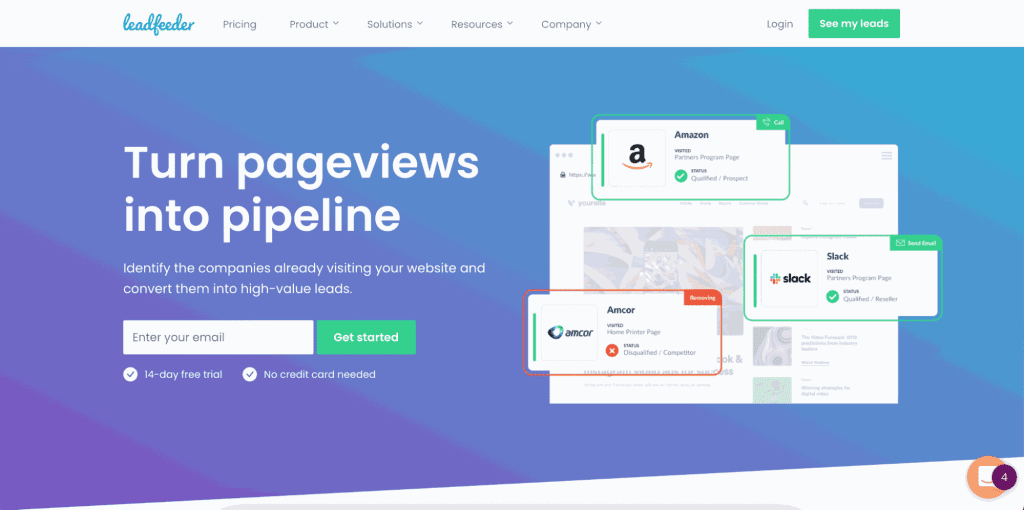
Leadfeeder by Dealfront is a lead generation tool that identifies visitors to your website and converts them into leads by integrating with the CRM and marketing automation tools you already use. Leadfeeder is a Dealfront solution.
For example, Leadfeeder by Dealfront integrates with popular tools like Slack, Salesforce, HubSpot, Google Ads, and Microsoft Dynamics. That way, your web traffic that was once anonymous is turned into real names and contacts, allowing you to contact them faster.
Leadfeeder by Dealfront also enables users to filter quality leads and remove unwanted companies so they can prioritize sales efforts, build better sales funnels, implement lead scoring, and develop automated lead-nurturing sales campaigns. All of this is available in a user-friendly platform for technical and non-technical users.
What is Lead Forensics?
Lead Forensics is another lead generation tool that helps businesses identify and track their B2B website visitors. This platform uses visitor identification software to identify anonymous website visitors so that businesses can generate new sales leads, drive customer satisfaction and revenue, and create stronger demand for their services.
This tool identifies visiting companies via IP matching and provides decision-maker contacts, such as the specific pages they view and how they found the site in the first place. It also allows users to segment their visitors based on their interests and behaviors for more targeted marketing and sales efforts.
Main Differences Between Leadfeeder by Dealfront and Lead Forensics
There are many similarities between Leadfeeder by Dealfront and Lead Forensics, such as tracking website visitors, lead scoring, integrations, and reporting. However, some main differences between Leadfeeder by Dealfront and Lead Forensics may help you decide which platform works best with your existing tools, team, and marketing strategies:
- Visitor identification and alerts: Both tools identify visiting companies in real time and notify users.
- Integrations: Leadfeeder by Dealfront lists core CRMs (Pipedrive, Salesforce, HubSpot, Zoho, Microsoft Dynamics 365) and a GA4 connector. Lead Forensics lists core CRMs (Salesforce, HubSpot, Microsoft Dynamics, Zoho, Pipedrive) plus Zapier connectors using API key and Portal ID.
- Reporting and analytics: Leadfeeder by Dealfront provides detailed reports on behavior and engagement. Lead Forensics offers reports on behavior, engagement, lead conversion rates, and campaign effectiveness.
- Transparent pricing: Leadfeeder by Dealfront offers a free option and transparent pricing plans. Lead Forensics has a short free trial and quote-based pricing.
Comparison Table: Leadfeeder by Dealfront vs. Lead Forensics
How does Leadfeeder by Dealfront compare to Lead Forensics? Here’s a quick table to see how they stack up.
| Leadfeeder by Dealfront | Lead Forensics | |
| Use Cases | Identifies website visitorsTracks on-site behaviorAdvanced filtering systemsForm, video, and download tracking | Identifies website visitorsReal-time alertsAutomated CRM workflows |
| Database Size & Reliability | More than 200 million data points | More than 1.4 billion B2B IP addresses |
| Data Enrichment Features | Website visitor trackingReal-time tracking of visitors detailed company profilesComprehensive reporting features | It may be more difficult and complex to navigate |
| Lead Management | Ranks and prioritizes leads based on visitor behavior | Ranks and prioritizes leads based on engagement and data analysis |
| AI Features | Language-specific AI models for data extraction and classification, Google Analytics 4, customer segmentation, advanced algorithms and tracking scripts | Identification of high-quality leads, customer behavior, intent, other data |
| Integrations | Pipedrive, Salesforce, HubSpot, Zoho, Microsoft Dynamics 365, Slack, Google Chat, Google Ads, Looker Studio, Mailchimp, ActiveCampaign, Zapier | Salesforce, HubSpot, Microsoft Dynamics, Zoho, Pipedrive |
| Ease of Use | User-friendly interface designed for ease of use | May be more difficult and complex to navigate |
| Compliance | ISO 27001 and ISO 27701 certified. 100% of data processed and stored in the EU. | ISO 27001 certified. Certificate valid until 31 October 2025. |
| Browser Extension | Dealfront Connect (Chrome and Edge) | No |
| Free Access? | Yes | Limited |
Leadfeeder by Dealfront vs. Lead Forensics Key Features
From CRM integration to customizable dashboards, there are key features to both Leadfeeder by Dealfront and Lead Forensics that set them apart from their competitors and each other.
Leadfeeder by Dealfront Key Features
We chose the most popular key features of Leadfeeder by Dealfront below:
- CRM integration: As noted above, Leadfeeder by Dealfront integrates with many popular CRM and marketing automation tools. This alone sets it apart from other platforms. Leadfeeder by Dealfront runs on the Leadfeeder Tracker. GA4 connectivity is optional via Dealfront’s Google Analytics Connector that sends Leadfeeder data into GA4 and Looker Studio. This allows companies to leverage their existing traffic data so that they can track visitor behavior together with other types of metrics.
- Lead identification: This is the main reason you would use Leadfeeder by Dealfront, as it identifies companies that visit your website even if they do not give any personal information on a form or contact area.
- Lead scoring: A score is given to each identified company based on their website behavior and engagement, so businesses can prioritize their leads based on their engagement with the website. That way, sales teams can focus on the higher scoring leads with the most potential of further action.
- User-friendly interface: The Leadfeeder by Dealfront platform is easy to use for both technical and non-technical users. This means your staff will need minimal training to navigate the system.
- Customizable reporting and analytics: Users receive customizable and detailed reports and analytics on website visitors’ behavior and engagement. Users can also create custom data views for more data-driven decision-making.
- Real-time visitor alerts: Timely notifications are given for visitor actions so that users can engage with leads in real time.
Lead Forensics Key Features
Lead Forensics also has key features to consider:
- In-depth visitor tracking: Similar to Leadfeeder by Dealfront, Lead Forensics also tracks visitors to your website. However, this company outshines other platforms with its detailed insights into visitor behavior and engagement, such as what pages are viewed and how long they stay on the site. They also provide the contact information and other important details about their visit. Lead Forensics provides rich data on the companies that visit your site.
- Real-time visitor data: Another aspect that sets Lead Forensics apart is its immediate access to information about who is visiting your site. That way, users can follow up and engage with these leads right away to increase the chances of converting leads into sales.
- Strong reporting features: Lead Forensics has advanced reporting options that allow users to not only see who visits their site, but also analyze their behavior in greater depth.
- Lead segmentation: Users can also segment the visitors based on their interests and behavior. That way, you can personalize your communication outreach.
- Customizable dashboard: Although Leadfeeder by Dealfront’s platform is easier to use, Lead Forensics does allow you to customize your dashboard so you can track and analyze your website visitor data in real time.
Leadfeeder by Dealfront vs. Lead Forensics Data
Lead Forensics claims to be the largest global database, and the numbers seem to back up the claim. It has also led the way with accuracy and data reliability, illustrated in the comparison below.
Leadfeeder by Dealfront Database
Leadfeeder by Dealfront has over 200 million data points to gather information about individuals and companies visiting a user’s site. They use supplemental databases to provide information on who is visiting your site. The coverage provided includes the time and date of the visit, the source and medium, how many pages were visited, the visitor ID number, and the total length of the visit.
Data accuracy was a common complaint of Leadfeeder by Dealfront. Although they do use advanced algorithms to deliver website visitor insights, the lack of preciseness may impact the lead generation capabilities.
Lead Forensics Database
Lead Forensics has a database of more than 1.4 billion B2B IP addresses, and more are being added every day. In addition to these lead sources, their accuracy rates are impressive as compared to Leadfeeder by Dealfront. Contact information includes the business name, contact details of key decision makers, telephone, email, and LinkedIn details, and financial data.
Lead Forensics also finds a company’s key stakeholders and their contact information so that you can focus on those decision makers.
Leadfeeder by Dealfront vs. Lead Forensics Cost
Both Leadfeeder by Dealfront and Lead Forensics have two different pricing plans from which to choose. However, Leadfeeder by Dealfront’s one option is free, and the company is more upfront and transparent with their paid option.
Leadfeeder by Dealfront Plans & Pricing
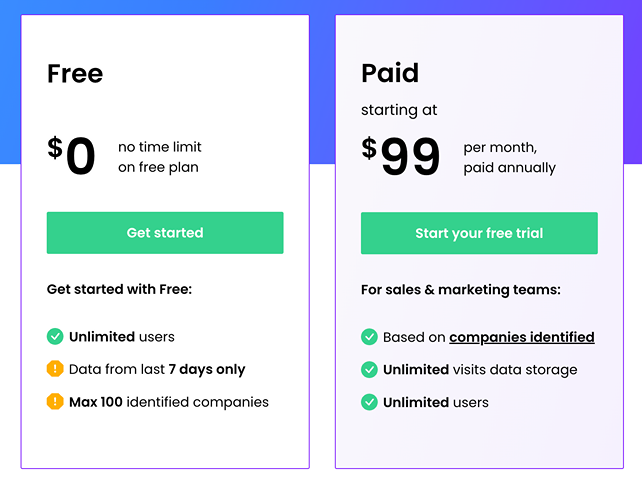
Free: Always free. Unlimited users. Last 7 days of data. Up to 100 identified companies per month.
Paid: Prices start at $99/month billed annually. Unlimited users. Unlimited visit storage. Price based on identified companies.
Trial & downgrade: 14-day free trial. No credit card required. After the trial, Leadfeeder automatically downgrades to the free version unless you choose a paid plan.
The paid plan includes:
- Verified company details
- Reveal contact details
- Visitor behavior and activity
- Two-way CRM integrations
- Marketing integrations
- Custom feeds and filters
- Automatic notifications
- Monitoring of target accounts
- Website form tracking
- Video and download tracking
- User management
- Contact export and sync
- Advanced tracking
Lead Forensics Plans & Pricing
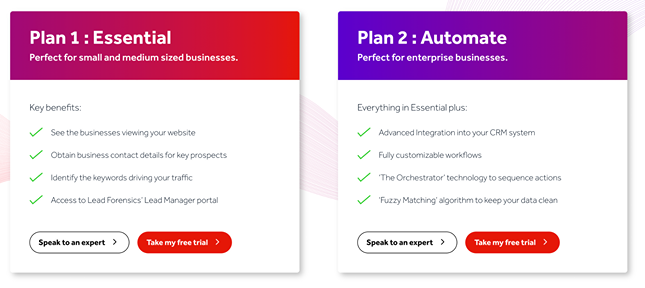
Two plans: Essential and Automate. Pricing is quote-based. Free trial is one week.
Features of both plans include:
- Unlimited users
- List of business visitors
- Contact data
- Categorization
- Real-time notifications
- Trigger reports
- Conversion tracking
- Customizable dashboard
- Data export
- Named customer success manager
- Import and manage data files
- Lead manager
- Lead scoring
- Integration with CRM
If you choose the Automate plan, you will also receive automated CRM reports, prospect pipeline reports, and key account behavior tracking.
Leadfeeder by Dealfront vs. Lead Forensics Integrations
Leadfeeder by Dealfront offers more integration options than Lead Forensics, which allows your company to manage leads, streamline workflows, improve efficiency, and collaborate more closely with your sales and marketing teams.
Leadfeeder by Dealfront Integrations
Leadfeeder by Dealfront integrates with the following popular CRM systems:
• Pipedrive
• Salesforce
• HubSpot
• Zoho
• Microsoft Dynamics 365
• Slack
• Google Chat
• Google Ads
• Looker Studio
• Mailchimp
• ActiveCampaign
• Zapier.
Leadfeeder by Dealfront runs on the Leadfeeder Tracker. GA4 connectivity is optional via Dealfront’s Google Analytics Connector that sends Leadfeeder data into GA4 and Looker Studio. This makes it suitable for companies that prioritize integration because they can leverage their existing traffic data without using additional setups. This benefit makes it easier to track visitor behavior together with other marketing metrics you are using to track website visitors. However, two-way CRM integrations are only available with the paid plan, not the free option.
Lead Forensics Integrations
Lead Forensics supports native CRM integrations and Zapier-based connectors. Connections use an API key and Portal ID. Connect a new account by entering your API key and Unique Portal ID.
Lead Forensics integrates with Salesforce, HubSpot, Microsoft Dynamics, Zoho, and Pipedrive. If these integration options are sufficient, Lead Forensics also gives companies lead management and enhanced collaboration between your sales and marketing teams.
Lead Forensics connects to third-party apps via Zapier using an API key and Portal ID.
Leadfeeder by Dealfront vs. Lead Forensics Customer Reviews
What are actual users saying about Leadfeeder by Dealfront and Lead Forensics? We read through the positive and negative reviews for both companies to find out.
Leadfeeder by Dealfront Reviews
Leadfeeder by Dealfront’s reviews on G2 are solid, with nearly 700 four- and five-star reviews for their ease of set up, integration capabilities, transparent pricing, and lead insights. Many reviewers praised Leadfeeder by Dealfront’s robust features that have helped them enhance their sales and marketing strategies. One user said that “the return on investment justifies the cost,” further demonstrating that many users find the pricing structure reasonable based on what you get in return.
Another benefit that sets Leadfeeder by Dealfront apart from Lead Forensics is how it integrates with CRMs. One reviewer described how beneficial Leadfeeder by Dealfront was for not only identifying anonymous website visitors but also combining this personal data by “seamlessly integrating with various CRM and email marketing tools.”
Although Leadfeeder by Dealfront’s ease of use and CRM integration are positive, some reviewers complained about the accuracy of the information, particularly with the anonymous visitors. Users found instances where the information was not as accurate and precise as they had expected, which could impact lead generation and follow-up approaches.
Lead Forensics Reviews
Lead Forensics also had more than 700 four- and five-star reviews, although they also had more one-star ratings than Leadfeeder by Dealfront on G2. The positive reviews is where accuracy reigned supreme, with reviewers praising the intelligence details about website visitors, including the companies, like size, location, and industry. The filter capabilities are also a benefit, allowing users to create reports based on their target prospect profiles. The triggered reports were also found to be beneficial to the effectiveness of ad campaigns and marketing efforts.
Not only is the lack of CRM options an issue, but some reviewers complained about how difficult it is to connect to CRM platforms. For example, one reviewer said it was tricky to connect Lead Forensics to Salesforce and it took a while to get this integration to work. Also, the ease of use was lacking in many reviews.
When to Choose Which
Choose Leadfeeder by Dealfront if you want a free plan, a published starting price with annual billing, a GA4 connector, and a browser extension.
Choose Lead Forensics if you want a one-week trial and enterprise workflows with CRM integrations and Zapier connectors.
A Final Look at Leadfeeder by Dealfront vs. Lead Forensics
Let’s take a final look at how these platforms compare.
Leadfeeder by Dealfront Pros & Cons
Leadfeeder by Dealfront offers an impressive list of CRM integrations, an easy-to-use interface, and GA4 connectivity via Dealfront’s Google Analytics Connector. However, it also received complaints about its data accuracy and a limited free version.
Pros:
- Impressive list of CRM integrations with various systems
- GA4 connectivity via Dealfront’s Google Analytics Connector
- Lead scoring features to prioritize leads
- User-friendly interface for both technical and non-technical users
- Customizable reports and dashboards
- Alerts and notifications of changes or actions for proactive lead engagement
- Transparent pricing plans
Cons:
- Concerns about the accuracy of data
- Limited free version
Lead Forensics Pros & Cons
Accuracy is a benefit with Lead Forensics, real-time visitor tracking, robust and comprehensive reporting features, and company profiles. But, with its pricing plans being less transparent and difficult to use interface, the cons may prohibit this platform from being used by smaller companies.
Pros:
- Real-time visitor tracking of website visitors for quick engagement
- In-depth and accurate visitor tracking and information
- Comprehensive company profiles, including industry information, contact details, and employee counts
- Robust reporting features and advanced reporting options
- Lead scoring and prioritization features
Cons:
- Complex, difficult to use interface that can overwhelm non-technical users
- Non-transparent pricing
- Some customer support concerns (related to the difficult interface)
Summing Up: Leadfeeder by Dealfront or Lead Forensics?
If you are new to lead generation or on a budget, Leadfeeder by Dealfront’s free forever option is a good choice to try out its basic functions. However, you do get what you pay for, and you will find that the CRM and marketing integrations, custom feeds and filters, and other benefits are only available with the paid version.
Choose Leadfeeder by Dealfront For Affordability
Companies that are on a budget and place an emphasis on user-friendly platforms that integrate with a variety of CRM tools and GA4. Although the accuracy of data has been an issue and the data size does not compare to Lead Forensics, Leadfeeder by Dealfront’s integration benefits allow users to manage their leads and optimize their marketing and sales forces.
Choose Lead Forensics For Robust Data Sets
Larger organizations that want to benefit from the more than one billion data points offered and advanced lead tracking and reporting offerings. Custom pricing is available based on a company’s web traffic levels and needs, and the accuracy standards are impressive for larger corporations.
UpLead is the Most Reliable Tool for Lead Generation
Many reviewers complained about the accuracy of data from Leadfeeder by Dealfront and the expense and useability issues with Lead Forensics. UpLead exceeds Leadfeeder by Dealfront in accuracy and is more transparent with its pricing options than Lead Forensics.
UpLead is well known for its 95% accuracy rate for emails and achieves this rate through a combination of human and machine-learning email verification processes. These results ensure your outreach efforts are more effective. After the seven-day free trial, UpLead has competitive pricing structures: from $74 a month for its Essentials plan and from $149 a month for the Plus plan.
UpLead also offers a user-friendly platform, real-time email verification for higher-quality leads, and access to over 160 million contacts worldwide. Try UpLead today for free and experience the power of high-quality leads and an easy-to-use platform.





