

Snov.io pricing starts with a free Trial plan, then moves to paid Starter plans from $39 per month and Pro plans from $99 per month, up to Custom Ultra pricing for enterprise teams. The real cost depends on more than the sticker price. Snov.io meters usage through credits and recipient limits, and it adds warm-up slots and a newer enrichment-token bucket on top of those. Two products sit outside that plan ladder and bill separately: LinkedIn Automation and Phone and Data Enrichment. Every Sales Suite plan, Trial included, also comes with unlimited team seats and MCP access.
If you only need the quick version: Trial is for testing and Starter is for low-volume solo outreach. Pro is where Snov.io becomes practical for active teams, while Custom Ultra covers very high-volume or enterprise use. Longer billing terms cut the effective monthly price too: 5% off on 3-month billing and 25% off on annual billing.
Snov.io Pricing and Plans
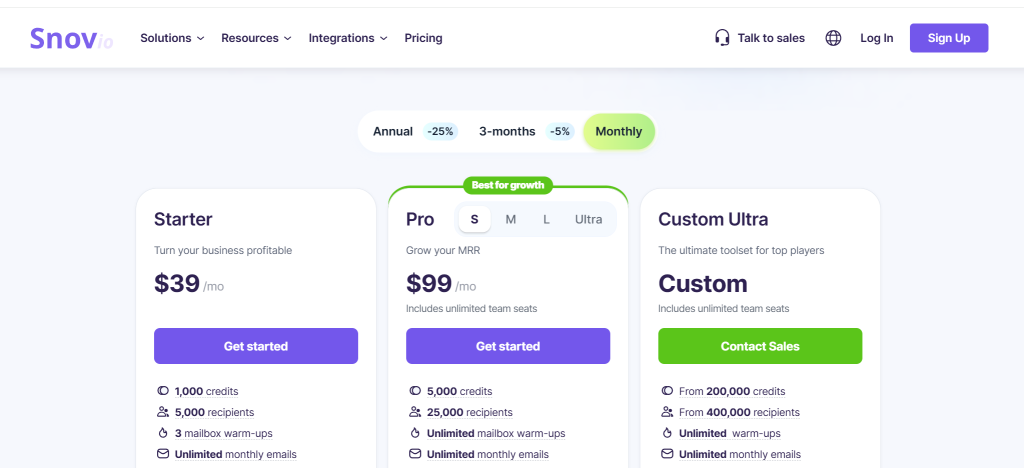
A free Trial plan sits at the bottom of the ladder. Paid tiers run from Starter pricing at $39 per month, through Pro pricing from $99 to $738 per month, up to Custom Ultra quote-based pricing for enterprise teams. All plans share the same billing framework: credits pay for prospecting and verification actions, and recipients cover outreach volume. Warm-up slots cover mailbox preparation on top of both.
In other words, Snov.io pricing combines a monthly-or-annual billing choice with a credit system. That system decides how much prospecting and verification you can run, and separately, how much email outreach fits inside each billing cycle.
| Plan | Credits | Recipients | Enrichment tokens | Warm-ups | Monthly | 3-month | Annual |
|---|---|---|---|---|---|---|---|
| Trial | 50 | 100 | 25 | 1 | Free | Free | Free |
| Starter | 1,000 | 5,000 | 75 | 3 | $39.00 | $37.05 | $29.25 |
| Pro S | 5,000 | 25,000 | 150 | Unlimited | $99.00 | $94.05 | $74.25 |
| Pro M | 20,000 | 50,000 | 300 | Unlimited | $189.00 | $179.55 | $141.75 |
| Pro L | 50,000 | 100,000 | 500 | Unlimited | $369.00 | $350.55 | $276.75 |
| Pro Ultra | 100,000 | 200,000 | 750 | Unlimited | $738.00 | $701.10 | $553.50 |
| Custom Ultra | From 200,000 | From 400,000 | From 750 | Unlimited | Custom quote | Custom quote | Custom quote |
Trial
The Trial plan is best for evaluating the workflow, not for running a real outbound program. It includes 50 credits and 100 recipients, 25 enrichment tokens, plus 1 warm-up slot, on a renewable free plan. The free warm-up allowance is only 450 emails in total and does not renew with the monthly Trial refresh. Bulk tools and exports stay locked at this tier, and so do API access and most other scale-oriented features.
Starter
Starter is the lowest paid tier and the first plan that makes sense for a solo operator or a very small team. You get 1,000 credits and 5,000 recipients, plus 3 warm-up slots, with access to the core prospecting and outreach workflow. It is the cheapest entry point if you want paid usage but do not yet need unlimited warm-ups or large team volume.
Pro tiers
Pro is where Snov.io shifts from testing and light usage into true outbound scale. Pro S through Pro Ultra increase credits and recipients and advertise unlimited warm-up slots, but fair-use restrictions apply. If more than half of connected mailboxes use providers outside Gmail/Google Workspace and Microsoft/Microsoft 365, Snov.io may cap active warm-up slots at 500 on Pro S and Pro M or 1,000 on Pro L and Pro Ultra. If your team runs multiple sending accounts or needs more campaign capacity, this is the tier family that matters most, and it also fits anyone who wants a more practical volume ceiling.
Custom Ultra
Custom Ultra is the enterprise plan for teams that need very large quota pools and account management help. Contract-level customization comes with it too. Pricing is not public, so readers who are already beyond the Pro Ultra range should treat this as a quote-based sales conversation rather than a predictable list-price upgrade.
What changes as you move up the plan ladder
The biggest difference between plans is not just quota size. Snov.io also uses plan gating to decide which workflows are practical at each level. That matters because two plans can look close in price while feeling very different in day-to-day use.
- Trial is limited to core testing. You can explore the platform, but bulk prospecting and exports are intentionally constrained, along with API-style workflows and broader team usage.
- Starter is the first tier that supports a repeatable process. It adds more serious quota volume plus practical features such as bulk domain search and bulk verification. Data export and REST API or webhook access come with it, on top of the core email finder and email verifier workflow.
- Pro is the step-up for teams that need more than simple access. In addition to larger quota pools, the Pro plans add unlimited warm-ups and more advanced features. Stronger campaign priority controls round it out, making it a practical setup for cold email campaigns or combined email-and-LinkedIn campaigns.
- Custom Ultra is less about one extra feature and more about operating model. It is for buyers who want larger negotiated limits and support priority, with plan flexibility that goes beyond the public self-serve ladder.
How Snov.io Billing Works
Snov.io sells subscriptions on three different billing cadences, but every plan is still governed by four separate quota buckets. Credits and recipients set the core limits, and warm-up slots plus a newer enrichment-token bucket sit on top of them. That matters because two teams paying the same base rate can experience very different value depending on how quickly they burn through credits and how many people or mailboxes they need to support.
Subscriptions renew on their billing cadence unless you turn renewal off, and paid-plan quotas still refresh every 30 days even on annual billing. That setup makes Snov.io feel more like a recurring usage model than a simple flat yearly software fee.
What credits cover
A credit is Snov.io’s payment unit for prospecting and verification activity. In practice, the platform uses credits for tasks such as prospect search and email search, plus email verification, so a team that finds and verifies contacts in the same workflow can burn through quota much faster than the headline price suggests.
That credit system is one reason Snov.io pricing can feel less obvious for new sales teams and marketing teams than a flat-seat SaaS tool. More credits help, but the real question is how quickly your workflow consumes them: search and verification first, then whatever is left for related outreach efforts.
What recipients mean
In multichannel campaigns, one recipient is charged when a prospect first receives an email or LinkedIn action during the billing period; later follow-ups to that prospect do not use another recipient. Sequences that contain only LinkedIn actions do not use recipient quota, while sequences with email steps do. This is why recipient ceilings can become a separate bottleneck from credits.
That means automated follow ups can be more cost-effective than they first appear, because the limit is tied to a new recipient in the current billing period rather than every message in the sequence.
How warm-up slots and billing cadence affect value
Warm-up slots control how many mailboxes you can warm and maintain for deliverability. Trial is limited to 1 slot, Starter includes 3, while Pro plans move to unlimited warm-ups. Billing cadence matters too: Snov.io publishes three pricing cadences, and quotas still refresh every 30 days even on annual billing. Paid plans are also positioned around rolling usage continuity, so readers should compare more than the monthly sticker number when choosing a plan.
What enrichment tokens are for
Enrichment tokens are the ladder’s newest quota bucket, spent on phone numbers plus extra lead data like publications or social activity, on top of the regular credit system. The monthly allowance scales with the plan, running from 25 tokens on Trial and 75 on Starter up to 750 on Pro Ultra and Custom Ultra (the table above has the full ladder). Enrichment can also be bought on its own, outside any subscription, as a pay-as-you-go token package. A 10,000-token package costs $200 billed once and stays valid for 90 days.
Unused credits roll over on an active monthly plan when renewal is enabled or a new paid plan is purchased before expiry. On an annual plan, unused credits carry forward only within that annual subscription term; any remaining balance expires at the end of the term even if the customer renews for another year. This rule matters when comparing a large prepaid plan with monthly usage. That is another reason to compare lower plan versus higher plan value through the full billing cycle, not just the first month.
If you want the underlying official rules, Snov.io explains billing cadence on its pricing page. Credit usage is covered in its credit help article, and renewal settings live in its automatic renewal guide.
Snov.io Add-Ons and Usage Limits
The biggest extra cost to watch is LinkedIn Automation, sold as its own product rather than a Sales Suite add-on. A standalone slot costs $69 per month, and an active paid Sales Suite plan reduces it to $59 per slot per month. Paying annually earns a 10% discount on the slot price, billed upfront for 12 months and activated through the sales team. New users can try one slot for seven days; the trial turns into a paid subscription unless renewal is disabled before it ends. Snov.io also sells Phone and Data Enrichment as a separate pay-as-you-go product outside the subscription ladder, billed per token package instead of monthly: a 10,000-token package costs $200 and stays valid for 90 days. The more important limit either way is that Snov.io still meters value through credits and recipients, with warm-up capacity plus enrichment tokens now adding two more levers, so comparing only the monthly plan price can still underestimate what the platform will actually cost once usage rises.
- LinkedIn Automation is a separate product, not an add-on. It is billed on its own at $69 per slot per month ($59 with an active paid Sales Suite plan), with a 10% discount for annual billing through sales and its own 7-day free trial, so treat it as an extra line item rather than a built-in part of a Sales Suite plan. Each slot is tied to one LinkedIn account, which matters if your team wants outreach from multiple accounts.
- Starter can look cheaper than it feels. The entry price is attractive, but 1,000 credits and 3 warm-up slots are easy to outgrow once you move beyond light prospecting, and the 75 included enrichment tokens go just as fast.
- Recipients can matter as much as credits. A team that sends to many new contacts can hit outreach limits even when verification or search capacity still looks healthy.
- Enrichment tokens run out on their own schedule. Phone numbers and deeper lead data draw from the token pool rather than from search or verification credits. A team leaning on phone enrichment can hit that ceiling while credits and recipients still have headroom.
- The Trial plan is intentionally restricted. It is useful for validating the interface, but bulk workflow plus integrations stay out of reach, along with exports, real team-scale operation, or enrichment-token usage beyond the 25-token monthly allowance.
Avoiding overspending is simplest when you estimate your monthly prospecting volume and the number of new recipients you expect to touch. Decide separately whether you need LinkedIn automation from day one. If those inputs are not clear, comparing plans by monthly price alone can be misleading.
Which Snov.io Plan Is Right for You?
Use Trial for testing and Starter for solo or low-volume outbound. Pro fits growing sales teams, while Custom Ultra covers enterprise-scale quota beyond the public ladder. In practice, the right plan depends on your monthly credit demand and recipient volume. Mailbox count and add-on needs such as LinkedIn Automation matter too.
- Choose Trial if you only want to test the product and inspect the interface, to verify whether the workflow matches your sales process.
- Choose Starter if you are a solo founder or freelancer running a very small outbound team that needs paid access but still operates with modest search and sending volume.
- Choose Pro S or Pro M if you already run repeatable outreach and need more room for credits and recipients, plus mailbox warm-up, without moving to enterprise procurement.
- Choose Pro L or Pro Ultra if higher-volume sending is already part of the workflow and the lower tiers would create constant quota pressure.
- Choose Custom Ultra if your team needs very large quota pools and sales support, with contractual flexibility beyond the public Pro ladder.
For more detail, the official plans overview is useful here because it shows how Starter compares with Pro and the higher tiers, while the public pricing page shows the current quota ladder and where Custom Ultra begins.
If your team is comparing Snov.io with other outbound data tools, it also helps to compare the value of Snov.io’s billing model against the workflow you actually need. Teams that care most about data accuracy may also want to compare other email finder tools or dedicated email verification software before committing.
Snov.io Pricing FAQ
Does Snov.io have a free trial?
Yes. Snov.io offers a renewable Trial plan with 50 credits and 100 recipients, 25 enrichment tokens, plus 1 warm-up slot. It is useful for testing the interface and the basic workflow, but it is not a substitute for a paid plan if you need bulk operations or exports, let alone true team-scale outreach.
What counts as a credit in Snov.io?
Credits are the usage unit for search and verification activity. In simple terms, they are the quota you spend when you find prospects and search for emails, or verify contact data. That is why heavy prospecting teams can outgrow a low monthly plan even when the price still looks affordable.
What is an enrichment token in Snov.io?
Enrichment tokens are a separate usage unit from credits, spent on phone numbers plus extra lead data such as publications or social activity. Every paid Sales Suite plan includes a monthly allowance, from 75 tokens on Starter up to 750 on Pro Ultra and Custom Ultra. Tokens can also be bought outside a subscription as a pay-as-you-go package: 10,000 tokens cost $200 billed once and stay valid for 90 days.
Is LinkedIn Automation included in the base plans?
No. LinkedIn Automation is its own product with its own billing. A standalone slot costs $69 per month, and an active paid Sales Suite plan reduces it to $59 per slot per month. Annual billing offers a 10% discount on the slot price and is activated through the sales team. The seven-day trial continues automatically as a paid subscription unless renewal is disabled before it ends. If LinkedIn outreach is part of your workflow, include that extra cost when comparing Snov.io against other platforms.
Can you change plans later?
Snov.io positions upgrades and downgrades as flexible, so most buyers should think of the public plan ladder as something they can move within as usage changes. The main question is not whether you can change plans, but whether the current tier gives you enough credits and recipients, plus warm-up capacity, to avoid frequent mid-cycle friction.
Is Snov.io worth the price?
This pricing model is worth it for teams that want one tool for prospecting and verification, plus outreach and warm-up, without moving into enterprise-level spend too early. It is less attractive if you need much more headroom than Starter provides, rely heavily on paid add-ons, or want a simpler billing model with fewer quota variables to manage.