



Cold emailing is an effective lead generation strategy for businesses. Unlike cold calling, it allows you to target many prospects with minimal effort. If utilized correctly, cold emailing can be a game-changer for your sales team. However, many companies don’t do it correctly. There are many factors to consider, including when to send your emails. This article will explore the best time to send cold emails to maximize your open rates.
- Why timing matters for cold emails
- The best time to send cold emails
- The best day to send cold emails
- Days and times to avoid sending cold emails
- Tips to increase email open rates
- Frequently asked questions
Let’s get started.
Why Timing Matters for Cold Emails
Does it matter when you send a cold email? Absolutely.
When sending a cold email significantly influences its open rate, you’ll generate more conversions when your emails are opened more frequently. You can only convert a cold prospect if they open your email. Even the best-written email is useless if it isn’t opened.
Several studies have shown that the open rate varies depending on the day of the week the email is sent. It’s also shown that the time of day also influences.
Generally speaking, emails sent during the working week are opened more frequently than those sent on weekends. Prospects live their personal lives on Saturday and Sunday and are more inclined to ignore work-related emails sent to them.
Those same studies also conclude that emails sent during working hours are more likely to be opened. Sending an email early or late in the day isn’t ideal. Outside these hours, prospects sleep or focus on other matters.
The links to all the studies are below. They’ll help you understand how the open rate varies throughout the day and week. You can use this information to optimize your cold email marketing efforts.
Best Time to Send Cold Emails
When looking at all the available research, there’s no specific time of day that’s best to send cold emails. Instead, general patterns emerge, suggesting larger time windows during the day.
Below, we’ll cover several studies on the matter and come to a conclusion.
In 2013, CampaignMonitor analyzed over 192 million opened emails. The results showed that 53% of those emails were opened during working hours—9 AM to 5 PM. The highest open rates in that time window occurred between 10 AM and 4 PM.
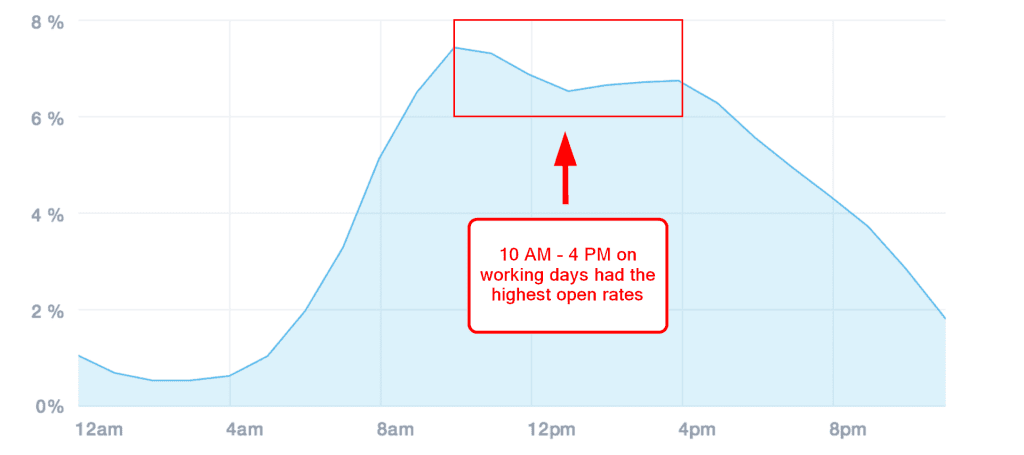
Image Source: CampaignMonitor
2018 research from SuperOffice showed different results. 3 PM had by far the highest open rates. 12 PM to 6 PM was the strongest extended period; open rates dropped significantly before and after this window.
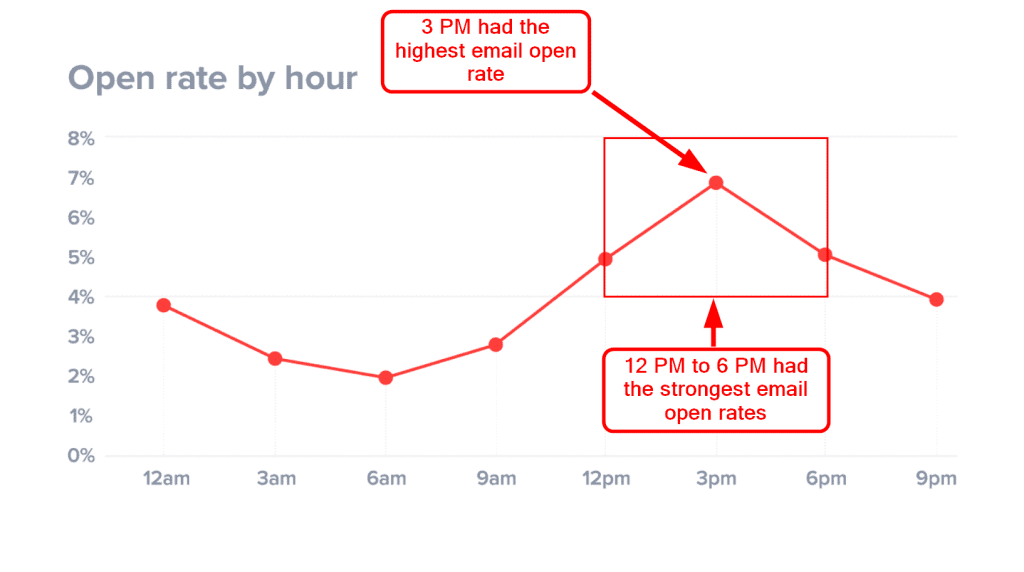
Image Source: SuperOffice
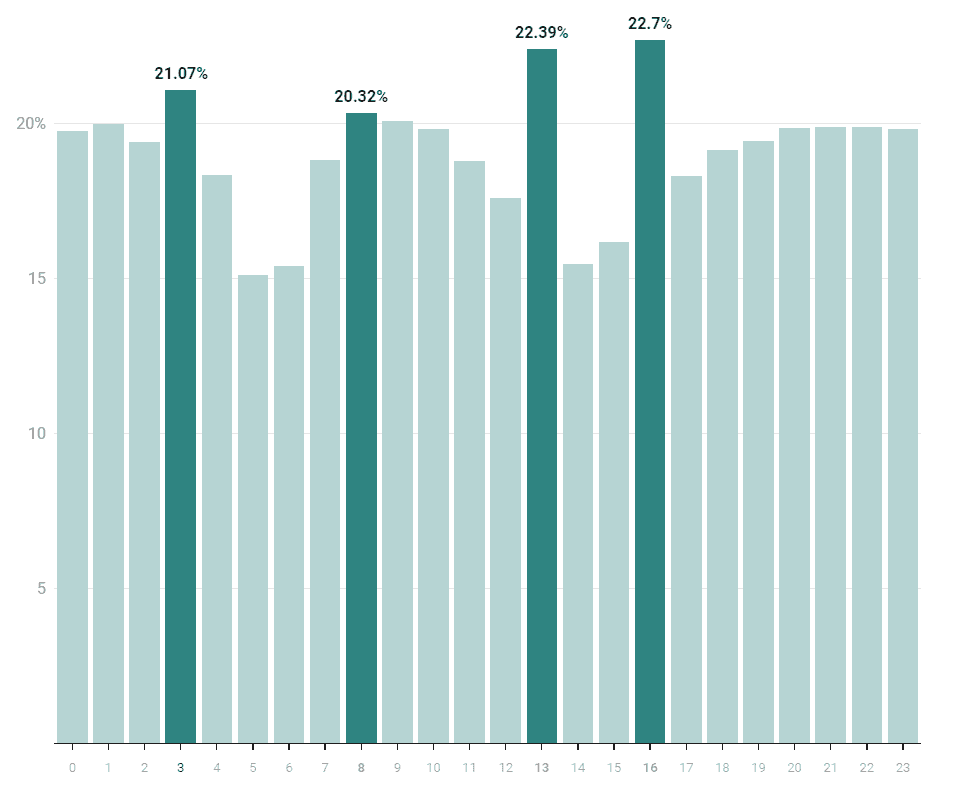
Omnisend analyzed over three years of email data from 2019 to 2021. They wanted to find out what time of the day had the best open rates, and the hours with the highest open rates were 4 PM, 1 PM, 3 AM, and 8 AM.
- 4 PM: 22.7%
- 1 PM: 22.39%
- 3 AM: 21.07%
- 8 AM: 20.32%
Research from Moosend found that 8 AM to 9 AM had the strongest email open rates, and after 6 PM, the number of opens dropped significantly.
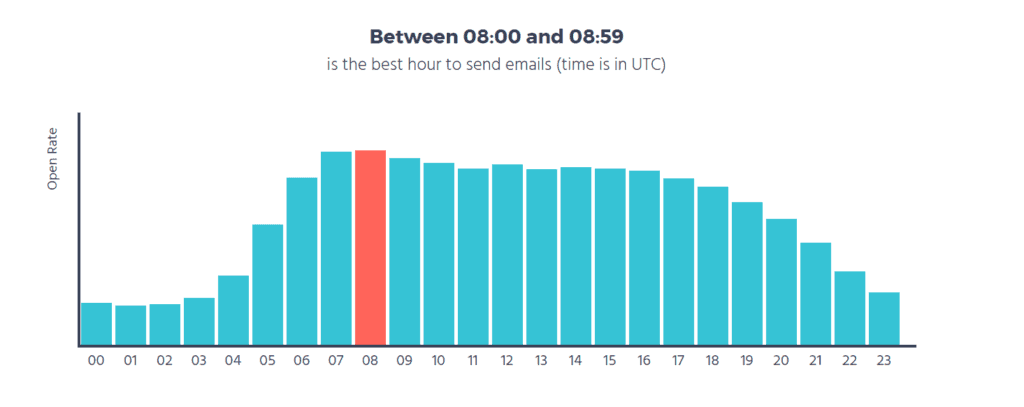
Image Source: Moosend
These four studies show that the results can vary. Some show more substantial open rates for earlier in the day, around 8 AM to 10 AM. Others suggest the afternoon is better, from 1 PM to 4 PM.
- CampaignMonitor: 10 AM to 4 PM
- SuperOffice: 3 PM
- Omnisend: 1 PM and 4 PM
- Moosend: 8 AM to 9 AM
We advise sending cold emails at any point during working hours and avoiding sending them too early or too late in the day.
What is the Best Day to Send Cold Emails?
The day you send a cold email is even more important than the time of day. Generally, the seven-day week is broken into two parts: the working week and the weekend. Most studies show that email open rates are lower on Saturday and Sunday.
However, there are varying results across the available research. Below, we’ll list some of the best studies on the topic. This information will help you understand how open rates change daily.
Research from Cience found that Wednesday was the best day to send an email, followed by Tuesday and Thursday. Here are the results for each day of the week:
- Monday: 15.98%
- Tuesday: 20.84%
- Wednesday: 23.07%
- Thursday: 21.32%
- Friday: 18.52%
- Saturday: 0.03%
- Sunday: 0.24%
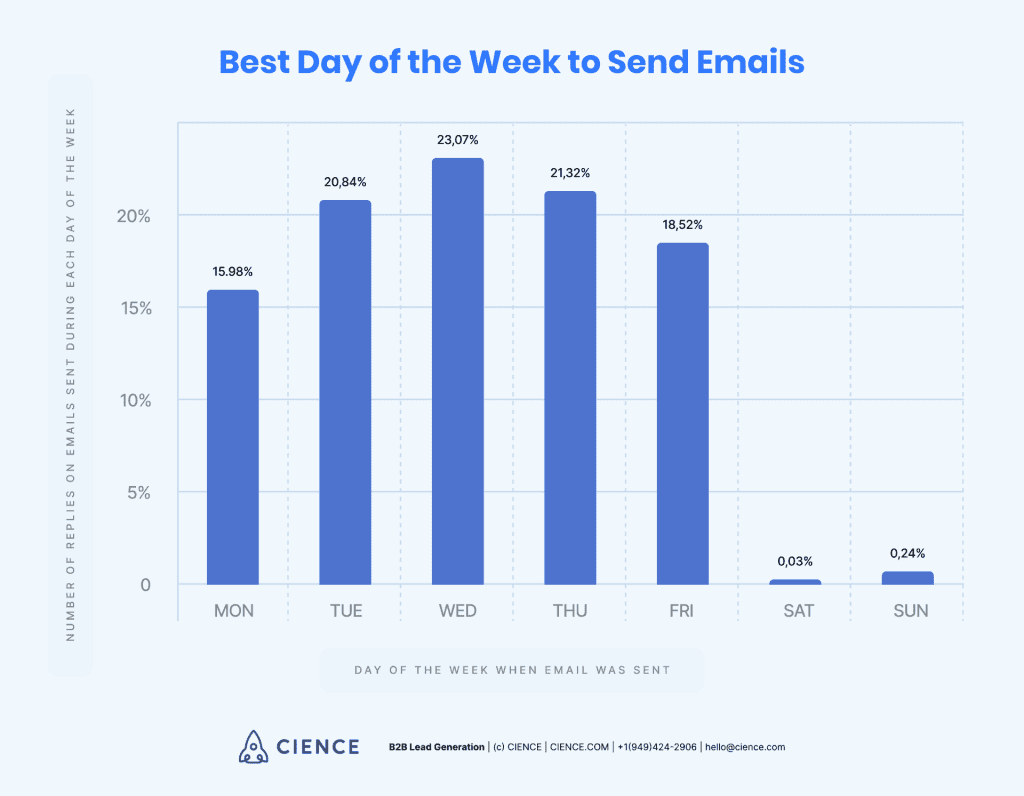
Image Source: Cience
Although Wednesday was the strongest performing day, Thursday and Tuesday weren’t far behind. The entire working week had strong results; the weekend was dramatically lower.
Another 2021 study from Moosend analyzed over 10 billion emails sent through its platform. They found Thursday had the highest open rate, followed by Tuesday in second place.
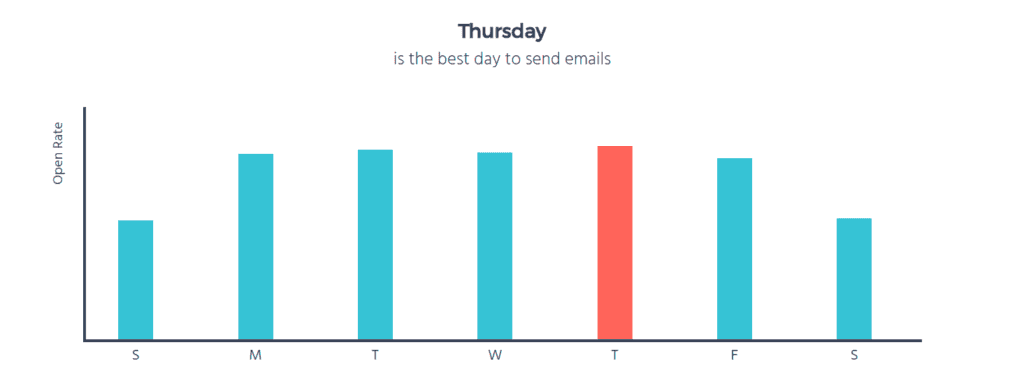
Image Source: Moosend
If you look at the results, the open rate is consistent across the entire working week, from Monday to Friday. It’s only on the weekend, Saturday, and Sunday that the open rate drops significantly.
GetResponse’s 2020 analysis of 2.85 million emails sent by its users found Friday to have the highest open rate, followed swiftly by Monday and Tuesday. Here’s what the open rate was for each day of the week:
- Monday: 20.43%
- Tuesday: 20.3%
- Wednesday: 20.07%
- Thursday: 19.85%
- Friday: 20.58%
- Saturday: 18.88%
- Sunday: 18.47%
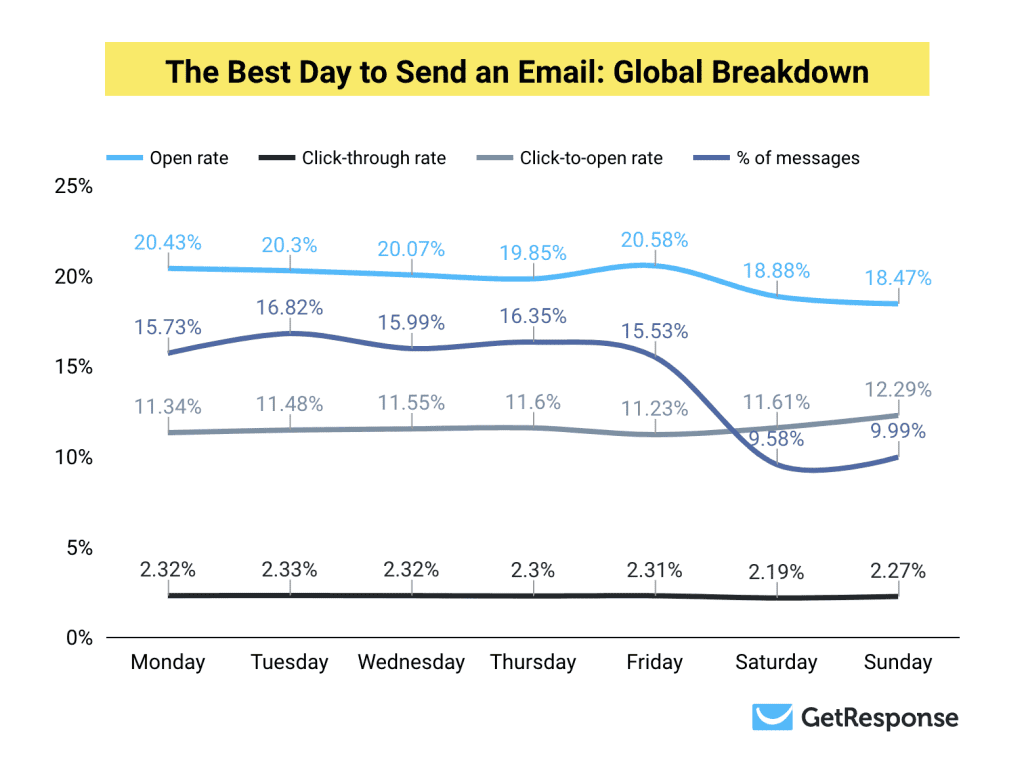
Image Source: GetResponse
Like the other studies, the open rate doesn’t vary much across the working week and drops off substantially on the weekend. This research concludes that cold emailing should be avoided on Saturday and Sunday. As you can see, GetResponse’s results vary over the years.
A three-year study from Omnisend concluded that Tuesdays are the best day to send an email. The data, which spans from 2019 to 2021, showed the following results:
- Monday: 11.21%
- Tuesday: 11.36%
- Wednesday: 11.33%
- Thursday: 11.29%
- Friday: 11.07%
- Saturday: 10.1%
- Sunday: 10.27%
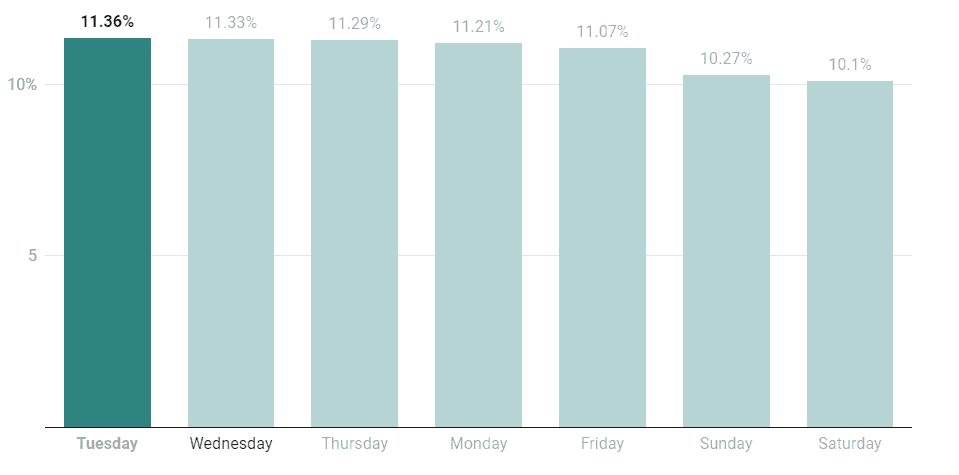
Image Source: Omnisend
When summarizing the research data, it’s clear that the optimal day varies. The top-performing day is different across all four of the studies provided.
- Cience: Wednesday
- Moosend: Thursday
- GetResponse (2020): Friday
- Omnisend: Tuesday
We advise sending cold emails any day during the working week. Avoid sending them on the weekend.
Days and Times to Avoid
Knowing what days and times to avoid is as important as when to send cold emails.
Generally speaking, the worst days to send a cold email are Saturday and Sunday—when your prospective targets are out of the office and away from work. They’re most likely spending time with their family or engaging in hobbies and activities.
Although most people have smartphones these days, they avoid looking at emails on weekends and don’t want to think about work-related issues. To keep things simple, keep sending cold emails during the working week—Monday to Friday.
Avoid sending cold emails too late or too early in the day. Your prospective targets will be sleeping or getting ready for work early in the morning. After work, they’ll focus on getting home, going to the gym, and cooking dinner or dining out.
Aim to send your cold emails during working hours, 9 AM to 5 PM. You can test and experiment to see what specific hour works best to maximize your email open rates.
More Tips to Increase Your Open Rate
Besides optimal timing, you can implement several other strategies to improve the open rate of your cold emails. The four best methods are listed below.
Keep a Clean Email List
You must ensure that you’re sending cold emails to verified email addresses. For your campaigns to be effective and your emails opened, you need to send them to actual people.
Your prospect list should be validated, and several tools exist. You could use an email validation tool. One of the best ways to find verified emails is to use UpLead, a lead generation platform.
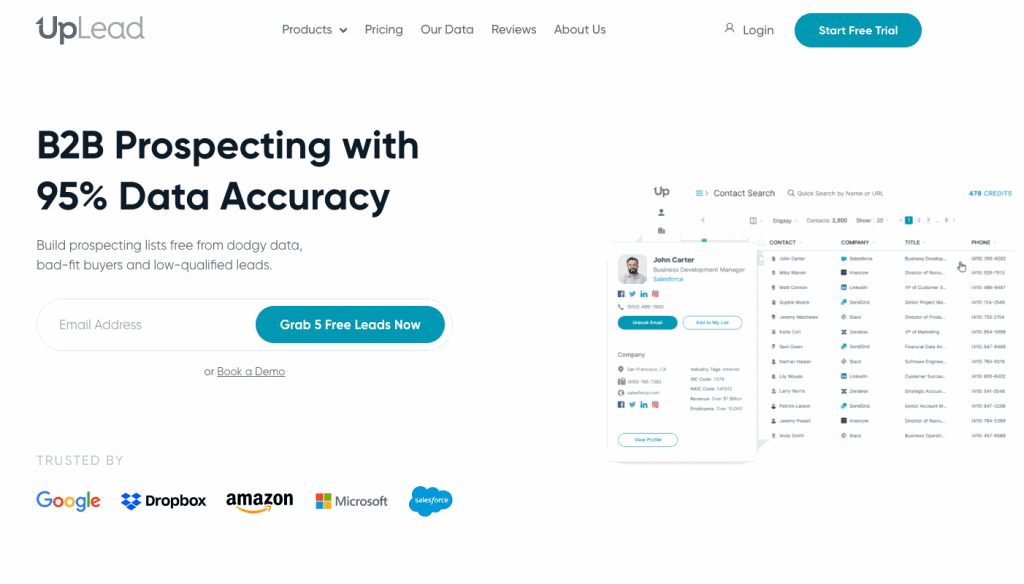
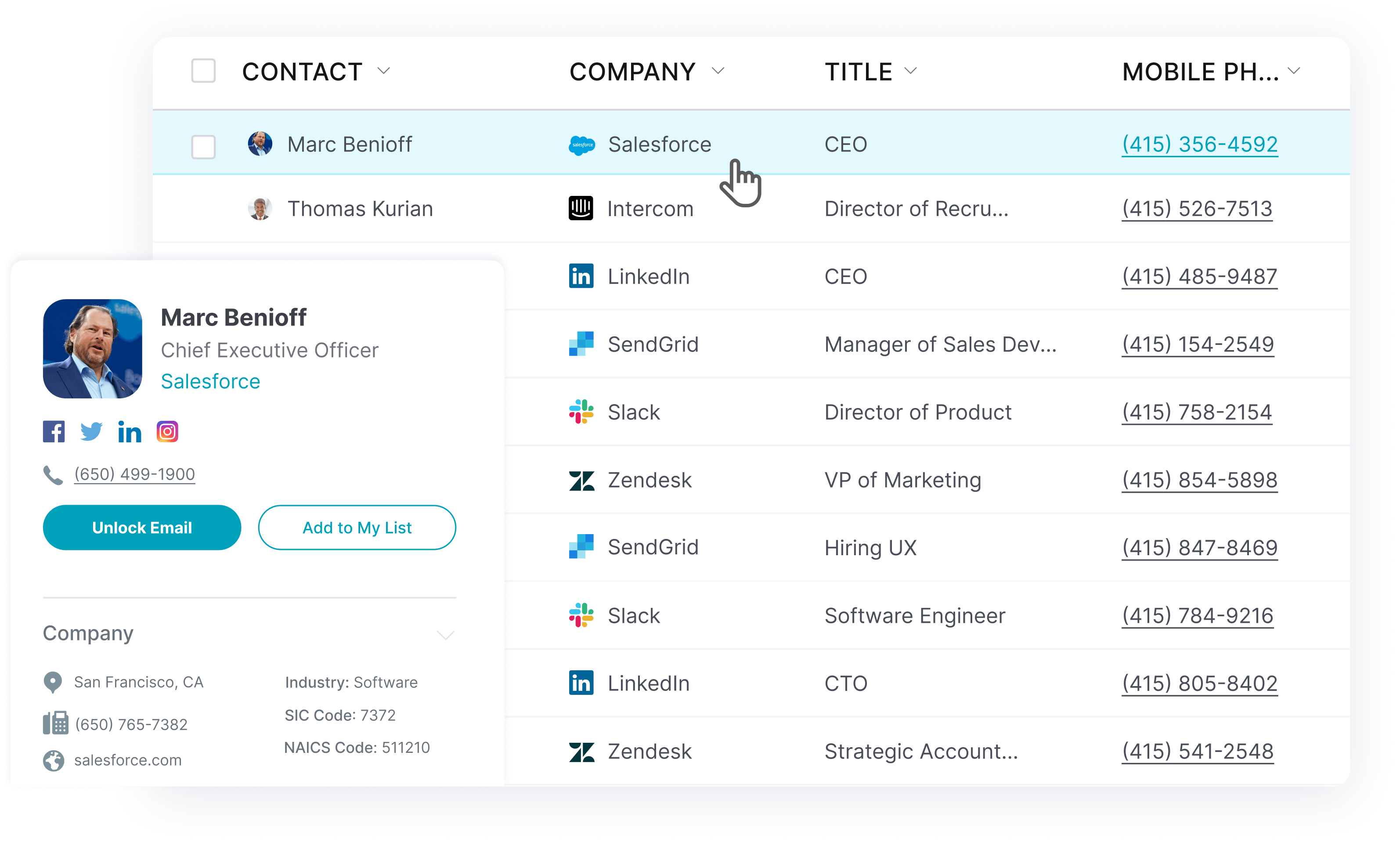
UpLead provides a B2B contact database featuring 200+ million business email addresses from over 200+ countries. The data is 95% accurate and includes 16+ million company profiles. There are also direct dials and mobile numbers.
Some of UpLead’s features include real-time email verification, 50+ search filters, technology tracking, and firmographics. These tools allow you to create highly targeted prospect lists that your sales team can use for its cold email marketing campaigns.

Use a Catchy Subject Line
When your prospects see your email, whether or not they open it largely depends on the subject line. It’s the email equivalent of an article headline and legitimately a make-or-break issue. The success of your cold email marketing campaigns depends on it.
You’re also competing with many other people and companies in their inboxes. You need a bold subject line to stand out amongst the competition. It doesn’t matter how good your cold email is if it doesn’t catch their attention. Your prospects can’t read emails they don’t open.
Great email subject lines feature several key elements, which include the following:
- Shorter Length: You must ensure that your subject lines are short. If they’re too long, they’ll be cut off in your prospects’ inboxes. Try to keep your cold email subject lines below 60 characters, as most ESPs cut off a subject line after that point.
- Personalization: One of the best ways to grab your prospect’s attention is to use their name. Personalization can improve the open rates of your cold emails. You can also include other details, such as the company they work for or a pain point.
- Urgency: Adding a sense of urgency to your email subject lines can spur your prospects into action. By adding a time-sensitive component, you’re challenging them to decide here and now. A call to action, if you will.
Dodge Spam Filters
Over the past several years, spam filters have become increasingly more efficient. However, they’re not perfect—even the best ones still fail occasionally. Often, legitimate emails will be sent to the spam folder, and this is a concern for your cold email marketing efforts.
If you didn’t know what spam filters are, they’re programs created by ESPs—email service providers. They detect certain types of unwanted, unsolicited, and potentially virus-infected emails. Spam filters catch a large majority of cold emails.
However, don’t think of spam filters as a bad thing; they protect the email experience for all users, including yourself. Your cold email marketing campaigns should acknowledge the existence of spam emails, and your goal is to separate your emails from spam.
If you want to reach as many prospects as possible and avoid spam filters, consider doing the following:
- Set up SPF and DKIM records
- Keep sending volume low
- Create targeted prospect lists
- Make sure to verify all prospect email addresses
- Keep all HTML code clean within your emails
- Avoid using tracking links
- No attachments
- Personalize your emails by including your prospect’s name, business, and relevant information
- Keep an eye on your sender’s reputation
Several words or phrases will attract the attention of spam filters. If you use these words, your cold email will most likely be in the spam folder. Avoid over-sensationalizing and over-promising. Refrain from using strange fonts or formatting to stand out.
Some examples of these words include the following:
- Buy
- Free
- Order Status
- Near you
- Additional income
- Be your own boss
- Earn extra cash
- Income from home
- While you sleep
- Work from home
- Affordable
- Fast cash
- Full refund
- Cancel at any time
These words and phrases are just some of many that you should be cautious about using in your cold emails.
Always Add Value
What’s in it for me? When considering opening your cold email, this is the first thought that goes through your prospects’ minds. Your subject line and the content within your email need to communicate value to your prospects.
If your cold email doesn’t immediately provide some form of value to the recipient, it’s unlikely to be opened. Make sure that your cold email offers valuable resources to help remedy their pain points and problems.
Ensure that these resources are particular to the needs of your prospects. Even if they don’t open your email, you still leave a good impression. You’re showing them that you care about their concerns. This consumer-centric approach builds trust and confidence.
Here are some examples of value-rich email subject lines:
- 5 strategies to Improve Your Dentist Marketing Strategy
- 7 vegan-inspired Christmas gifts
- A better way to get stronger on pull-ups
FAQs: The best time to send cold emails
You shouldn’t send cold emails on the weekend. Studies have conclusively shown that open rates are higher during the working week, from Monday to Friday. Prospects are more focused on work-related issues during the week. Your cold email prospects are less likely to open your emails on weekends. Saturday and Sunday are when they live their personal lives, not thinking about work-related issues. They might see the email in their inbox but still ignore it until Monday.
There’s not one best day or time to send an email. Several studies have been done on this topic, with varying results. Some studies suggest earlier in the week—such as Monday and Tuesday—is best. Others show Wednesday and Thursday to be optimal. The time of day also varies across the available research. However, there are general patterns that we can observe. For instance, all the studies show that the working week has stronger open rates than the weekend, and we can conclude that Monday to Friday are the best days. Most research shows working hours from 9 AM to 5 PM are best for the time of day.
The best day to send an email blast is any working weekday. However, you might find better luck on Monday and Tuesday compared to the other three days. The most important thing to do is to run tests to find out for yourself. Each business deals with a unique target audience.
It’s best to email from 9 AM to 5 PM during working hours. Sending an email too early will decrease its open rate. The recipient will likely sleep, work out, or prepare for work. Sending it too late in the day is also problematic.
What You Need to Remember About the Best Times to Send Cold Emails
Cold emailing is an effective, time-tested strategy for sales teams to generate more leads. With a little effort, you can reach large volumes of new prospects that have never interacted with your brand.
Timing is one of the most important elements of a successful cold email campaign. When you send your emails, it is crucial and notably influences open rates. This article covered the best time and day of the week to send cold emails.
In conclusion, the evidence shows that it’s best to send cold emails during the working week and within working hours, Monday through Friday, and 9 AM to 5 PM. Also, consider implementing the other open rate-boosting strategies outlined in this article.





