



-
ZoomInfo typically costs between $14,995 and $39,995+ per year (Professional $15k to $18k, Advanced $22k to $28k, Elite $35k to $45k+), with higher totals once seats, credits, and add-ons scale. ZoomInfo Lite, a separate product for small teams, starts at $0 (free plan) with paid options from $130-$750/month.
-
Pricing is mainly driven by plan tier, number of user licenses, credit usage, global data needs, and paid add-ons or integrations.
-
Hidden costs usually come from paid add-ons and integrations that can require minimum bulk-credit purchases, extra credit buys when you exceed your allotment, and strict auto-renewal or cancellation notice terms (often 60 days).
-
ZoomInfo is usually worth it for larger B2B teams with high outbound or ABM volume plus ops support (often US-focused), but it is often poor value for small teams or budget-sensitive orgs that cannot fully utilize credits and add-ons.
ZoomInfo has strong B2B prospecting tools and a large contact database, but its pricing is hard to pin down.
This guide breaks down ZoomInfo’s pricing tiers (Professional, Advanced, Elite), what you get in each plan, and what drives the total cost. It also flags the biggest cost traps: seat fees, credits, add-ons, and auto-renewal terms.
If you are buying for the first time or renewing, you will see the core costs to expect, like annual plans starting around $14,995 plus seat fees and credit charges.
By the end, you can decide if ZoomInfo is worth the price for your team.
What is ZoomInfo?
ZoomInfo is a B2B (business-to-business) data intelligence platform designed for sales, marketing, and recruiting teams to find and engage potential customers. It offers a large database of company and contact information and uses AI-powered insights to assist with lead generation, sales prospecting, and market analysis.
How Much Does ZoomInfo Cost?
ZoomInfo costs between $14,995 (Professional plan) and $39,995 (Elite plan) per year for annual subscriptions
ZoomInfo also offers ZoomInfo Lite, a separate product for small teams and individuals, starting at $0 for the free plan, with paid plans ranging from $130/month (Essentials) to $750/month (Professional), plus custom pricing for the Advanced plan.
The cost of ZoomInfo is primarily determined by the chosen plan, the number of ZoomInfo credits, the number of users, and any additional features or add-ons a business might need.
There are three main pricing plans available:
- Professional Plan: Costs $14,995 annually, offering 5,000 annual bulk credits. Additional users cost $1,500 each, with discounts available for more than 20 users.
- Advanced Plan: Priced at $24,995 per year, this plan provides 10,000 annual bulk credits and adds 1,000 monthly user credits. User fees increase to $2,500, with similar discounts for larger user groups.
- Elite Plan: At $39,995 annually, it includes 10,000 annual bulk credits and 1,000 monthly credits per user, with user fees consistent with the Advanced plan. This plan offers the most in terms of features and add-ons.
The cost also varies with the purchase of additional credits and users. Bulk credit prices decrease as the volume increases, starting from $0.60 per credit for 5,000 credits down to $0.20 for over 2,505,000 credits. Add-ons such as Worldwide Data, FormComplete, InboxAI Premium, and various engagement and compliance tools can impact the overall cost.
Here’s a detailed pricing overview of all three plans:
| Platform & Add-Ons | Professional | Advanced | Elite |
| Base Platform | $14995 | $24995 | $39995 |
| Annual Bulk Credits | 5,000 credits | 10,000 credits | 10,000 credits |
| Monthly User Credits | – | 1000 / user | 1000 / user |
| User Fees | $1500 / user | $2500 / user | $2500 / user |
| Up to 20 users | – | – | – |
| 21-30 users | $1425 / user | $2375 / user | $2375 / user |
| 31-50 users | $1400 / user | $2250 / user | $2250 / user |
| 50+ users | Pricing based on volume | Pricing based on volume | Pricing based on volume |
| Bulk Credit Fees | |||
| 5,000 Credits | $0.60 | $0.60 | $0.60 |
| 10,000 Credits | $0.55 | $0.55 | $0.55 |
| 15,000-20,000 Credits | $0.50 | $0.50 | $0.50 |
| 25,000-30,000 Credits | $0.45 | $0.45 | $0.45 |
| 35,000-40,000 Credits | $0.40 | $0.40 | $0.40 |
| 45,000-50,000 Credits | $0.35 | $0.35 | $0.35 |
| 55,000-100,000 Credits | $0.32 | $0.32 | $0.32 |
| 105,000-500,000 Credits | $0.29 | $0.29 | $0.29 |
| 505,000-1,000,000 Credits | $0.26 | $0.26 | $0.26 |
| 1,005,000-2,500,000 Credits | $0.23 | $0.23 | $0.23 |
| 2,505,000+ Credits | $0.20 | $0.20 | $0.20 |
| Add-on Features | |||
| Worldwide Data | $9,995 | $9,995 | $9,995 |
| Attributes | – | $8000 | – |
| FormComplete (Includes 5,000 Bulk Credits) | $7,500 | $7,500 | $7,500 |
| InboxAI Premium | $480 / user | $480 / user | $480 / user |
| Engage | – | – | $15000 |
| Enrich (Includes 25,000 Bulk Credits) | $15,000 | $15,000 | $15,000 |
| NeverBounce (1 Million Verifications) | $3000 | $3000 | $3000 |
| Compliance API | – | $5000/50000 calls and $.10 / call after | – |
| Intent | $9000 | $12000 | $20000 |
| 6 Topics Signal Unlimited | – | $20000 | $30000 |
| 12 Topic Signal Unlimited | – | – | $40000 |
| 25 Topic Signal Unlimited | – | $9000 | – |
| 50 Topic Signal Unlimited | – | $20000 | $25000 |
How Much Does ZoomInfo Cost Monthly?
ZoomInfo does not offer true monthly billing since it operates on annual contracts typically starting around $14,995 per year for the Professional plan which breaks down to roughly $1,250+ per month.
How Much Does ZoomInfo Cost Yearly?
ZoomInfo yearly pricing starts at $14,995 per year and is based on choice of platform, number of users, number of credits and chosen add-ons.
What is the ZoomInfo Cost per Contact?
The ZoomInfo cost per contact depends on the plan you choose and the amount of contact data you need. For example, the cost per contact of the Professional plan is approximately $3.00 ($14,995 / 5,000 credits).
What’s the ZoomInfo pricing according to Reddit?
According to discussions on Reddit from two years ago, the cost of a ZoomInfo license starts at $15,000 annually for three users, with no options for individual users.
A sales representative highlighted that simpler ZoomInfo packages might cost around $7,000 a year. You must sign contracts as a company, not as an individual. Keep in mind, these figures could have shifted, but they provide a baseline to grasp the pricing structure of ZoomInfo.
How to Calculate ZoomInfo Pricing?
You can calculate your ZoomInfo prices based on the plan, your desired number of users and your expected number of credits. Use our calculator to get your individual ZoomInfo price:

ZoomInfo Pricing Compared: 2023 vs 2024 vs 2025 vs 2026
ZoomInfo’s pricing hasn’t changed from 2023 to 2024, 2025 and 2026. The software provider still offers three different tiers: Professional, Advanced and Elite. Previously, they’ve offered a Starter plan which was abandoned.
What’s the ZoomInfo API pricing?
According to a ZoomInfo sales rep on Reddit, the ZoomInfo API pricing starts at $50K/year for prospecting and lead generation and at $5,000/year for contact enrichment within the HubSpot App Marketplace.
Why does ZoomInfo hide their pricing on their website?
According to ZoomInfo sales reps on Reddit, ZoomInfo hides their pricing on their website to maintain a higher barrier to entry because they only sell to businesses and pricing starts at around $15k/year.
What are the hidden costs of ZoomInfo?
Hidden costs of ZoomInfo usually come from (1) credit-based usage that forces expensive top-ups, (2) paid add-ons for “must-have” datasets and features, and (3) contract terms that increase your bill at renewal or lock you in if you miss the cancellation window.
Key hidden costs to watch:
- Credit overages and top-ups: Credits can be consumed by exports and CRM syncing, so normal workflows can burn through your allowance faster than expected, then you pay to top up.
- Add-ons that feel “required”: Teams often pay extra for things like intent data, enrichment modules, and certain premium data types (for example, mobile numbers or deeper datasets) that are not always included in the base package.
- International coverage upgrades: If you need stronger non-US coverage, you may need an additional package like Data Passport (Europe or Global), which can materially increase the total contract value.
- Renewal uplifts: Some contracts reportedly include automatic renewal price increases (commonly cited in the 10 to 20 percent range) unless you renegotiate.
- Auto-renewal notice window: A common complaint is a strict cancellation notice requirement (often 60 days) that can trigger an unwanted renewal if missed.
- Seat expansion and re-quotes: Adding users mid-contract can be priced at a premium or trigger a re-quote, pushing the effective cost per user up as you scale.
How to negotiate lower ZoomInfo pricing?
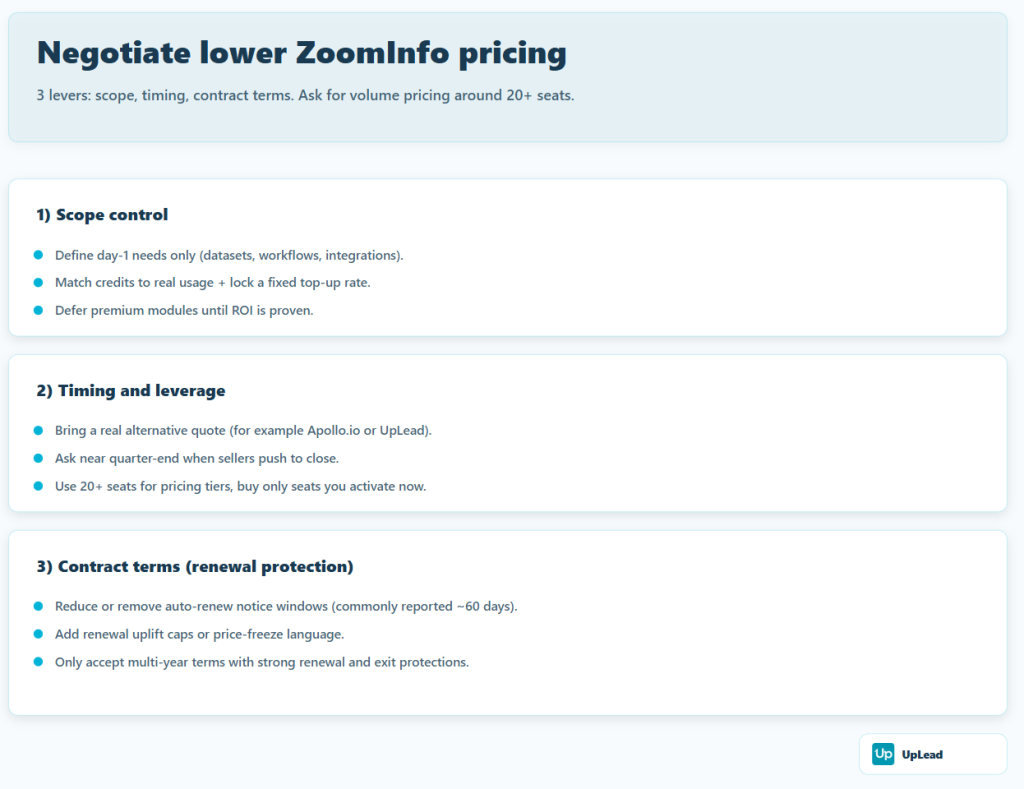
To negotiate lower ZoomInfo pricing, win on three fronts: (1) scope control (seats, credits, add-ons), (2) timing and competitive pressure, and (3) contract terms (renewal, uplifts, auto-renew notice). Volume discounts are commonly reported around 20+ seats, and many buyers get better concessions near quarter-end when sellers are pushing to close.
Step 1: Set your “target package” before you talk numbers
- Define only what you need for day 1: required datasets, required workflows, required integrations.
- Cap usage risk: ask for a credit allowance that matches real usage, plus a pre-negotiated top-up rate (so overages do not become a surprise).
- Defer premium modules: start lean and add later only after ROI is proven.
Step 2: Use timing and leverage correctly
- Run a competitive bake-off: show you have live alternatives and pricing, not hypothetical options. Name competitors like Apollo.io or UpLead and push for a “win-the-deal” rate.
- Time the ask around quarter end: sellers are often more flexible when they need to hit targets.
- Use seat count as a lever, not a trap: ask for volume pricing at 20+ seats, but buy only the seats you will actually activate now.
Step 3: Negotiate renewal risk up front (this is where many overpay)
Two recurring “gotchas” to negotiate out or soften:
- Auto-renew notice window: ZoomInfo contracts are widely reported to require notice (commonly 60 days) to avoid getting locked into another term. Negotiate to reduce or remove this, and send non-renewal notice early.
- Renewal uplift caps: negotiate a renewal cap, or “price freeze” language, so renewal does not jump just because the term is ending.
What are the ZoomInfo payment terms?
ZoomInfo payment terms are typically set in the Ordering Document, but the baseline in their license terms is: fees are due when you sign, and if the order form does not specify a schedule, the full amount is due within 30 days of invoice.
Key payment and contract terms to know
- Upfront payment expectation: Subscription fees are due upon execution of the order form (or when additional seats are “deemed subscribed”).
- Net terms (default fallback): If no payment schedule is specified, the entire amount is payable within 30 days of invoicing.
- Non-cancelable term: The agreement states it is not cancellable and remains in effect until it expires or is terminated under its terms.
- Auto-renew notice window: The term auto-extends unless notice is given on or before the “Extension Date,” which is 60 days before the last day of the term.
- Renewal uplift baked into the extension language: The extension section describes renewal fees as the annualized subscription fee plus 10% (and then applies discount logic described there).
- Billing cadence on renewal: ZoomInfo can invoice extensions annually or in a manner consistent with the existing payment schedule (at ZoomInfo’s discretion).
How do ZoomInfo credits work?
ZoomInfo uses credits as usage units for contact and company data.
You spend credits when you export records to a CRM like Salesforce or HubSpot, or when you export to a CSV file.
Some plans split credits into two pools: monthly user credits that reset on the 1st of each month and do not roll over, plus bulk credits that your whole team shares for larger enrichment work or when monthly credits run out.
After you export a record, ZoomInfo typically treats it as unlocked for 365 days, so you can re-export the same record during that window without spending another export credit.
Most exports cost one credit per record, but some actions can cost more, and some teams also spend credits to view or unlock certain details before they export.
ZoomInfo Pricing Plans and Tiers
ZoomInfo offers four plans: Lite, Professional, Advanced, and Elite, each designed to meet different levels of need for business insights and sales tools.
| Plan | Base price (annual) | Bulk credits (annual) | Monthly user credits | User fee (per seat) | Typical add-ons |
|---|---|---|---|---|---|
| Professional | $14,995/yr | 5,000 | — | $1,500 | Worldwide Data, FormComplete, Enrich |
| Advanced | $24,995/yr | 10,000 | 1,000 per user | $2,500 | Intent, Attributes, Enrich |
| Elite | $39,995/yr | 10,000 | 1,000 per user | $2,500 | Signals packages, Engage, Enrich |
ZoomInfo Lite Pricing
ZoomInfo Lite is now a multi-tier offering that includes both free and paid plans designed for small to mid-sized teams.
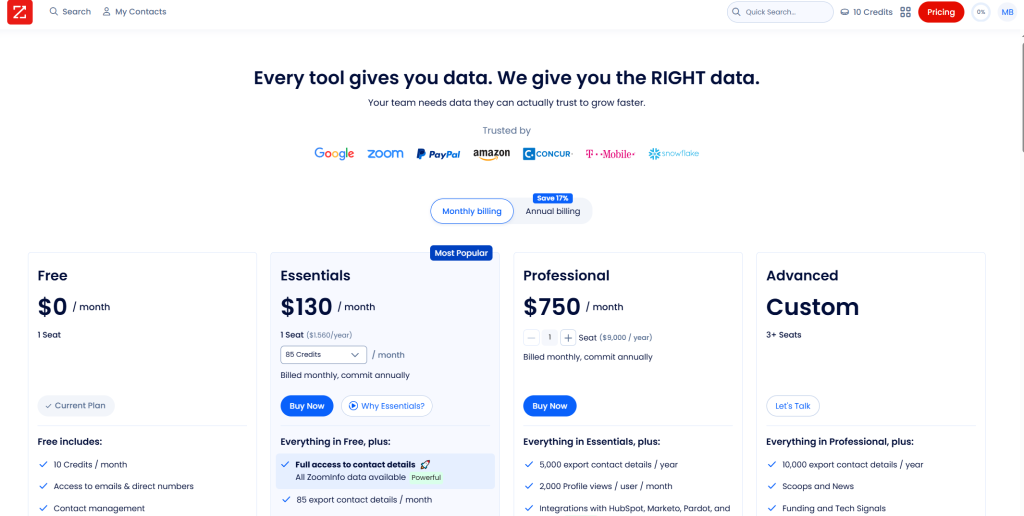
The pricing structure includes:
Free Plan – $0/month
- 10 credits per month
- Access to emails and direct numbers
- Contact management
- Advanced search
- Contact and company data enrichment
- Activity feed
- Web visits (10 companies/day)
- HubSpot integration
Essentials Plan – $130/month ($1,560/year)
- 85 export contact details per month
- Full access to all ZoomInfo contact data
- Access to mobile numbers
- 100 AI-powered emails
- Bulk exporting
- Mobile app and Chrome extension
- Everything in Free plan
Professional Plan – $750/month ($9,000/year)
- 5,000 export contact details per year
- 2,000 profile views per user per month
- Integrations with HubSpot, Marketo, Pardot, and more
- Comprehensive professional and company profiles
- AI Emailer and AI Dialer
- Tailored prospect lists, alerts, and customizable tagging
- Everything in Essentials plan
Advanced Plan – Custom pricing (3+ seats minimum)
- 10,000 export contact details per year
- Scoops and News
- Funding and Tech Signals
- WebSights
- Workflows (3 active)
- Advanced AI features including AI Generated Buying Group, GTM Plays, and Target Account Prioritization
- Everything in Professional plan
ZoomInfo Professional Pricing
The Professional plan is the gateway to ZoomInfo’s features. It gives you basic access to their database, allows for direct contact with prospects, and helps you create targeted lists. This plan is ideal for newcomers to ZoomInfo or smaller businesses exploring basic data access. The starting cost is around $15,000 annually, a bit steep for small businesses. There’s a free trial to give it a go before fully committing.
ZoomInfo Advanced Pricing
The Advanced plan goes a step further, providing deeper data insights like location information, org charts, and intent data. It’s geared towards businesses aiming for a more refined approach in their campaigns, ready to invest more for richer insights. The price jumps up from the Professional level. You’ll need to get in touch with ZoomInfo’s sales team for the exact figures.
Note: ZoomInfo Lite also offers an “Advanced” plan, but it’s a completely different product with custom pricing for 3+ seats.
ZoomInfo Elite Pricing
The Elite plan is the top-tier offering, bundling all of ZoomInfo’s premium features, including real-time intent signals, advanced sales automation and extensive data insights. This plan is best suited for organizations that need comprehensive data and tools to fuel aggressive marketing and sales efforts. Pricing is custom and also requires a conversation with the sales team.
Each plan builds on the previous, starting from basic database access to sophisticated sales and marketing automation tools. Additional features and more advanced data insights become available as you move up the plans, with options for add-ons like email verification checks for an extra fee.
Here’s an overview of all features included in each of the plans:
| Professional | Advanced | Elite | |
| Features by Package | |||
| Home / Dashboard | x | x | x |
| Quick Search | x | x | x |
| Advanced Search | x | x | x |
| ZoomInfo Opt Out Lists | x | x | x |
| ReachOut Chrome Extension | x | x | x |
| Lists | x | x | x |
| ListMatch | x | x | x |
| Tagging | x | x | x |
| Integrations | x | x | x |
| Mobile App | x | x | x |
| Alerts | – | x | x |
| WebSights | – | x | x |
| Events | – | x | x |
| News | – | x | x |
| Enhance | – | x | x |
| View Customization | – | x | x |
| Master Suppression | – | x | x |
| Monthly User Credits | – | x | x |
| Do Not Call | – | x | x |
| Ideal Customer Profile Score | – | – | x |
| AI-Generated Ideal Customer Profile | – | – | x |
| Workflows | – | – | x |
| Salesforce Sync | – | – | x |
| NeverBounce Email Verification Checks | $ | $ | x |
| FormComplete | $ | $ | $ |
| InboxAI Premium | $ | $ | $ |
| Compliance API | $ | $ | $ |
| Enrich | $ | $ | $ |
| Data by Package | |||
| Company Profiles | x | x | x |
| Contact Profiles | x | x | x |
| Notice Provided Date | x | x | x |
| Accuracy Score$ | x | x | x |
| European Data | $ | $ | $ |
| Technologies | – | x | x |
| Org Charts | – | x | x |
| Scoops | – | x | x |
| Funding | – | x | x |
| Education & Employment History | – | x | x |
| Locations & Hierarchy | – | x | x |
| Web References | – | x | x |
| Mobile Phone & Personal Email | – | x | x |
| Attributes | – | $ | x |
| Intent | – | $ | x |
| Department Employee Counts | – | – | x |
What Products and Packages Does ZoomInfo Offer?
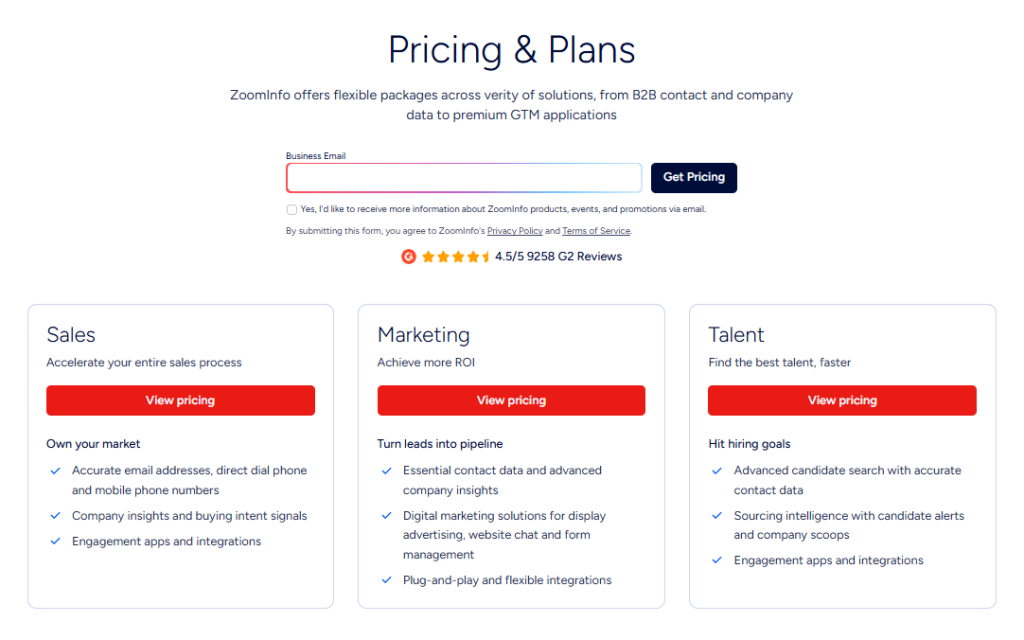
ZoomInfo’s Go-to-Market Intelligence Platform is built around three core products designed for different teams: Sales, Marketing, and Talent.
- Sales: Designed to help sales teams hit their targets faster. It provides access to verified contact and company data, buyer intent signals, and engagement tools so reps can identify the right prospects and close deals more efficiently.
- Marketing: Built to convert leads at the speed of demand. It gives marketing teams access to account-based marketing tools, audience activation, contact data, and digital advertising capabilities — making it ideal for teams looking to improve campaign ROI and turn leads into revenue.
- Talent: Built for recruiters who need a data-first approach to hiring. With verified candidate data, smart sourcing filters, candidate insights, and ATS integration, it helps HR and recruiting teams find and engage top talent faster.
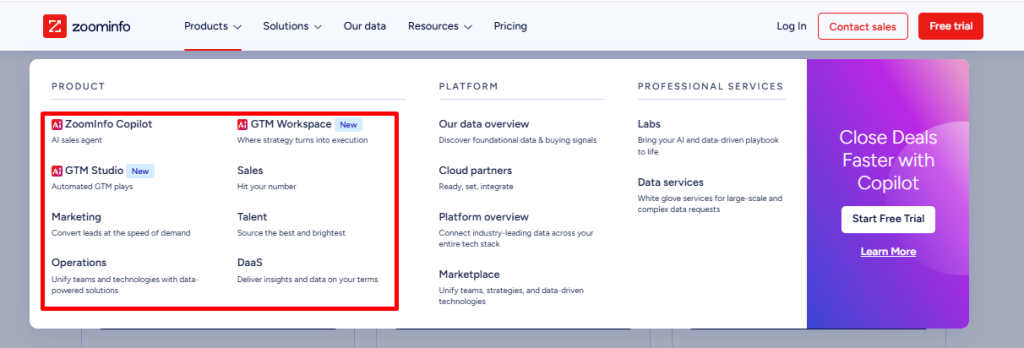
In addition to its core products, ZoomInfo offers a suite of AI-powered tools and data solutions:
- ZoomInfo Copilot: An AI sales agent that uses verified B2B data and buying signals. It finds high-intent accounts, ranks opportunities, drafts outreach, and logs updates in your CRM. This cuts admin work for sellers.
- GTM Workspace: A single place for account teams. It combines CRM data, ZoomInfo insights, call history, and buyer signals. Sellers can search in plain language, prep for meetings fast, and manage accounts without switching tools.
- GTM Studio: A workspace for revenue ops to plan and run GTM plays. Teams can design, enrich, and launch plays while keeping planning, data, and activation in one place. It reduces data silos and automates campaign execution. Early access.
- Operations: Tools that clean, enrich, and route data so your CRM stays accurate. It helps sales and marketing work from the same records across your stack.
- Data as a Service (DaaS): Access to ZoomInfo’s B2B data via APIs, cloud data shares (AWS, Google Cloud, Snowflake, Databricks), or flat files. Built for teams that need contact, company, and intent data at scale.
What support packages does ZoomInfo offer?
ZoomInfo offers three support packages: Standard, Preferred, and Premium.
- The Standard package offers industry-leading free support, ideal for those requiring basic assistance without incurring additional costs.
- The Preferred package is designed for organizations prioritizing personalized care to maximize platform utility, making it ideal for teams seeking enhanced support for their operations.
- The Premium package offers white-glove service, expediting business transformation for enterprises looking for the highest level of assistance and fastest response times.
Here’s a comparison of the services each support packages offers:
| Features | Standard | Preferred | Premium |
| Expedited Response Time | – | x | x |
| Email Support | – | x | x |
| Live Chat Support | x | x | x |
| Knowledge Center | x | x | x |
| ZoomInfo University | x | x | x |
| Phone Support | – | x | x |
| Platform Support Hours of Operation | Weekday local business hours | 24 hours x 5 days a week | 24 hours x 5 days a week |
| Weekend Coverage | – | Emergency support for platform critical issues | US based hours |
| Reporting and Trend Analysis | – | – | x |
| Prioritized Access to ZoomInfo Integrations Experts | – | – | x |
| Additional Access to Training Managers & Delivery Consultants | – | – | x |
| Request to Profile New Companies and Contacts | – | – | x |
FAQ on ZoomInfo Prices
No, there is no special ZoomInfo pricing for small businesses. If you’re willing to agree on a longer-term contract (from 2 years on), you can negotiate a discount, though.
You can get a ZoomInfo quote by going to the ZoomInfo pricing page, entering your email and waiting for the ZoomInfo sales rep to get in touch with you.
Yes, ZoomInfo does offer a free trial. You have to submit a form at the ZoomInfo website to request a free trial.
Yes, ZoomInfo does offer a demo. You can request a demo on their website.
No, ZoomInfo is not free and pricing starts at $14,995 per year. ZoomInfo Lite offers a free plan at $0 with 10 credits per month, access to emails and direct numbers, and basic features though.
Whether ZoomInfo is worth it depends on the size and needs of your business. Large enterprises may find its comprehensive database and advanced targeting features justify the cost for enhanced lead generation and customer engagement. However, smaller businesses might consider the expense outweighing the benefits, alongside the necessity to manage credit usage carefully, and could explore alternatives like UpLead for more budget-friendly options.
No, ZoomInfo doesn’t have monthly pricing. ZoomInfo offers yearly pricing but you can calculate the ZoomInfo cost per month.
ZoomInfo offers multiple billing options, including automatic payments through credit/debit card and ACH Debit, as well as manual payments via wire/bank transfer, EFT, ACH, and check.
ZoomInfo does offer discounts, but pricing is quote-based and highly negotiable. In practice, discounts depend on your seat count, the modules you include, and whether you sign a longer-term agreement. Third-party procurement data and buyer reports suggest discounts can range from modest (around 15% to 22% on average) to much larger when you apply strong leverage and buy at higher volume.
Yes, you can pay for ZoomInfo on a quarterly basis but it comes with a 5 % price increase compared to an annual payment.
No, ZoomInfo doesn’t offer single-user licenses.
No, you can’t use the ZoomInfo free trial without having a demo with an account executive.
Yes, ZoomInfo Lite offers a free plan at $0 that includes 10 credits per month, access to emails and direct numbers, contact management, advanced search, and HubSpot integration. This is separate from their enterprise platform.
ZoomInfo continuously updates its database to maintain high data quality, ensuring that company data and phone numbers remain accurate and reliable.
Yes, some users have experienced a steep learning curve due to ZoomInfo’s extensive features.
Monthly user credits reset monthly. Bulk credits don’t reset monthly. Buy more as needed.
Yes. ZoomInfo contracts auto-renew unless you provide written notice within the contract’s stated window (commonly 60 days before term end). Check your agreement for the exact clause.
Typical ones include Worldwide Data, FormComplete, Intent, Enrich, InboxAI Premium, and compliance/integration add-ons.
ZoomInfo Lite and ZoomInfo Enterprise are two separate products. ZoomInfo Lite is designed for small teams and individuals with transparent pricing starting at $0 (free plan) up to $750/month, 1-3 seats, and monthly export credits (10-10,000 per year). ZoomInfo Enterprise is designed for larger organizations with annual contracts starting at $14,995/year, bulk credit pools shared across teams, unlimited seat scaling, and advanced features like workflows, extensive integrations, and AI-powered GTM tools.
What Are ZoomInfo Alternatives?
While ZoomInfo is a powerful tool with a lot to offer sales and marketing teams and enhanced sales processes, plenty of options are just as impactful and less expensive. ZoomInfo is a well-known brand, but it may not be the right choice for every business.
Let’s look at some top ZoomInfo alternatives to help you make the right choice for your company and sales and marketing departments.
| Tool | Pricing (starting) | Best for | Database size |
|---|---|---|---|
|
|
Quote-based
Pricing is bundled and negotiated
|
Enterprise GTM orgs that can justify a larger bundle and have ops support to manage seats, credits, and add-ons. |
Large (enterprise-scale)
Counts vary by definition (contacts vs profiles)
|
|
|
From $99/mo
Plus: $199/mo • Free trial available
|
Teams that want transparent pricing and a simpler buying decision (easy to compare vs quote-based bundles). | 200M+ leads |
|
|
Quote-based
Packages: Grow / Elevate
|
Teams that still accept sales-led pricing but want strong compliance positioning and EMEA-oriented prospecting. | 440M+ contacts • 100M mobiles |
|
|
From $22.45
Premium: $52.45 • Free plan available
|
SMB and mid-market teams that want lower-cost entry and a lighter-weight tool when ZoomInfo feels like overkill. | 280M contacts |
|
|
Free / From $49
$49 Basic • $79 Pro • $119 Org (per user/mo, billed annually)
|
Teams that want predictable per-seat pricing and an all-in-one outbound workflow when ZoomInfo bundles make comparisons harder. | 210M contacts • 35M companies |
Notes: “Starting” pricing reflects public pricing where available; quote-based tools require a sales process for final pricing. Database sizes are vendor-stated and can change over time.
UpLead vs ZoomInfo
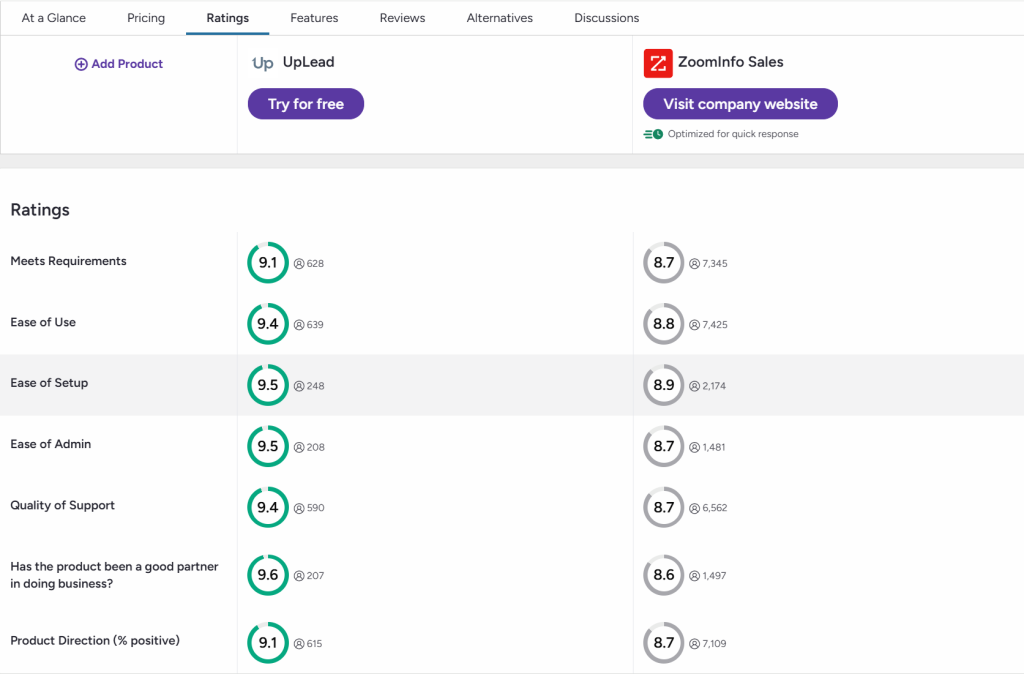
UpLead has an impressive lineup of tools and features to take your sales team to the next level at a fraction of the cost. With an industry-leading prospector tool, real-time email search and verification, data enrichment, intent data, and so much more, choosing UpLead as the best Zoominfo Competitor is a no-brainer.
This G2 review comparison will help you see how UpLead is superior.
Key Features:
- Industry-Leading Data Accuracy: Our platform has a 95% data accuracy guarantee. With over 200 million contacts in our database, you can be confident knowing you’re getting high-quality, accurate data for your next campaign.
- Wide Range of Tools: Leverage the email finder and verification tools to quickly build an accurate email list for an outbound campaign or build contact lists in the prospector tool for cold call campaigns, direct mail initiatives, and more.
Best for:
Teams that want transparent pricing, high data accuracy, and a simple credit-based model without hidden fees.
Pricing Model:
When it comes to pricing, there’s truly no comparison. UpLead’s straightforward pricing means you know exactly what you’re getting and how much it costs. Free trial available. Plans and credits published. Professional is annual/quote-based. Contact sales.

What You Need to Remember About ZoomInfo Pricing
ZoomInfo pricing depends on how many seats you buy, how many credits you need, and which add-ons you pick. It’s also one of the most expensive options. Check your renewal terms and credit burn to avoid surprises.
For a fantastic alternative that offers powerful tools at a fraction of the cost, look no further than UpLead!
Stuck in ZoomInfo contracts? Book a call, and let’s see how we can help.




