Your sales pipeline is directly linked to your sales process and your revenue. A well-functioning pipeline can make or break your business.
It allows you to streamline your sales process. You get to see where in the sales process leads are getting stuck and where they’re dropping out.
This allows you to place more focus on key areas of your sales cycle and get those conversions soaring.
Yet here’s the reality: by 2025, 80% of B2B sales interactions occur in digital channels as buyers increasingly prefer to self-educate and transact online. This shift is driven by changing buyer preferences, with 33% of all buyers desiring a seller-free sales experience. Despite this transformation, many sales teams still operate without a clear, optimized pipeline, leading to unpredictable revenue and missed opportunities.
So why do so many sales managers ignore this critical sales cycle element?
Before we start answering the hard questions, let’s look at what’s in a sales pipeline.
What Is a Sales Pipeline?
A sales pipeline is a visual representation of your sales process from awareness through to closing the sale. It’s a map of where your leads are, where they’re stuck, which stages convert well and which need work.
At the front end of your sales pipeline, you’ll have your lead generation and sales team working at discovering new leads. At the back end, you’re closing deals and nurturing customers for retention and referrals.
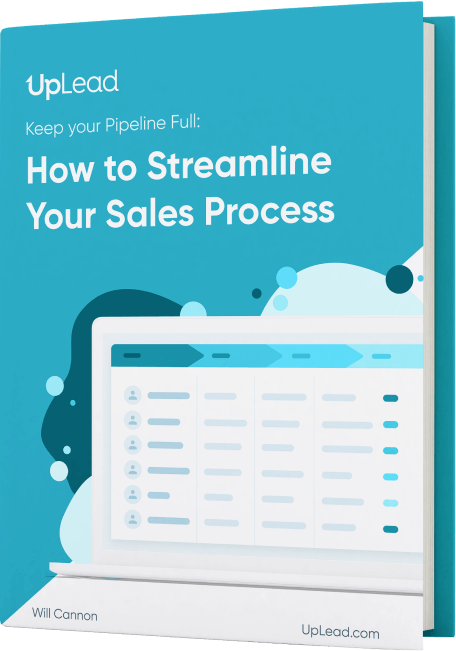
All the leads in the world won’t do you any good if your sales process isn’t optimized.
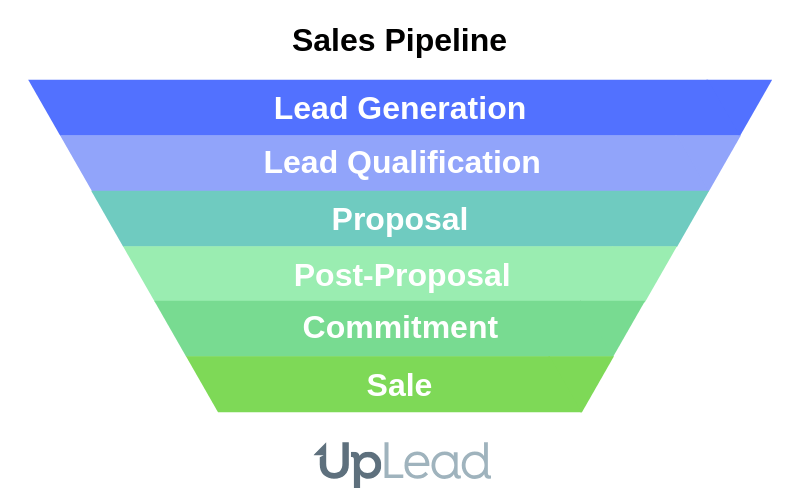
This is the basic anatomy of a sales process. So without further ado, let’s look at the critical difference between a pipeline and a funnel.
What Is the Difference Between a Sales Pipeline and a Sales Funnel?
The difference between a sales pipeline and a sales funnel is perspective and focus. A sales pipeline is a visual representation of the sales process from the seller’s perspective. It outlines specific stages and actions a salesperson takes to move prospects from leads to customers. The stages are action-oriented, focusing on seller activities like prospecting, qualifying leads, sending proposals and negotiation.
A sales funnel is a model that visualizes the customer’s journey from first awareness to purchase. It represents the quantity and conversion rates of prospects as they move through stages like Awareness, Interest, Desire and Action. It’s buyer-centric and shaped like a funnel because prospects drop off at each stage.
Here’s a clear comparison:
Your sales funnel has a limited number of leads that move through it and a limited number of deals that can be achieved. They dry up. Whereas your sales pipeline is your core sales process. It’s what keeps your business ticking over between each sales funnel.
How Do You Build a Sales Pipeline in 7 Steps?
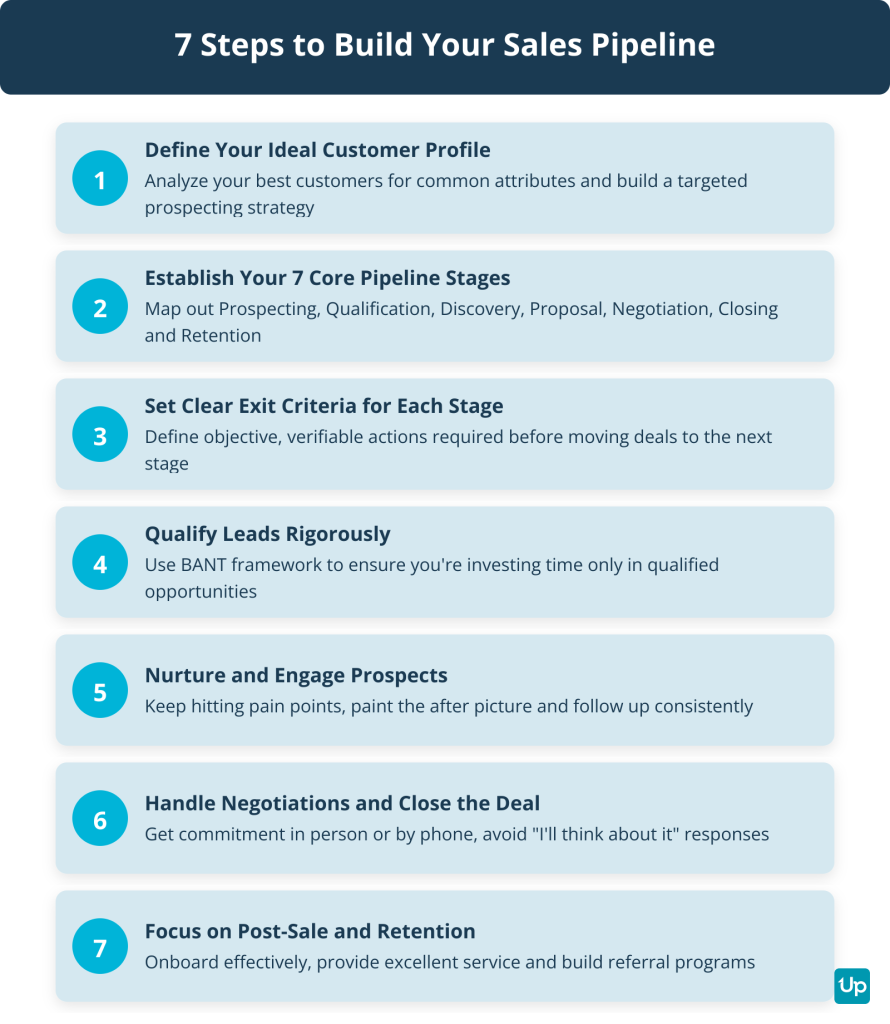
You build a sales pipeline in 7 steps by defining your ideal customer profile, establishing core pipeline stages, setting clear exit criteria, qualifying leads rigorously, nurturing prospects, handling negotiations and focusing on post-sale retention. Here’s how to do it in seven concrete steps.
Step 1: Define Your Ideal Customer Profile and Prospecting Strategy
You can’t build a pipeline without knowing who you’re selling to. Start by analyzing your best customers for common attributes like industry, company size, geographic location, budget and pain points.
This is your Ideal Customer Profile. Once defined, build a prospecting strategy around it. Use outbound prospecting (cold email, LinkedIn outreach), inbound marketing (content, SEO, PPC) and referrals to fill the top of your pipeline with qualified leads.
Step 2: Establish Your 7 Core Sales Pipeline Stages
A typical B2B pipeline has seven stages. Each stage represents a specific phase in the buyer’s journey and your sales process.
- Prospecting/Lead Generation: Identifying potential customers who fit your ICP
- Lead Qualification: Determining if the lead has budget, authority, need and timeline (BANT)
- Discovery/Needs Analysis: Understanding the prospect’s specific challenges and requirements
- Proposal/Demo: Presenting your solution and demonstrating how it solves their problem
- Negotiation: Addressing objections, discussing pricing and finalizing terms
- Closing: Getting the contract signed and payment processed
- Post-Sale/Retention: Onboarding, customer success and generating referrals
Step 3: Set Clear Exit Criteria for Each Stage
Define rules based on verifiable buyer actions for each stage. This prevents deals from stalling and keeps your pipeline accurate.
Objective exit criteria for each of the 7 sales pipeline stages are:
- Prospecting/Lead Generation: The lead is confirmed to fit the ICP and initial contact has been made with the prospect agreeing to a next step
- Qualification: Key elements of BANT have been confirmed in a live conversation and the prospect has acknowledged a clear business problem
- Demo/Meeting: A discovery call or product demo has been completed and the prospect confirms the solution meets their needs
- Proposal/Quote: A formal proposal has been sent to the key decision-maker and the prospect has confirmed receipt with an agreed timeline for review
- Negotiation/Commitment: All stakeholder feedback and objections have been addressed and there is a verbal or written commitment to move forward
- Closing: The contract is signed by all required parties and initial payment has been processed
- Post-Purchase/Retention: The customer has been handed off to onboarding/customer success and has completed initial setup
Step 4: Qualify Leads Rigorously
If you want to keep your sales team productive, not busy, you need to give them qualified leads. Qualifying your leads is simpler than some would make it out to be. You just need to ask the right questions. Establish:
- where they are in the sales process — how much do they know about your product?
- how badly they need your product — is it a critical point for them or something that can be pushed down the line?
- whether they can afford you
- what their current specific needs are and whether you can tailor a specific solution for them
The best approach to qualify your leads is a discussion. A tactful discussion that answers these questions without seeming too aggressive.
For example, you could frame it as “Where are you now in your business and where would you like to be?”
“Oh, we’re all about growth right now. We had to stop new client applications a while back since we just couldn’t scale fast enough. But we’ve built up a few more teams and they’re ready and waiting to serve a bunch more clients.”
If you’re a recruiting agency, this lead has been disqualified. They should be moved to the back burner so they know where to find you the next time they need to scale.
If you’re leading marketing or sales teams, you’re about to have a feast.
Step 5: Nurture and Engage Prospects
According to Dan Lok, a respected businessman, proposals suck (at least, the traditional proposals we know and hate).
The best proposals are made in-person or by phone. It works well in pushing a client to close right there and then. And it only takes 30 minutes to an hour or two of your time.
Whereas crafting that perfect proposal takes a while. You go through all the little details. You nitpick, proofread and tweak over and over.
And after all that the client gets a nice little package to print out and forget about.
Granted, the proposal does have its place. And when you do need to send one, make sure it’s impeccable.
But don’t forget to follow up. Keep hitting on those pain points if you want to increase the number of deals you make. Learn to close the sale on the phone or in person or at least make sure your staff knows how to and you’ll get more sales.
In your written proposal (when you need one), remember to hit on all the pain points. Paint the after picture clearly and persuasively.
Make sure you’ve got the right copywriter for the job.
Step 6: Handle Negotiations and Close the Deal
This is what the follow-ups are for. Getting that prospect to say yes.
If you’re following up with emails, keep hitting the pain points. Keep painting that after picture more clearly in the prospect’s mind.
If you’re following up by phone, try to get an in-person meeting. If you can’t, try to close the sale right there and then. Get commitment from the prospect.
You don’t want them to say “I’ll think about it” because that’s as good as a no.
You want to close them in this stage.
Get your prospect around a table, go over the contract with them and have them sign.
Don’t send them a contract to sign if you can help it. Get them in the same room as you. And if you detect any hesitation on their part, remind them again why they’re there, what you’re about to do for them and how they’re going to win big with you at their side.
If you send the contract to them to sign, you can’t take these actions. You can only wait and hope. And maybe drop another call or email.
And then hope some more.
Step 7: Focus on Post-Sale, Retention, and Referrals
Once the clients have passed the closing stage, the selling isn’t over. Focus on onboarding, customer service, education and referral programs. The vast majority of businesses rely on referrals as a great source of revenue.
Integrate retention into your sales process. Focusing on new customers at the expense of existing ones is more expensive than retention.
Your Pipeline Is Different
We can’t give you a ready-made template for your business. Each business is unique. One thing you can do is validate your ideas and get great advice on the structure of your sales cycle by talking to a growth marketing mentor and removing some of the guesswork from the equation.
So once you’ve established your sales cycle, you can add your steps into your pipeline. Your business and pricing model may appeal to a wider market and thus you may not need a rigid qualification process.
Maybe your demo is your proposal. And your demo conversions are 10%+. Yet your post-demo follow-ups convert at less than 1%.
Then you’ll want to place more focus on the front end and forget about post-proposal.
What Are the 12 Essential Sales Pipeline Metrics to Track in 2026?
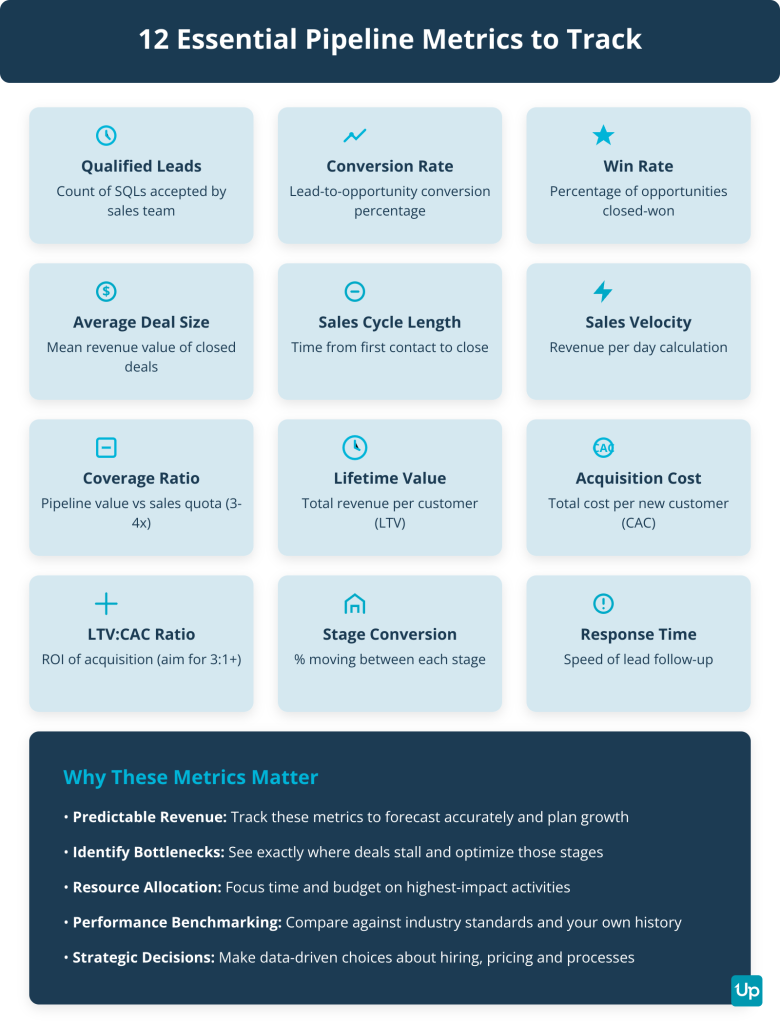
The 12 essential sales pipeline metrics to track in 2026 are number of qualified leads, lead-to-opportunity conversion rate, win rate, average deal size, average sales cycle length, sales velocity, pipeline coverage ratio, customer lifetime value, customer acquisition cost, LTV-to-CAC ratio, stage conversion rate and lead response time. Different business models will need different metrics, but at the end of the day there are core metrics you need for an effective pipeline.
1. Number of Qualified Leads (SQLs)
This is the count of leads accepted by your sales team. You’ll need to know how many leads are in your pipeline at any one stage for accurate revenue forecasting.
Good sales pipeline management will give you predictable sales process results every week, month or quarter. But you can’t even begin measuring if you don’t have this figure first.
2. Lead-to-Opportunity Conversion Rate
This is the percentage of leads converted to opportunities. A number of leads will fall out of the pipeline with each new stage. Time will show you an average which you can use to predict future fallout.
And this number gives you a great indicator as to your different stages’ health. If a huge number of leads are dropping off just before the close, it could be your pricing or close techniques.
3. Win Rate (Close Rate)
This is the percentage of opportunities that result in closed-won deals. If a huge number are dropping off in your qualification phase leading to a small number of deals, the sales process might be too strict. This might not be the case if your conversion ratio after the qualification phase mitigates this drop-off.
4. Average Deal Size
This is the average revenue value of closed-won deals. Another obvious one, no doubt. But a metric that’s needed to calculate your bottom line in regards to the sales funnel.
Your cost per lead will be factored into your cost per sale at the end of the day. But knowing the cost of leads up front as a separate number is a no-brainer.
5. Average Sales Cycle Length
This is the time from first contact to final signature. How long does the average lead take to sell after entering your sales funnel? It’s a vital part of the sales process we should all be measuring.
Again, a very important part of your forecasting.
6. Sales Velocity
This is revenue per day calculation using opportunities × deal size × win rate ÷ cycle length. It shows how fast you’re generating revenue.
7. Pipeline Coverage Ratio
This is total pipeline value vs. sales quota. Aim for 3x-4x coverage to ensure you hit your targets even with expected drop-off.
8. Customer Lifetime Value (LTV)
This is the total revenue expected from a single customer over the entire relationship. It helps you understand how much you can afford to spend on acquisition.
9. Customer Acquisition Cost (CAC)
This is the total sales and marketing costs per new customer. Track this closely to ensure profitability.
10. LTV-to-CAC Ratio
This measures ROI of acquisition efforts. Aim for 3:1 or higher to ensure sustainable growth.
11. Stage Conversion Rate
This is the percentage moving from one stage to the next. Track this for each stage to identify bottlenecks.
12. Lead Response Time
This is the average time to follow up with new leads. Faster response times increase conversion rates.
Using the Metrics
Now that you’ve got all the metrics set up, the value of the pipeline starts to show.
You’ll now be able to draw up reports that show you at a glance the value of the current state of your pipeline.
And you’ll be able to forecast what profits are going to be at the end of this month, quarter or year.
What Are the 12 Sales Pipeline Management Best Practices for Predictable Growth?
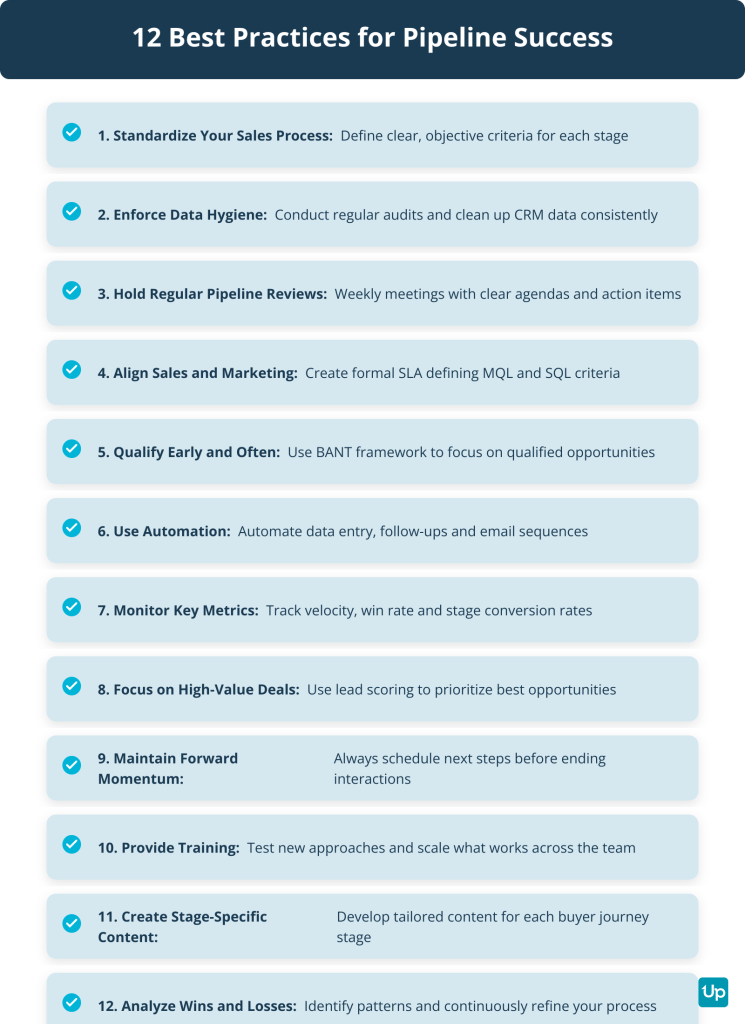
The 12 sales pipeline management best practices for predictable growth are standardizing your sales process, enforcing rigorous data hygiene, conducting regular pipeline reviews, aligning sales and marketing, qualifying early and often, using automation, monitoring key metrics, focusing on high-value opportunities, maintaining forward momentum, providing training, creating stage-specific content and analyzing wins and losses.
The primary pain points in sales pipeline management are poor pipeline visibility and inaccurate data (lack of clear overview and unreliable CRM data makes forecasting impossible, poor data quality can cost businesses 15-25% of their revenue), inaccurate forecasting (overly optimistic estimations and not including sales team insights lead to unreliable forecasts), inefficient processes and lack of automation (manual tasks and poorly defined sales process slow down the pipeline), poor lead qualification and management (failing to qualify leads wastes time on prospects who won’t convert) and pipeline leakage and stagnation (leads go cold due to mismatch or poor follow-up).
Here are 12 best practices to turn unpredictable revenue into a reliable forecast.
1. Standardize Your Sales Process and Stages
Define clear, objective criteria for each stage. This creates consistency across your sales team and makes your pipeline data reliable.
2. Enforce Rigorous Data Hygiene in Your CRM
Establish company-wide standards for data entry. Conduct regular audits to clean up duplicate records, outdated information and incomplete fields.
3. Conduct Regular, Structured Pipeline Reviews
Hold weekly meetings with a clear agenda. Review each deal’s status, identify blockers and assign next steps. This keeps momentum and prevents deals from stalling.
Make sure all your role players are prepared in advance for the meeting. This will save a ton of time on these meetings and may even help you increase the frequency of meetings which will let you have a clearer, more up-to-date picture of the pipeline available.
In our article on setting sales goals, we emphasize the importance of having tangible, measurable actions as goals instead of vague numbers.
So make sure to identify key focus areas in each meeting and assign tangible tasks to your role players.
For example, don’t tell your sales reps to get 5 new leads this week. How many calls, on average, does it take to get a new lead? 10? Your rep should be tasked with making 50 calls this week. That makes it tangible and measurable.
4. Align Sales and Marketing on Lead Handoff
Create a formal SLA defining MQL and SQL. Misalignment between sales and marketing leads to low-quality leads. Align around shared ICP and lead definitions.
5. Qualify Early and Disqualify Often
Focus on ICP and remove poor fits. Don’t waste time on unqualified leads. Establish a BANT framework and use it consistently.
6. Use Automation to Reduce Administrative Burden
Automate repetitive tasks like data entry, follow-up reminders and email sequences. This frees up your sales team to focus on high-value activities.
7. Closely Monitor Key Pipeline Metrics
Track sales velocity, win rate and conversion rates at each stage. Use these metrics to identify bottlenecks and opportunities for improvement.
8. Focus on High-Value and High-Intent Opportunities
Use lead scoring to prioritize deals most likely to close. Depending on your pricing model, you may have leads of different value. If this is the case, it would be wise to split your metrics into sub-categories.
Who got the premium package? How long did it take them?
The same questions should be asked for the lower tier packages.
If your high-value leads take longer to close and your low tier leads close much faster, try to find a happy medium.
One way to find your highest value leads is to measure in profits per day over their time in your pipeline.
9. Maintain Forward Momentum on Every Deal
Ensure clear next steps for every interaction. Never end a call or meeting without scheduling the next one.
10. Provide Training and Documentation
Equip your team for success. Test new things and watch the effect on your pipeline. And when you find something that works well, have your staff place their focus there.
Allow a small percentage of your sales force with which you can test. But when you find something that works well, it would be a waste not to implement it across the board.
11. Create and Use Content for Each Pipeline Stage
Develop tailored content for each stage of the buyer journey. This helps move prospects forward more effectively.
12. Analyze Wins and Losses for Continuous Improvement
Identify patterns for refinement. The whole point of the sales pipeline is streamlining your sales process. Be on the lookout for stages in which you can improve. Whether it’s a sharp drop in leads or low conversion rates, find and iron out the problem areas.
Use your metrics and testing to try to identify unnecessary sales practices you’re holding onto. Does a lead take twice as long to convert without being shown a demo? Offer the demo up front.
Don’t they respond to your emails? Test different things. If nothing works, cut them.
Try to get your sales process as lean and effective as possible.
Use Your Gut
These are just a few best practices. You’re likely to be able to identify a ton more once you get going with your pipeline.
And it’s likely that if you’ve been in the industry for a while, you’ll know what’s best. So pay attention to your gut feelings. Measure the metrics you think will have the biggest impact.
And pay attention to the best practices that are going to take your business to the next level.
What Are the 7 Common Sales Pipeline Mistakes (And How to Fix Them)?
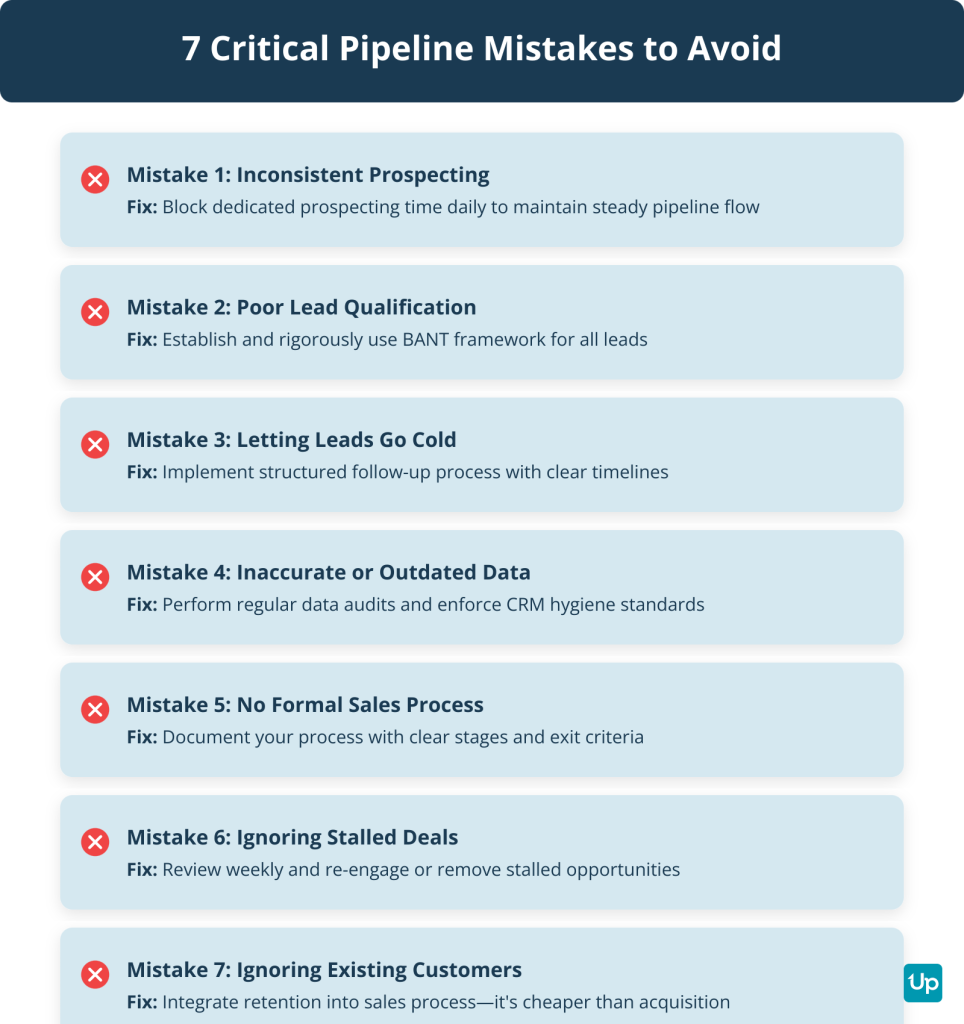
The 7 common sales pipeline mistakes are inconsistent prospecting, poor lead qualification, letting leads go cold, inaccurate or outdated data, not defining a formal sales process, ignoring stalled deals and focusing on new customers at the expense of existing ones. Here are the seven most critical pitfalls and how to avoid them.
1. Inconsistent Prospecting
Inconsistent prospecting creates feast or famine cycles. Block dedicated prospecting time daily to keep your pipeline full.
2. Poor Lead Qualification
Poor lead qualification wastes time on unqualified leads. Establish a BANT framework and use it rigorously.
3. Letting Leads Go Cold
Promising leads lose interest when follow-up is inconsistent. Implement a structured follow-up process with clear timelines.
4. Inaccurate or Outdated Data
Inaccurate data leads to wasted effort and flawed decisions. Perform regular data audits and enforce CRM hygiene standards.
5. Not Defining a Formal Sales Process
Lack of a formal process causes inconsistency and confusion. Document your sales process with clear stages and exit criteria.
6. Ignoring Stalled Deals
Stalled deals inflate pipeline value and skew forecasts. Review and re-engage or remove stalled opportunities.
If a certain group of leads takes longer than usual to convert, consider setting a cut-off point. Say, for example, you’re selling a private program for school teachers. But they take longer to sell because they need to get approval from the school and don’t want to pay from their pocket.
On the other hand, you’re getting tons of interest from private tutors who are fast to pay to improve their business.
Which should you focus on more? At what point does the former’s profit per day drop to a point where it’s not even worth it?
7. Focusing on New Customers at Expense of Existing Ones
Focusing only on new customers is more expensive than retention. Integrate retention into your sales process and nurture existing relationships.
What Are the 10 Best Sales Pipeline Software and Tools for 2026?
The 10 best sales pipeline software and tools for 2026 are Pipedrive, HubSpot Sales Hub, Pipeline CRM, Bitrix24, Freshsales, Salesforce Sales Cloud, Zoho CRM, Monday Sales CRM, Salesmate, Close and Nutshell. Having the right tool can make a big difference, so let’s take a look at specialized pipeline tools.
Pipedrive
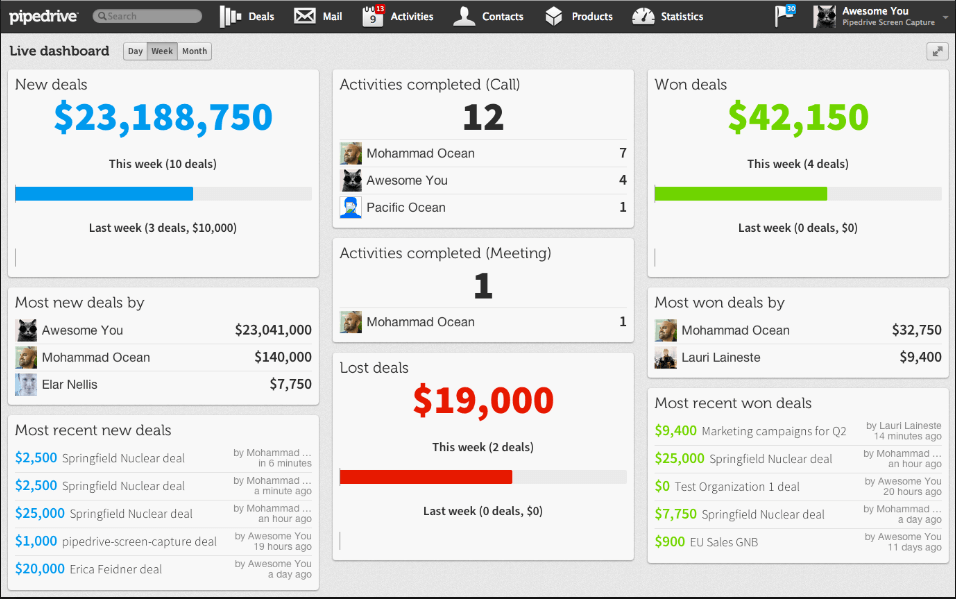
Pipedrive is a lightweight, simple sales pipeline management tool trusted by over 100,000 companies with US headquarters in New York.
Best for: Small to mid-sized sales teams wanting intuitive, visual pipeline management.
Key Features:
- Visual drag-and-drop pipeline management
- AI Sales Assistant for predicting deal success and automating tasks
- 500+ integrations in the Pipedrive Marketplace
- 14-day free trial for all plans without requiring a credit card
Pricing (Annual Billing): Essential ($14.00/user/month), Advanced ($24-$39/user/month), Professional ($49.00/user/month), Power ($69-$79/user/month), Enterprise ($94.90/user/month).
There may be some issues integrating with mail systems like Outlook. But browser mail is a small sacrifice for such a simple tool.
There’s also the fact that they’re improving and updating their product. So the integration issues that exist today may well be gone tomorrow.
A recommended program for your first delve into sales pipeline management and tracking.
HubSpot Sales Hub
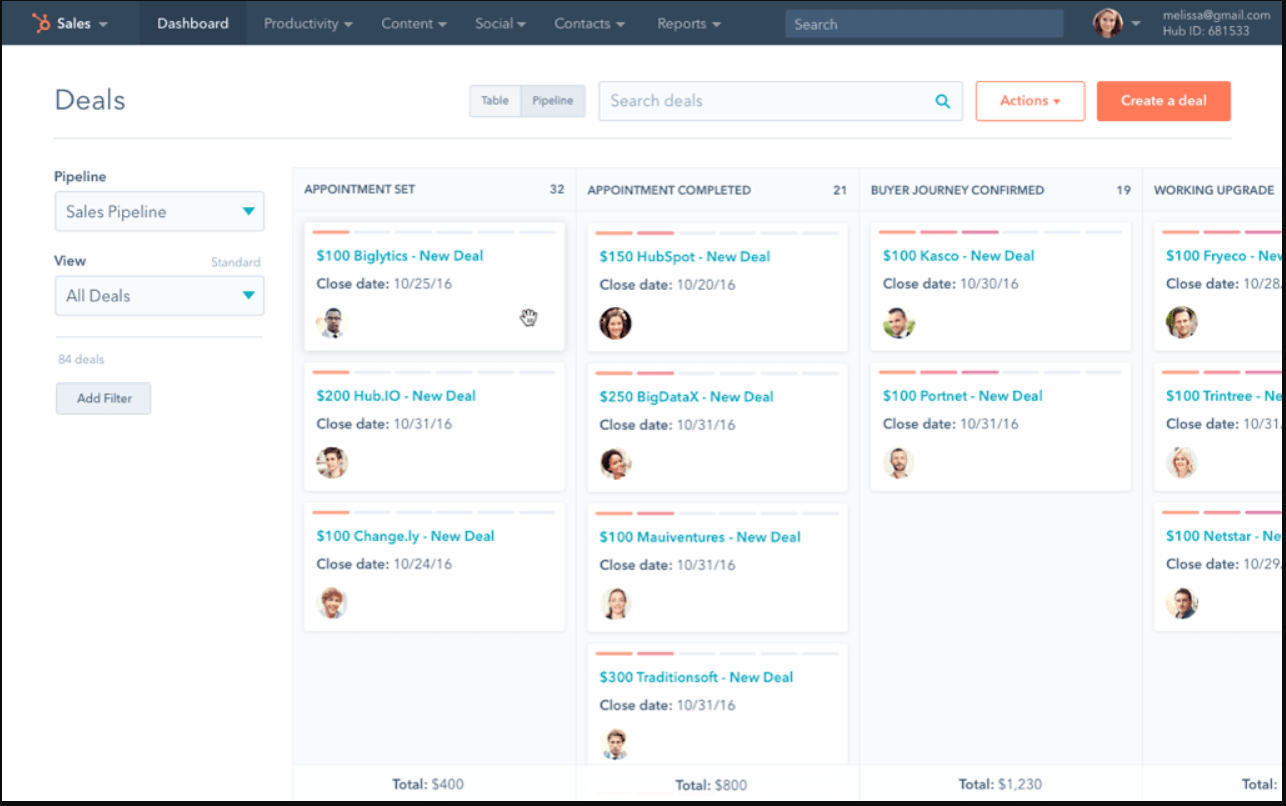
HubSpot is a big player in this arena with some great software solutions.
Best for: Growing businesses wanting an all-in-one CRM with powerful automation and reporting.
Key Features:
- Contact and lead management with customizable deal pipelines
- Sales automation with sequences and email tracking
- AI assistants for email crafting and prospecting workspace
- Detailed analytics and reporting
Pricing: Free Tools (basic features), Starter ($15/month per seat annually, $20 monthly), Professional ($100/month per seat, minimum 3 seats, $1,500 one-time onboarding fee), Enterprise ($150/month per seat, minimum 5 seats, $3,000 one-time onboarding fee).
Their CRM is also user-friendly and easy to adapt and add users with specific access. Though there are some drawbacks to the free version.
But you’ll be able to give it a try before paying a thing. Another great option for when you’re just starting out on your sales pipeline.
And though HubSpot scales well with business needs, the higher-tier packages can be a bit pricey.
Pipeline CRM
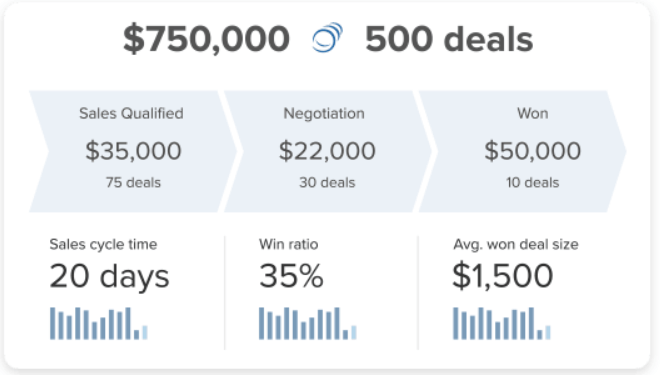
Pipeline CRM (formerly Pipeline Deals, rebranded in 2020 and acquired by saas.group in 2022) has a simple, effective UI. Its users swear that it’s easy to use and the best around.
Best for: Small businesses and startups needing straightforward pipeline management with excellent support.
Key Features:
- Simple, intuitive pipeline visualization
- Notes on clients and reminders
- Integration with other software
- 14-day free trial and U.S.-based phone support
Pricing (Annual Billing): Start ($25/user/month, 1 sales pipeline, 250 active deals), Develop ($33/user/month, 2 sales pipelines, 2,500 active deals), Grow ($49/user/month, unlimited sales pipelines and deals).
One issue with the software is doing client tag searches for reporting purposes. For example, if you have clients tagged as “clients” and “NY”, if you search for “Clients NY”, you’ll get all those with the “clients” tag and all those with the “NY” tag.
It’s a very small issue and can be addressed with better client tag planning.
But all in all, it’s another great piece of software with a free trial too.
Bitrix24
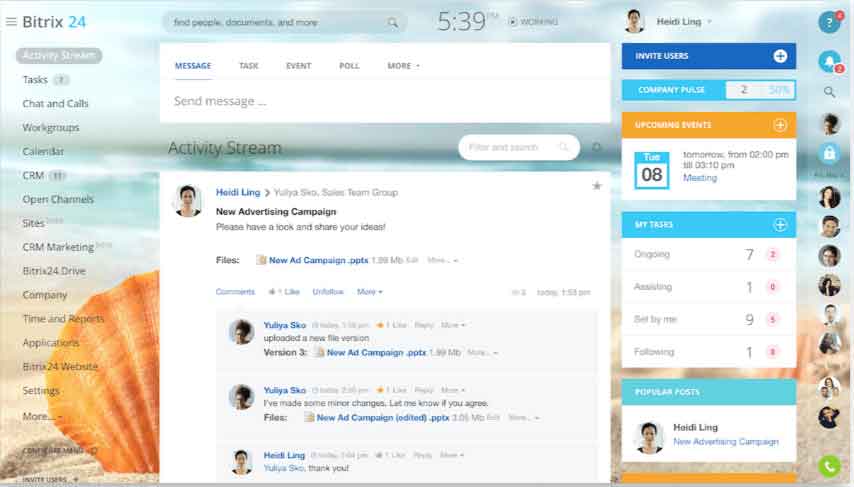
Bitrix24 is active in the US market with data stored in AWS US data centers. It has a free forever plan with support for up to unlimited users. You also get 5GB of cloud storage and their core CRM and related features.
Best for: Teams wanting an all-in-one collaboration platform with CRM, project management and communication tools.
Key Features:
- Company hierarchy and task management
- Internal messaging and communication
- CRM with pipeline management
- Free 30-day trial on paid packages
Pricing (Annual Billing, per organization): Free ($0 for unlimited users with 5GB storage), Basic ($49/month for up to 5 users), Standard ($99/month for up to 50 users), Professional ($199/month for up to 100 users), Enterprise ($399/month for up to 250 users).
It’s a good program praised by critics in the arena. But one flaw might be that it tries to do a little too much.
When you’re looking for something lightweight and for your sales pipeline, Pipedrive is a good choice.
But if you are looking for something more involved, if you want a project management software with company hierarchy, internal messaging, task management and more, Bitrix might be the solution for you.
Freshsales
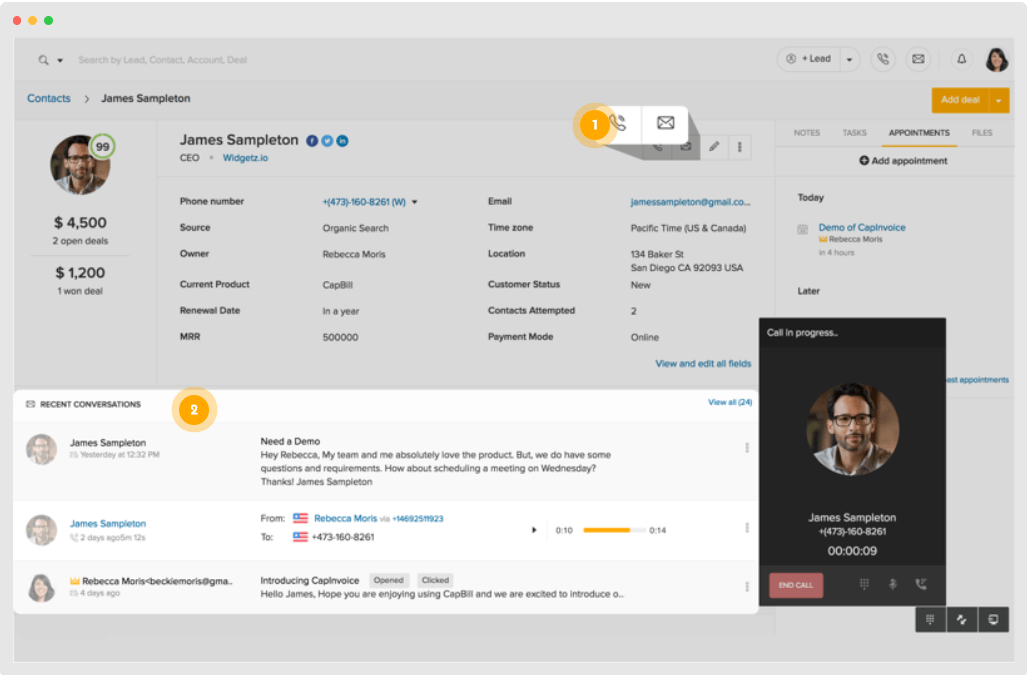
Freshworks’ CRM, Freshsales, is active in the US market and is a great CRM with internal calling and messaging.
Best for: Sales teams needing AI-powered lead scoring and built-in phone and email.
Key Features:
- Visual sales pipeline with multiple pipelines
- AI-powered contact scoring via Freddy AI
- Built-in phone and email
- 21-day free trial with Enterprise-level features
Pricing (Annual Billing): Free ($0 for up to 3 users with basic contact and deal management), Growth ($9/user/month with visual sales pipeline), Pro ($39/user/month with multiple pipelines and AI-powered contact scoring), Enterprise ($59/user/month with AI forecasting insights and custom modules).
It’s not quite as heavy on features as some of the other entries on this list. But for basic pipeline management, viewing reps’ own sales pipelines and keeping in touch, it’s a great place to start.
Salesforce Sales Cloud
Salesforce Sales Cloud is the leading provider in the CRM space.
Best for: Enterprise sales teams needing customizable, scalable CRM with advanced analytics.
Key Features:
- Account and lead management
- Opportunity management with customizable pipelines
- Forecast management and workflow automation
- Sales analytics powered by Tableau and Einstein AI
Pricing: Starts at $25/user/month.
Zoho CRM
Zoho CRM serves over 250,000 businesses across 180+ countries.
Best for: Businesses of all sizes looking for a scalable, feature-rich platform with AI assistant.
Key Features:
- Comprehensive all-in-one platform
- AI assistant Zia for predictions and automation
- Customizable pipelines and workflows
- Extensive integration options
Pricing: Standard ($14/user/month), Professional ($23/user/month), Enterprise ($40/user/month), Ultimate ($52/user/month).
Monday Sales CRM
Monday Sales CRM is built on Monday.com Work OS and was recognized in Gartner Magic Quadrant for Sales Force Automation in 2025.
Best for: Sales teams needing visual, customizable CRM with project management features.
Key Features:
- Visual, customizable interface
- Built on flexible Work OS platform
- Strong automation capabilities
- Excellent for teams already using Monday.com
Pricing: Basic CRM ($12/seat/month), Standard CRM ($17/seat/month), Pro CRM ($28/seat/month), Enterprise CRM (custom, minimum 3 users).
Salesmate
Salesmate is an AI-powered CRM platform for sales, marketing and support teams, offering a 15-day free trial with no credit card required.
Best for: SMBs and growing businesses wanting AI-driven automation and omnichannel communication.
Key Features:
- AI-powered automation and sequences
- Omnichannel communication (email, calls, SMS)
- Pipeline management with AI insights
- Advanced goal management
Pricing (Annual Billing): Basic ($23/user/month for startups/SMBs), Pro ($39/user/month for growing businesses with AI features), Business ($63/user/month with power dialer and advanced goal management), Enterprise (custom pricing).
Close
Close is a sales-engagement-focused CRM designed for small and scaling businesses, offering a 14-day free trial.
Best for: High-speed sales teams needing integrated communication channels including email, calling and SMS.
Key Features:
- Built-in calling, email and SMS
- Power dialer and predictive dialer
- Email sequences and automation
- Advanced call coaching
Pricing (Annual Billing): Solo ($9/user/month for individuals with up to 10,000 leads), Essentials ($35/user/month with unlimited contacts), Growth ($79/user/month with email sequences and power dialer), Scale ($139/user/month with predictive dialer and advanced call coaching).
Nutshell
Nutshell is a user-friendly CRM for SMBs with integrated email marketing.
Best for: Small and medium-sized businesses wanting user-friendly, all-in-one CRM with excellent support.
Key Features:
- Simple, intuitive interface
- Integrated email marketing
- Pipeline management and reporting
- Excellent customer support
Pricing: Foundation ($16/user/month), Pro ($42/user/month).
But Then, You’re Different
Each organization is different with different needs and different specifications.
So why not try all the tools on our list? See which best fits your business.
And try any other you might find that have good reviews online. You never know, you might find a gem we aren’t even aware of. And if you do, make sure to post it in the comments below.
What Are the 5 Free Sales Pipeline Templates to Get You Started?
The 5 free sales pipeline templates to get you started are HubSpot Sales Pipeline Template, Smartsheet Sales Pipeline Template, OnePageCRM Simple Sales Pipeline Template, Pipeline CRM Sales CRM Template and Gong Sales Pipeline Template. Feel free to use these great templates to get started on your sales pipeline.
These are not recommended for larger corporations as things will get rather hard to manage.
But if you have a small sales team, give it a try.
HubSpot Sales Pipeline Template
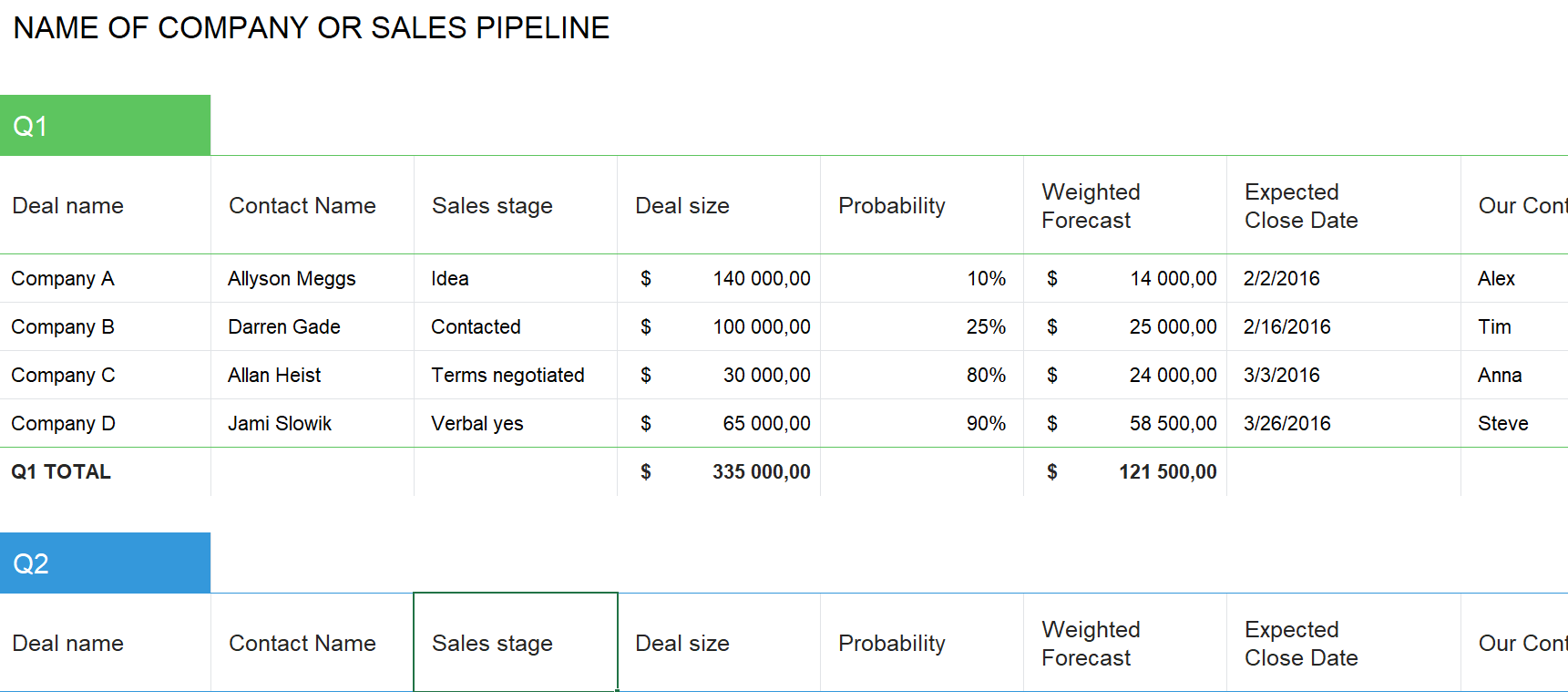
This template is available in Excel and Google Sheets. It manages deal stages and closing probability, allowing you to set up your sales pipeline.
Smartsheet Sales Pipeline Template
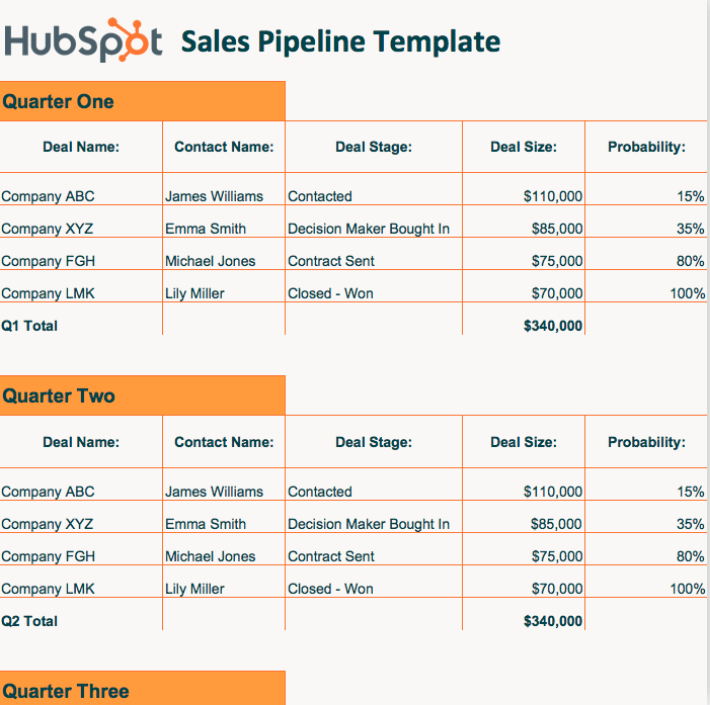
This template tracks opportunities, deal value and sales stages with a quarterly focus. It’s available in both Word and Excel.
OnePageCRM Simple Sales Pipeline Template
This template is ungated and includes formulas and charts to help you visualize your pipeline performance.
Pipeline CRM Sales CRM Template
This is a comprehensive 12-tab template for your entire sales operation, covering everything from lead tracking to closed deals.
Gong Sales Pipeline Template
This template tracks every opportunity from discovery to close with built-in formulas for calculating pipeline health metrics.
Our advice is to try each template and see what’s easier for you to use and is more useful to your specific needs.
They don’t cost you a thing except for maybe some time. But that’s it.
Sales Pipeline FAQ
What Are the 7 Stages of a Sales Pipeline?
The 7 stages of a sales pipeline are Prospecting/Lead Generation, Lead Qualification, Discovery/Needs Analysis, Proposal/Demo, Negotiation/Commitment, Closing and Post-Sale/Retention. Each stage represents a specific phase in the buyer’s journey and your sales process.
Is a CRM Necessary for a Sales Pipeline?
A CRM is not mandatory but is essential for scaling. It provides a centralized platform, automation and data-driven insights that make pipeline management more efficient and accurate.
What Is the Difference Between a Sales Pipeline and a Revenue Pipeline?
A sales pipeline tracks specific opportunities through sales stages. A revenue pipeline encompasses all revenue streams including upsells and renewals, providing a broader view of total revenue potential.
How Often Should You Review Your Sales Pipeline?
Weekly reviews are recommended for most teams to maintain momentum and identify stalled deals. Monthly reviews are suitable for longer sales cycles or smaller teams.
Conclusion
Sales pipelines aren’t that hard. If you came into this article wondering what a sales pipeline was and you’re now a sales pipeline expert, our job is done.
Your business is different. You have different needs. So try out the various options above and see what fits you best before committing to anything.
And if you find your perfect match, do let us know.
If you have any questions or comments, let us know down below. We’re happy to hear from our readers.