


LeadIQ is a sales prospecting platform built around a Chrome extension and an AI agent called Lando. It targets SDR and AE teams, plus RevOps, who need verified contact data without leaving their existing workflow. It pulls email and mobile numbers, tracks when a champion changes jobs, and pushes enriched records straight into a CRM or sales engagement tool. It starts free for a single user and scales through a credit-based Pro plan to a custom Enterprise tier.
What Is LeadIQ?
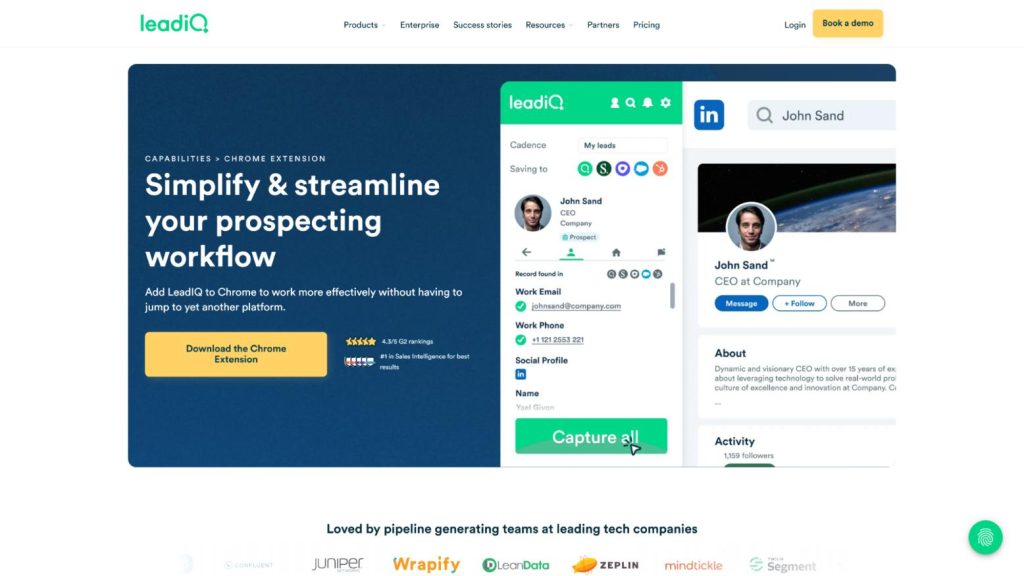
LeadIQ combines a contact and company database with AI-assisted prospecting tools. Three access modes run on a single subscription: a Chrome extension with the Lando AI agent, an MCP integration for AI workflow builders, and a developer API for programmatic access. The Chrome extension mirrors whatever a rep is looking at on LinkedIn Sales Navigator or a company site and surfaces verified contacts. From there, it captures the prospect, enriches the record, then syncs it to the CRM in one step.
LeadIQ Features
LeadIQ Pricing
LeadIQ’s pricing scales with a credit system rather than a flat per-seat fee. The Free plan covers 1 user and 50 credits. Pro starts at $20 per user per month on monthly billing, or $15 per user per month when billed annually (a 25% discount baked into the sticker price), and includes up to 5 users at its lowest credit tier; credit allowances scale up from there on a slider, with the price moving with them. Enterprise drops the per-seat model entirely in favor of a custom quote built around a team’s volume and governance needs.
Source: LeadIQ pricing.
The Free and Pro tiers are the ones most solo reps and small teams will actually compare; Enterprise exists mainly for teams that need governance controls, SSO, or custom field mapping that the self-serve tiers do not expose.
Credits are not spent evenly across record types: revealing an email costs 1 credit, while a mobile phone number costs 10, a 10-to-1 ratio confirmed independently by multiple pricing breakdowns of LeadIQ’s public rate card. That gap matters for budgeting, since a team that leans on phone-first outreach burns through a monthly credit allowance far faster than one that works email-first, even on the same plan. For the full state-by-state and plan-by-plan credit math, see UpLead’s dedicated LeadIQ pricing breakdown.
LeadIQ Reviews: What Users Say
Across review sites, the pattern repeats: people like how fast LeadIQ makes prospecting, and the main complaint is data accuracy on certain records, especially phone numbers, the field that also costs the most credits to reveal.
Is LeadIQ Worth It?
This tool is worth it for teams whose prospecting already happens inside LinkedIn Sales Navigator and a CRM, since the Chrome extension plus champion tracking remove the manual copy-paste step between the two. It is a weaker fit for teams that need guaranteed phone-number accuracy out of the box, since that is the most consistent complaint across hundreds of reviews, or for teams that want a flat per-seat price instead of a credit meter that gets harder to forecast as usage grows.
LeadIQ or Lusha? Lusha carries a similar G2 rating (4.3/5 from 1,670 reviews) and leans more on a simple contact-and-company lookup; LeadIQ’s edge is the Lando AI agent and champion tracking built around an existing CRM workflow, so the choice usually comes down to whether a team wants an AI-assisted workflow layer or a leaner lookup tool.
LeadIQ Pricing and Features FAQ
How much does LeadIQ cost?
Pricing starts free for 1 user and 50 credits. The paid Pro plan starts at $20 per user per month billed monthly, or $15 per user per month billed annually, scaling up with credit volume. Enterprise pricing is a custom quote.
What is a LeadIQ credit?
A credit is LeadIQ’s unit for revealing a verified contact record, such as an email address or mobile number, through the People Search or Company Search tools. Credit allowances scale with the plan and billing tier chosen.
Is LeadIQ accurate?
Reviewers rate LeadIQ 4.2/5 on G2 and 4.4/5 on Capterra, and most reviews cite fast, easy prospecting as the main strength. Data accuracy, particularly on phone numbers, is the most repeated complaint across hundreds of reviews, so teams that depend heavily on phone outreach should budget time to verify numbers before a high-volume dialing push.
Does LeadIQ integrate with Salesforce and other CRMs?
Yes. This review found CRM enrichment, Salesforce duplicate detection, custom field mapping for CRM and engagement tool integrations, all listed on LeadIQ’s Pro and Enterprise plans. An MCP integration for AI workflow tools plus a developer API cover custom integrations separately.
Is there a LeadIQ free trial?
A permanent free plan is offered rather than a time-limited trial. It is capped at 1 user and 50 credits; the paid plans separately carry their own 30-day free trial, according to LeadIQ’s pricing page.