

Datanyze built its name on a narrow pitch: find a company’s tech stack, grab a contact’s email or phone number, and move to the next prospect. That pitch still works for some solo reps. For everyone else, a closer look at what Datanyze has become since ZoomInfo bought it changes the calculation.
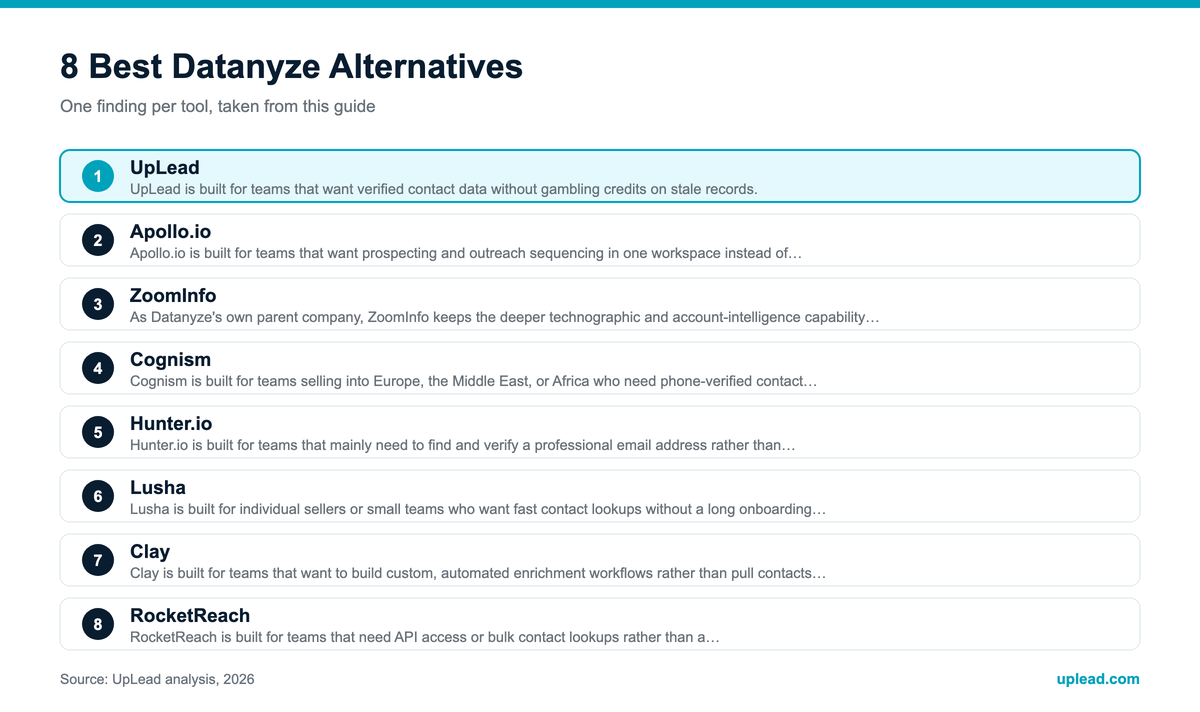
The best Datanyze alternatives in 2026 are UpLead, Apollo.io, ZoomInfo, Cognism, Hunter.io, Lusha, Clay and RocketReach. Below you get current pricing from each vendor’s own page, sourced pros and cons, and a plain read on who each tool fits.
What Is Datanyze?
Datanyze is a sales intelligence and technographic data platform. ZoomInfo acquired it in September 2018, and it still operates today, but not as the standalone product it once was. Teams use it mainly through a Chrome extension: install it, browse LinkedIn or a company site, and Datanyze surfaces an email or phone number tied to that profile.
According to ZoomInfo’s own published comparison of the two products, Datanyze was rebuilt after the acquisition into a budget, self-serve contact tool aimed at individual reps and small teams, while ZoomInfo folded the deeper technographic research capability into its core platform. The same page describes Datanyze as a Chrome-only extension without team accounts, intent data or a documented public API. ZoomInfo sells a competing product, so read that comparison with the bias in mind. (ZoomInfo’s Datanyze review)
Datanyze Pricing: How Much Does It Cost?
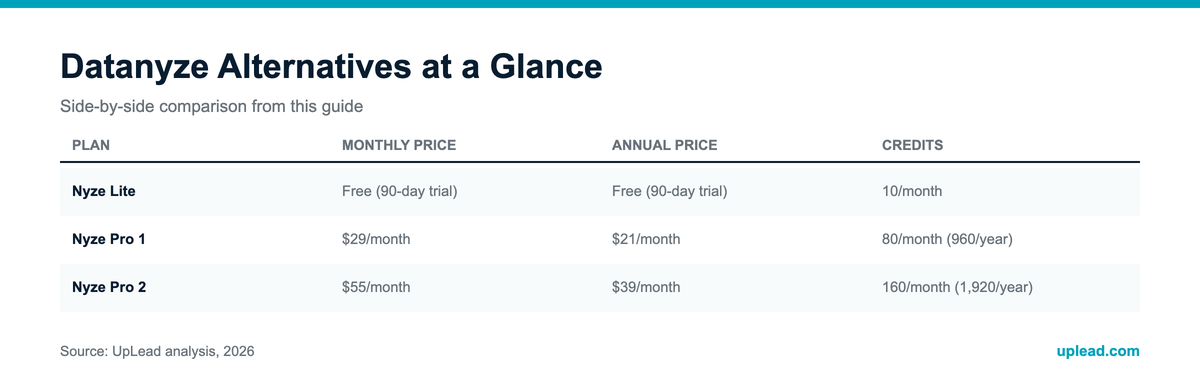
Datanyze runs on a credit-based system with three tiers, and ZoomInfo’s page says the tiers differ only in credit volume, not in features.
One credit covers one contact reveal. There is no published overage rate, so once a plan’s credits run out, additional reveals wait for the next cycle or an upgrade. The figures come from ZoomInfo’s Datanyze review and Capterra.
Why Look for a Datanyze Alternative?
Five reasons come up most often, and the first is more structural than a typical user complaint.
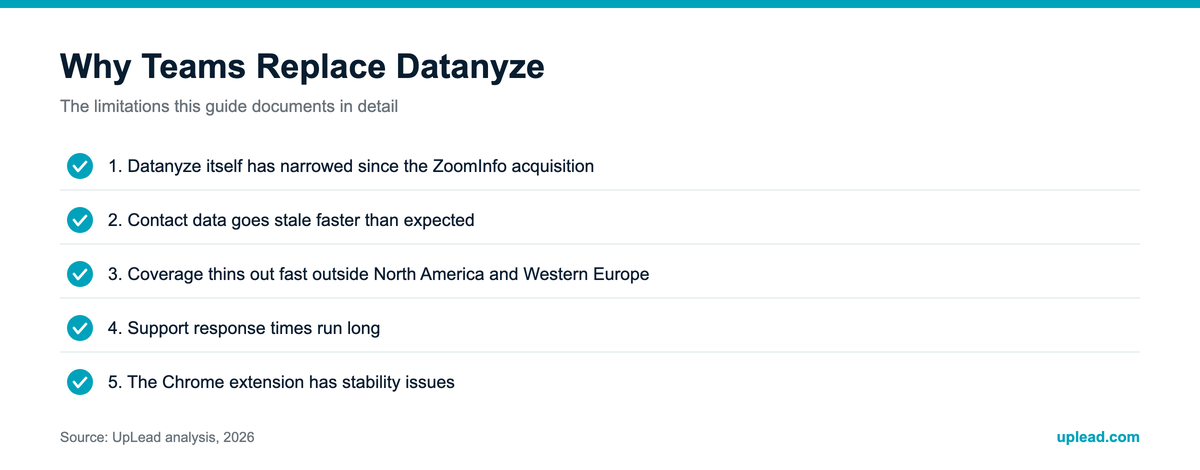
1. Datanyze itself has narrowed since the ZoomInfo acquisition
This is the reason most “alternatives” articles skip. Datanyze’s own help center says that it does not currently offer integrations and is working on adding them. Older Datanyze articles still describe a Salesforce integration, so check with Datanyze before you rely on a CRM sync. The tool is a single-seat, Chrome-only contact lookup, and ZoomInfo’s page lists no team accounts, intent data or public API. If your team needs any of those, you would have to leave the product entirely, either for ZoomInfo’s flagship tier or for a competitor. Source: Datanyze help center.
2. Contact data goes stale faster than expected
A Capterra reviewer identified as a CEO described company data as “90% inaccurate,” including wrong executive information. Other reviewers report spending credits on emails and direct dials tied to people who already left the company. (Capterra)
3. Coverage thins out fast outside North America and Western Europe
Independent reviews flag the Middle East and Asia-Pacific as weak spots in Datanyze’s contact coverage, with India singled out repeatedly.
4. Support response times run long
A Capterra reviewer wrote that “customer service” felt “non existent despite subscription fees,” and a separate reviewer described difficulty getting anyone to help resolve a cancellation. (Capterra)
5. The Chrome extension has stability issues
Multiple reviews mention the extension breaking or losing its session when several browser tabs are open at once, which matters given that the Chrome extension is now Datanyze’s only real interface.
None of this makes Datanyze unusable for a rep who only wants an occasional contact lookup on a tight budget. It explains why teams that need broader coverage, faster support, or a tool built to grow with them tend to shop around.
What to Check for in a Datanyze Alternative
Ten things separate a good fit from a wasted trial.
1. Contact coverage in your actual territory
Total database size matters less than coverage inside your specific target roles and regions. A smaller, more relevant dataset beats a bigger one that misses your ICP.
2. Data freshness and verification
Old job titles and dead emails create more cleanup work than a missing record would. Ask whether verification happens at the point of export or only periodically in the background.
3. CRM and enrichment sync
Check whether the tool writes directly to Salesforce, HubSpot, or your CRM of choice. A missing or clumsy sync creates duplicate records and routing errors for RevOps to clean up later.
4. Team and multi-seat support
Datanyze’s own paid tiers stay single-seat. If more than one person on your team needs access, confirm the alternative supports real team accounts, not just multiple individual logins.
5. API access
Engineering-led teams or agencies pulling contact lists programmatically need this. Some vendors gate it behind a custom enterprise tier, so check where in the pricing ladder it actually appears.
6. Technographic and firmographic filtering
If technographic data was the reason you looked at Datanyze in the first place, confirm the alternative tracks a comparable or larger number of technologies, not just company size and industry.
7. Outreach or sequencing support
Some platforms stop at the contact record. Others add sequencing, dialers, or engagement tracking. That changes how many separate tools your reps need open at once.
8. Intent data and buying signals
If your team wants to prioritize accounts that are already in-market, check whether intent data is included or sold as a separate add-on.
9. Regional and compliance fit
Anyone selling into the EU should check GDPR sourcing and phone-verification quality specifically, since general database size claims often hide weak coverage in a given region.
10. Pricing transparency and credit mechanics
Published pricing lets you compare real costs before a sales call. For quote-gated tools, ask directly what a typical contract looks like for a team your size, and what happens to unused credits at the end of a billing cycle.
Datanyze Alternatives at a Glance
| Tool | Best for | Starting price | Pricing |
|---|---|---|---|
| UpLead | Verified contact data with a real accuracy guarantee | $99/month ($74/month annual) | Published |
| Apollo.io | Prospecting plus outreach for growing teams | Free plan, paid tiers on request | Prices not shown on page |
| ZoomInfo | Enterprise-scale data and native CRM sync | Custom quote only | Quote-gated |
| Cognism | GDPR-compliant international contacts, EMEA-heavy teams | Custom quote only | Quote-gated |
| Hunter.io | Lightweight email finding and verification | €34/month annual | Published |
| Lusha | Fast, individual-seller contact lookups | $37.45/month annual (Starter) | Published |
| Clay | AI-driven enrichment and research workflows | $54/month annual (actions only) | Published |
| RocketReach | API access and bulk lookups | $19/month annual | Published |
Five of these eight tools publish real prices on their websites. ZoomInfo and Cognism require a sales conversation before you see a number, and Apollo’s pricing page no longer shows dollar amounts. That matters if your team wants to compare real costs before booking a demo.
How We Compared the Tools
Every figure in this guide comes from the vendor’s own pricing or product page, or from a named customer story. Pros and cons come from G2 and Capterra review themes, and we only list a theme when it shows up repeatedly. UpLead ranks first because UpLead publishes this guide, and the entries that follow are ordered by how closely each tool replaces what Datanyze users actually do: look up a verified contact quickly.
What a contact costs on each credit plan
Credits are not identical across vendors, so treat this as a ballpark. We divided each plan’s list price by its monthly credits, using only numbers from the pricing pages above.
Datanyze is cheaper per credit. The difference is what a credit returns: one UpLead credit gives access to a verified email and, where available, a mobile number, and UpLead refunds credits on records that fail its accuracy guarantee. Whether that is worth about 10 to 20 cents more per record depends on how many bounced emails your team can tolerate.
8 Best Datanyze Alternatives for B2B Data in 2026
UpLead
UpLead is built for teams that want verified contact data without gambling credits on stale records.
The platform gives teams access to a database of more than 200 million leads, with more than 50 search filters and technographic data covering over 16,000 technologies. Every email gets checked in real time at the point of export, and UpLead backs its database with a 95% data accuracy guarantee, refunding credits for bad data rather than just publishing a marketing claim.
Scope is the main tradeoff. Essentials and Plus stay single-seat, so a team that needs multiple logins has to jump straight to the custom Professional tier. The raw database is also smaller than what ZoomInfo advertises for large-scale enterprise prospecting.
Source: UpLead pricing.
UpLead or Datanyze? UpLead publishes a 95% accuracy guarantee and connects to the major CRMs from the Essentials plan. Datanyze costs less per credit, but it stays a single-seat Chrome extension, and its own help center says CRM integrations are not available today.
Apollo.io
Apollo.io is built for teams that want prospecting and outreach sequencing in one workspace instead of stitching several tools together.
Apollo’s product menu advertises access to 240M contacts and 30M companies. The built-in sequencing means a rep can move from finding a lead to emailing or calling them without leaving the app, and a free plan that stays free with no time limit lets a team test the workflow before paying.
Accuracy is where the tradeoff shows up outside the US. G2 reviewers report data quality dropping in Europe, APAC and the Middle East, with bounce rates in the 15 to 35 percent range in some reported cases, and AI-drafted email copy often needs a real editing pass before it goes out.
Source: Apollo.io pricing. The page shows no dollar amounts, so check it for the current rate.
Apollo.io or Datanyze? Apollo bundles a far larger self-serve database with built-in sequencing. Datanyze returns a contact record and stops there, leaving outreach to a separate tool.
ZoomInfo
ZoomInfo is built for larger sales organizations that need enterprise-scale data depth and native CRM integration, and that already have budget for a premium platform.
As Datanyze’s own parent company, ZoomInfo keeps the deeper technographic and account-intelligence capability for its flagship product rather than its budget tier. ZoomInfo’s homepage cites 500M+ contacts and 100M+ companies, 1.5B+ data points processed daily and 300+ human researchers who verify records. Its pricing page shows intent topics scaling by package, from 25 topics on Marketing Demand to unlimited on ABM Enterprise.
Cost and opacity are the tradeoff. ZoomInfo’s pricing page lists no dollar amounts, and Vendr’s marketplace page, last updated in February 2026, shows a median buyer paying $33,500 a year based on 1,581 purchases, a figure most SMB and solo-seller budgets cannot absorb.
Pricing is custom. ZoomInfo says cost depends on features and licenses, credit usage where each contact or company export uses one credit, and add-ons such as Streaming Intent. Sources: ZoomInfo pricing, Vendr.
ZoomInfo or Datanyze? ZoomInfo is Datanyze’s parent company and its full flagship data platform. Datanyze is ZoomInfo’s single-seat budget product, not a lighter version of the same experience.
Cognism
Cognism is built for teams selling into Europe, the Middle East or Africa who need phone-verified contact data and GDPR-compliant sourcing.
Cognism’s Diamond Data verification process focuses on mobile-number accuracy, a common weak point for competitors with lighter international coverage. The product ships as Standard and Pro packages with 5 seats included in each, and the Pro tier adds higher-quality mobile data, on-demand mobile verification and buying-intent prioritization. Both Standard and Pro list MCP and API access.
Access is the catch. Cognism publishes no price list and offers no self-serve signup, so every account starts with a conversation with sales. Its FAQ says pricing is tailored to the product, team setup and usage.
Source: Cognism pricing. No dollar amounts are listed.
Cognism or Datanyze? Cognism’s phone-verified data covers international markets that Datanyze’s own reviewers flag as its weakest region. Datanyze is far cheaper, but it has no equivalent mobile-verification layer.
Hunter.io
Hunter.io is built for teams that mainly need to find and verify a professional email address rather than manage a full contact and company database.
Its workflow stays deliberately simple: run a Domain Search, get back a list of associated emails with confidence scores, then verify before sending. A Free plan with 50 credits a month lets most individuals test data quality before committing to a paid tier.
Depth is the tradeoff. G2 reviewers describe Hunter as feeling surface-level next to enrichment-heavy tools like Apollo, and it returns no phone numbers. Hunter does offer TechLookup for listing websites by technology, but it is a separate tool, not a filter inside the contact search.
Source: Hunter.io pricing. Credits reset monthly and do not roll over. Enterprise is custom.
Hunter.io or Datanyze? Hunter is narrower and costs a little more at the entry level. Choose it when email is the only data you need; Datanyze at least adds phone reveals in the same extension.
Lusha
Lusha is built for individual sellers or small teams who want fast contact lookups without a long onboarding process.
Its Chrome extension surfaces a contact’s email and phone number directly from a LinkedIn profile in a couple of clicks. Lusha’s pricing page says a verified email costs 1 credit and a phone number costs 5 credits, and that monthly plans roll unused credits over up to twice the plan limit.
Geography and data hygiene are where the tradeoff shows up. Reviewers flag weaker coverage outside North America and the UK, with France called out specifically, and some report being charged credits for contacts who had already moved to a new company, with no refund option.
Source: Lusha pricing. Scale is quoted through sales.
Lusha or Datanyze? Both lean on a lightweight Chrome-extension workflow. Lusha adds a free tier, larger credit packs and a published CRM sync story, while Datanyze tops out at 160 credits a month.
Clay
Clay is built for teams that want to build custom, automated enrichment workflows rather than pull contacts from a static database.
Clay pulls from more than 150 data providers through a waterfall model: it queries one source, and if that comes back empty, it automatically tries the next, which reviewers say lifts match rates above what any single provider delivers alone. Claygent, its AI research agent, can also run custom per-row research instead of relying only on structured database fields.
The pricing model is the part to read twice. Clay sells two separate meters. Actions cover platform work such as enrichment and GTM execution, and data credits pay for data and AI from vendors in Clay’s marketplace. Each plan lets you choose the volume of each meter, so the headline price is not the cost of a working setup.
Source: Clay pricing. Launch and Growth add the two meters together, so a Launch setup with the entry volumes costs more than the $54 shown for actions alone. Clay’s page also shows headline prices of $167 (Launch) and $446 (Growth) that differ from the $185 and $495 in its FAQ, so confirm the total at checkout. Enterprise is custom.
Clay or Datanyze? Clay’s waterfall pulls from 150+ providers, so one vendor’s blind spot does not end a search. Datanyze relies on a single database with no failover when a record comes back stale.
RocketReach
RocketReach is built for teams that need API access or bulk contact lookups rather than a one-contact-at-a-time browser workflow.
Its pricing page advertises 700 million professionals and 60 million companies, real-time verification with a stated 98% accuracy, and 50+ search filters. A lookup is only deducted when RocketReach finds and verifies an email or phone, and is refunded otherwise. Team plans start at $6,000 a year.
Data reliability at that scale is the tradeoff. G2 reviewers report a mixed accuracy signal, with roughly as many mentions of outdated data as of accurate data, and several describe the interface as laggy during search.
Source: RocketReach pricing. Monthly billing costs more and varies by plan, so check the page.
RocketReach or Datanyze? RocketReach adds API access and bulk exports at a similar entry price. Datanyze’s Chrome-only workflow handles one contact at a time.
How to Choose a Datanyze Alternative
Start with the job, not the vendor list. A solo rep who wants an occasional email lookup does not need the same tool as a five-person team running coordinated outbound sequences.
Match your team size to the pricing tier honestly. Hunter.io, Lusha, or UpLead’s Essentials plan cover most single-user or small-team workflows at a fraction of ZoomInfo or Cognism’s enterprise pricing. Save the quote-gated tools for when your data needs genuinely require that scale.
Weigh regional coverage before you commit credits to a search. If most of your pipeline sits in the US, nearly every tool on this list performs reasonably well. If you sell into the EU, the Middle East or APAC, check Cognism’s phone-verified international data against whatever the alternative publishes about coverage in those regions.
Decide how much workflow you want bundled in. Apollo.io and Clay both go beyond contact lookup into sequencing or automated enrichment; Hunter.io and RocketReach stay closer to a lookup tool. Paying for a bundled workflow you won’t use is a common way teams overspend on this category.
How to switch from Datanyze without losing your lists
Datanyze’s help center lists no CRM integration and ZoomInfo’s review says it documents no public API, so your history lives in exports and in your CRM. Export your saved contacts to CSV before the annual plan renews, since Datanyze annual plans auto-renew with a price increase according to ZoomInfo’s review. Then run a 50-contact test in the new tool on accounts you already know: count the emails that bounce and the phone numbers that connect, and compare cost per usable record rather than cost per credit. Keep Datanyze on monthly billing until the test finishes.
Before switching, ask every vendor the same three questions: is pricing published or does it require a sales call, what happens to unused credits at the end of a billing cycle, and what is the actual data accuracy guarantee rather than a marketing claim.
Frequently Asked Questions (FAQ)
Is Datanyze still around in 2026?
Yes, but not in its original form. ZoomInfo still sells it as a single-seat product with three published pricing tiers and a 90-day free trial on its entry-level plan. Per ZoomInfo’s own comparison page, the product was rebuilt after the 2018 acquisition into a budget contact-lookup tool, and Datanyze’s help center says CRM integrations are not offered today.
Is there a free Datanyze alternative?
Several tools on this list offer a genuine free tier: Apollo.io, Hunter.io (50 credits a month), Lusha (40 credits a month) and Clay (100 data credits a month) all let you test real data before paying anything.
What is the cheapest Datanyze alternative?
Among published plans, RocketReach’s Essentials plan at $19 a month billed annually and Hunter.io’s Starter plan at €34 a month billed annually are the lowest entry points on this list. Both cover a narrower use case than Datanyze’s combined contact and technographic data.
Does UpLead have better data accuracy than Datanyze?
UpLead publishes a 95% data accuracy guarantee, backed by real-time verification at export and credit refunds for bad data. Datanyze does not publish an equivalent accuracy figure for its own database, and independent reviews describe accuracy as inconsistent, which makes UpLead’s published guarantee the more specific, checkable claim of the two.
Which Datanyze alternative has the best international coverage?
Cognism is the strongest option for EMEA-focused teams, with phone-verified international data and GDPR-compliant sourcing built around non-US markets.
Which Datanyze alternative is best for a solo seller on a tight budget?
Lusha and Hunter.io both offer usable free tiers and low-cost paid plans built for one person rather than a team, which fits the same budget-conscious use case Datanyze’s own entry tier targets.