Integrations are vital to creating an effective and streamlined sales and marketing tech stack. By connecting platforms like Apollo.io to other best-in-class tools, teams can revolutionize workflow automation and data synchronization – eliminating silos and manual busywork. This guide details Apollo.io’s expansive integration capabilities, including native app connectors, Zapier, API integration, and step-by-step instructions to configure key platforms. Follow along to learn how Apollo integrations with CRMs, email tools, sales applications, and more can boost results.
What Are the Business Benefits of Apollo.io Integrations?
Apollo.io integrations deliver measurable business value by connecting your sales intelligence platform to the tools your team uses daily. These connections solve the core problem of disconnected systems that force sales professionals to waste hours on manual data entry instead of selling.
The primary business benefits include:
- Automate Repetitive Workflows: Integrations eliminate manual data entry by automatically syncing prospects between platforms. When you save a new contact in Apollo, it can instantly create or update records in your CRM platform without any manual input. This automation frees up sales professionals to focus on building relationships rather than updating databases.
- Create a Single Source of Truth: Bi-directional sync ensures data consistency across all platforms. When a prospect updates their job title on LinkedIn, that change flows through Apollo to your CRM, email campaigns, and sales engagement tools. This eliminates the confusion and errors that come from working with outdated information across multiple systems.
- Enhance Personalization at Scale: By combining Apollo’s database of verified email addresses, phone numbers, and company information with your CRM’s engagement history, you can craft hyper-personalized outreach. Sales professionals can reference specific data points like recent job postings, company size, or technology stack to make every message relevant.
- Improve Reporting and Forecasting: With all activities like emails, calls, and tasks logged automatically in your CRM platform, sales leaders get complete pipeline visibility. This eliminates manual data compilation and provides accurate forecasting without requiring reps to remember to log every interaction.
These benefits translate directly to revenue impact. Teams spend less time on administrative tasks and more time on high-value activities that move deals forward.
How Do Apollo.io Integrations Work?
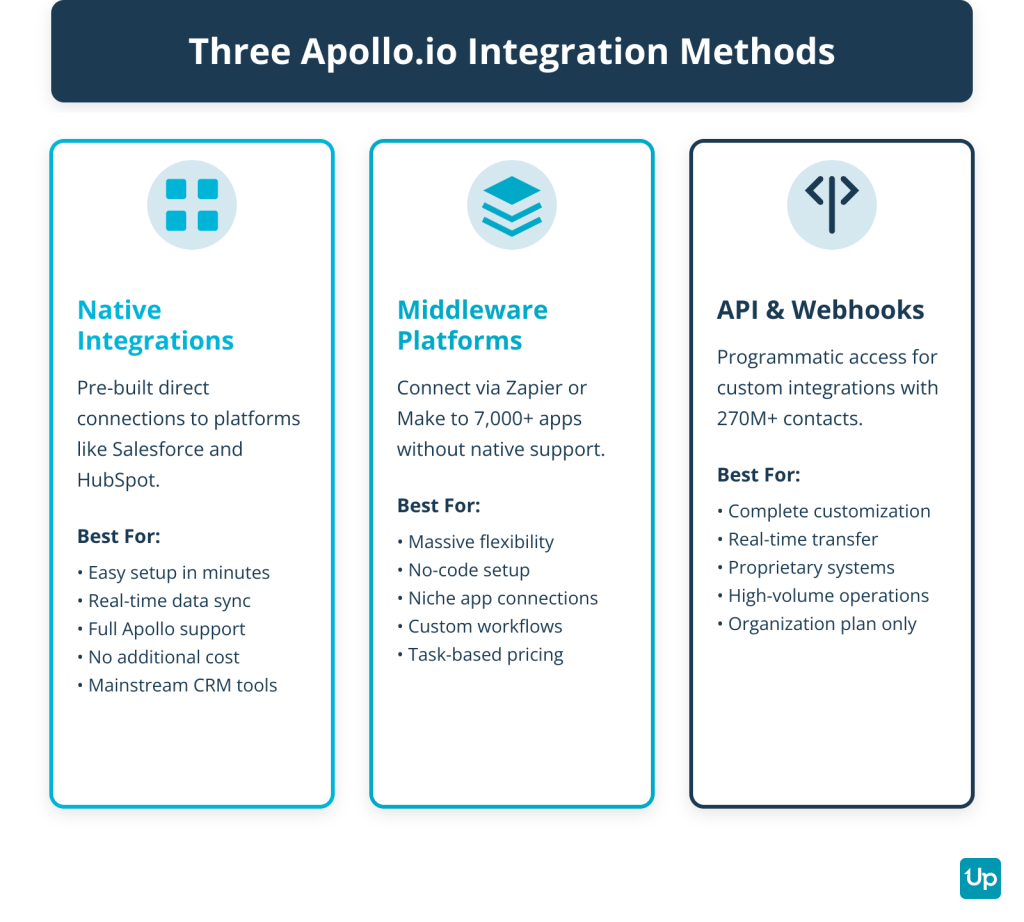
Apollo.io integrations work through three distinct methods, each with specific use cases and technical requirements. Understanding these approaches helps you choose the right integration path for your needs.
Native Integrations
Native integrations are pre-built, direct connections between Apollo.io and other platforms like Salesforce, HubSpot, Gmail, and Outlook. Apollo maintains these integrations as core product features.
Key characteristics:
- Easy setup requiring just a few clicks to authenticate
- Reliable, real-time or near-real-time bi-directional data sync
- Full support from Apollo’s team
- No additional cost beyond your Apollo subscription
- Limited to specific apps that Apollo has built connectors for
Native integrations work best when you use mainstream CRM platforms or email tools and need reliable, real-time data sync without technical complexity.
Middleware Platforms
Middleware platforms like Zapier and Make act as intermediaries, connecting Apollo.io to over 7,000 apps that lack native integrations. These platforms use a visual workflow builder that requires no coding.
Key characteristics:
- Massive flexibility to connect virtually any app
- No-code setup through visual interface
- Syncs run every 1-15 minutes depending on your plan
- Costs based on task usage can scale quickly
- May not support all granular triggers and actions
Middleware works best when you need to connect Apollo to niche tools or create custom workflows between multiple apps without developer resources.
API and Webhooks
The Apollo API provides programmatic access to the platform’s 270 million B2B contacts and 70 million companies. Developers use this API to build completely custom integrations tailored to specific business processes.
Key characteristics:
- Complete customization and control
- Real-time data transfer
- Requires technical expertise and developer resources
- Needs ongoing maintenance
- Only available on Organization plan
API integrations work best when you have proprietary systems, need real-time sync for high-volume operations, or require workflows that native integrations and middleware cannot support.
Top Apollo.io Integrations by Category
Apollo.io connects with a wide range of platforms across different categories. This section breaks down the most valuable integrations by type, helping you identify which connections will deliver the most impact for your team.
CRM Integrations
CRM integrations form the foundation of most Apollo implementations, creating a seamless flow of prospect data between your intelligence platform and customer relationship management system.
Salesforce
Active native integration with bi-directional sync of contacts, accounts, and activities in real-time.
- Automatically creates new Leads or Contacts when you save prospects in Apollo
- Logs email opens, replies, and calls in Salesforce activity timeline
- Triggers Process Builder or Flow automations based on Apollo activities
- Enriches existing records with verified phone numbers and company information
Use case: A sales professional finds a prospect on LinkedIn, saves them to Apollo, and the contact automatically appears in Salesforce with verified email, mobile phone number, and company size data.
HubSpot CRM
Active native integration with flexible field mapping and comprehensive activity logging.
- Bi-directional sync keeps contact records updated across both platforms
- Maps custom properties between Apollo and HubSpot
- Triggers HubSpot workflows based on Apollo engagement
Use case: Marketing campaigns in HubSpot can trigger when a prospect reaches a specific engagement score in Apollo, creating seamless handoffs between sales and marketing.
Zoho CRM
Active integration with data sync capabilities, may require Zoho Flow for full bi-directional functionality.
- Syncs contacts and accounts between platforms
- Updates records when data changes in either system
- Suitable for small to mid-sized enterprises
Pipedrive
Active native integration focused on pipeline management and deal tracking.
- Syncs contacts and organizations automatically
- Creates deals in Pipedrive from Apollo sequences
- Logs all email and call activities
Microsoft Dynamics 365 CRM
Active native integration designed for enterprise users with complex sales processes.
- Bi-directional sync of contacts and accounts
- Automatically updates cases and incidents
- Integrates with Microsoft’s enterprise software systems
Close
Active via Zapier with automated lead creation and activity logging.
- Creates new leads in Close from Apollo contacts
- Syncs communication history
- Ideal for teams already using Close’s calling features
Attio
Active via Zapier for automated record creation and updates.
- Syncs contact and company data
- Updates relationship records automatically
- Supports custom data models
Copper
Active via Zapier, designed specifically for Google Workspace users.
- Integrates seamlessly with Gmail and Google Calendar
- Syncs contacts and opportunities
- Maintains relationship history
Sales Engagement and Prospecting Integrations
These integrations connect Apollo’s prospect data with your outreach and engagement tools, enabling seamless workflows from research to contact.
Outreach
Active integration with one-way push of contacts from Apollo to Outreach sequences.
- Sends enriched prospects directly to Outreach cadences
- Includes verified email addresses and mobile phone numbers
- Appends company information and data points for personalization
Use case: Build a targeted list in Apollo using filters for company size and job postings, then push the entire list to an Outreach sequence with all contact details pre-populated.
Salesloft
Active integration with one-way push to Salesloft Cadences.
- Transfers prospects with complete contact information
- Maintains data accuracy through Apollo’s verification processes
- Supports bulk export of prospect lists
LinkedIn via Chrome Extension
Active native integration through the Apollo.io Chrome Extension, enabling direct prospecting from LinkedIn profiles and Sales Navigator.
- One-click prospecting reveals verified email addresses and phone numbers directly on LinkedIn profiles
- Add prospects to Apollo lists and sequences without leaving LinkedIn
- Save entire Sales Navigator search results to Apollo in bulk
- Enrich profiles with company information and additional data points
Use case: While browsing LinkedIn Sales Navigator, identify 50 prospects matching your ideal customer profile, select them all, and save them to an Apollo list in seconds with verified contact information.
Surfe
Active integration where Surfe uses Apollo as a data enrichment source when syncing LinkedIn profiles to your CRM.
- Enriches LinkedIn profiles with Apollo’s verified data
- Syncs enriched data directly to your CRM platform
- Combines the power of both platforms for complete prospect intelligence
Email and Marketing Automation Integrations
Email integrations enable seamless outreach and campaign management directly from Apollo or your preferred email platform.
Gmail and Google Workspace
Active native integration serving as a core Apollo feature.
- Send tracked emails using Apollo email template directly from Gmail
- View open and click tracking in real-time
- Bi-directional Google Calendar sync prevents double-booking
- Access Apollo data and sequences without leaving your inbox
Use case: Compose an email in Gmail, apply an Apollo email template with personalization tokens that auto-fill prospect data, and track when the recipient opens it.
Outlook and Microsoft 365
Active native integration with equivalent functionality to Gmail.
- Full email sending and tracking capabilities
- Bi-directional Outlook Calendar sync
- Works across desktop and web versions of Outlook
Mailchimp
Active via Zapier for adding subscribers and triggering marketing campaigns.
- Automatically add new Apollo contacts to Mailchimp lists
- Trigger campaigns based on Apollo engagement signals
- Sync tags and segmentation data
ActiveCampaign
Active via Zapier for contact creation, updates, and automation triggers.
- Create or update contacts in ActiveCampaign from Apollo
- Trigger automation workflows based on Apollo activities
- Maintain synchronized contact records
SendGrid
Active native integration for advanced email deliverability with dedicated IP management.
- Send high-volume email campaigns through SendGrid’s infrastructure
- Improve deliverability with dedicated IPs
- Access detailed delivery and engagement analytics
Instantly
Active via Zapier for pushing leads to Instantly campaigns.
- Send Apollo prospects to Instantly cold email sequences
- Maintain high deliverability with verified contacts
- Scale outbound campaigns efficiently
Communication and Productivity Integrations
These integrations connect Apollo with your team’s daily communication and project management tools.
Slack
Active integration for sending notifications to Slack channels based on specific Apollo events.
- Get real-time alerts when prospects reply to emails
- Notify teams when high-value accounts engage
- Share prospect lists and sequences with team channels
Use case: Configure Apollo to send a Slack message to your sales channel whenever a prospect from a Fortune 500 company opens an email, enabling immediate follow-up.
Google Sheets
Active via Zapier with two-way data flow for exporting contacts and importing prospect lists.
- Export Apollo contacts to Sheets for analysis
- Import prospect lists from Sheets to Apollo
- Create custom reports and dashboards
Google Calendar
Active native integration with bi-directional sync.
- Prevents double-booking by syncing availability
- Automatically creates calendar events from Apollo tasks
- Logs meetings as activities in Apollo
ClickUp and Asana
Active via Zapier for creating tasks based on Apollo activities.
- Create tasks when prospects reach specific sequence steps
- Assign follow-up actions to team members
- Track sales activities within project management workflows
Dialer and Conversation Intelligence Integrations
These integrations enhance calling capabilities by connecting Apollo’s contact data with specialized dialing and recording platforms.
Koncert
Active integration allowing users to pull Apollo prospect lists directly into Koncert dialers for calling campaigns.
- Import Apollo lists with verified phone numbers
- Access mobile phone data and line type information
- Track call outcomes back to Apollo records
Use case: Build a list of 200 prospects in Apollo filtered by industry and company size, then push it to Koncert’s parallel dialer to connect with multiple prospects simultaneously.
How Much Do Apollo.io Integrations Cost?
Apollo.io integration costs vary based on several factors. Understanding the complete cost structure helps you budget effectively and choose the right integration approach.
Apollo Plan Cost
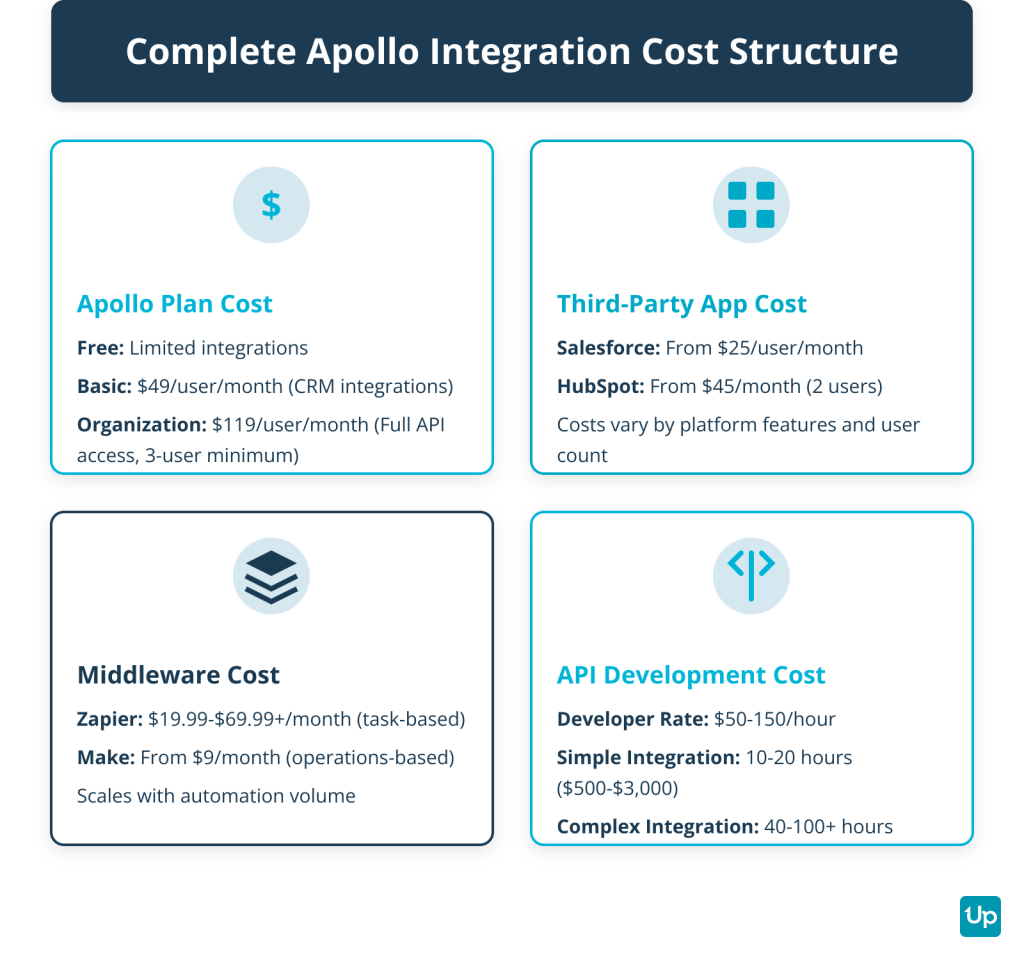
Basic CRM integrations like Salesforce and HubSpot are available on the Basic plan starting at $49 per user per month when billed annually. However, full API access for custom integrations requires the Organization plan, which starts at $119 per user per month annually with a minimum of three users.
The Free plan includes limited integration capabilities, suitable for testing but not for production use at scale.
Third-Party App Cost
Each platform you integrate with Apollo has its own subscription cost. Salesforce starts around $25 per user per month for its Essentials plan, while HubSpot’s Sales Hub begins at $45 per month for two users. These costs are separate from your Apollo subscription and can vary significantly based on the features and user count you need.
Middleware Cost
Zapier pricing is based on tasks, which are individual automation executions. The free plan includes 100 tasks per month but lacks premium features. Paid plans start at $19.99 per month when billed annually, scaling up to $69.99 per month or more for higher task volumes and advanced features.
Make offers an alternative starting at approximately $9 per month when billed annually, with pricing based on operations rather than tasks. This can be more cost-effective for high-volume automation.
API Development Cost
Custom API integrations require development resources. Hiring a freelance developer typically costs $50-150 per hour, with simple integrations taking 10-20 hours and complex implementations requiring 40-100+ hours. This translates to $500-$15,000+ depending on complexity.
Using internal development resources has opportunity costs, as your team could be working on other projects. Factor in ongoing maintenance costs as APIs and platforms evolve over time.
How to Set Up an Apollo.io Integration
Setting up a native Apollo.io integration follows a consistent process across most platforms. This guide uses Salesforce as an example, but the steps apply to other CRM platforms with minor variations.
Prerequisites
Before starting, verify you have:
- An active Apollo.io account on a plan that supports CRM integrations
- Administrator permissions in both Apollo and your CRM platform
- A clear understanding of which data fields you want to sync
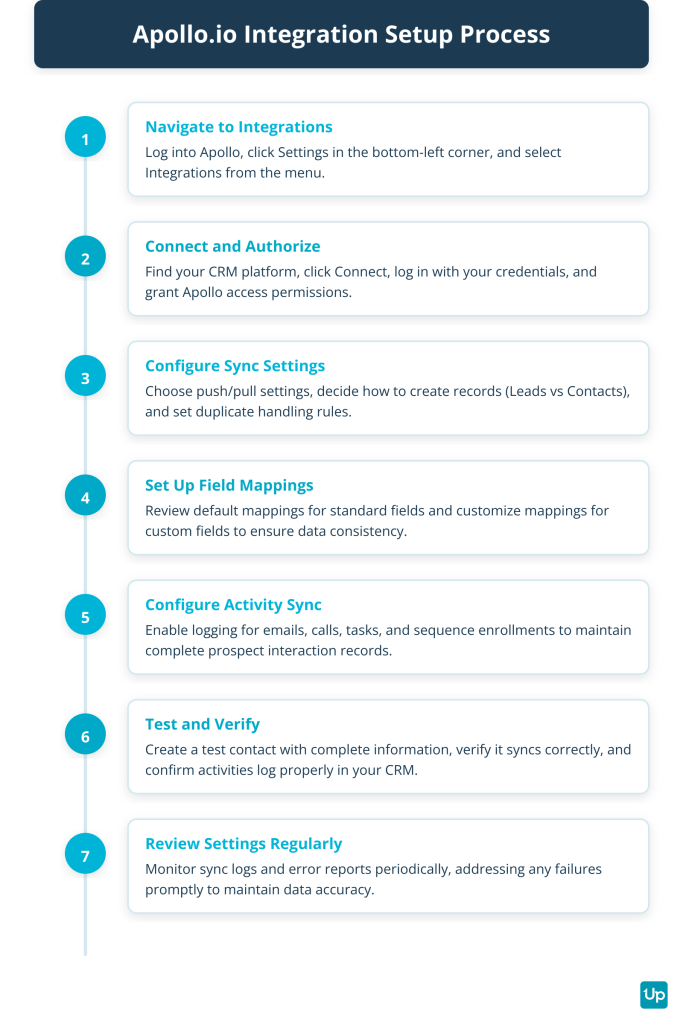
Step 1: Navigate to Integrations
Log into your Apollo account and click on Settings in the bottom-left corner. Select Integrations from the menu to view all available connections.
Step 2: Connect and Authorize
Find Salesforce in the list of integrations and click Connect. Apollo will redirect you to Salesforce’s login page. Enter your Salesforce credentials and click Log In.
Salesforce will display a permissions screen showing what data Apollo will access. Review the permissions carefully and click Allow to grant access.
Step 3: Configure Sync Settings
After authorization, Apollo displays configuration options:
- Push Settings: Choose whether new Apollo contacts should create Leads or Contacts in Salesforce
- Pull Settings: Decide if you want to import existing Salesforce records into Apollo
- Duplicate Handling: Set rules for how Apollo handles duplicate records
Select the options that match your workflow. Most teams start with push-only settings to avoid importing old or irrelevant data.
Step 4: Set Up Field Mappings
Field mapping determines how data transfers between platforms. Apollo provides default mappings for standard fields like Email, Phone, Company Name, and Title.
Review these mappings and customize them if needed. If you use custom fields in Salesforce, map them to the corresponding Apollo fields. Proper field mapping prevents data loss and ensures consistency.
Step 5: Configure Activity Sync
Decide which Apollo activities should log in Salesforce:
- Email sends, opens, and replies
- Call logs with duration and outcome
- Task completions
- Sequence enrollments
Enable the activities you want to track. This ensures your CRM maintains a complete record of all prospect interactions.
Step 6: Test and Verify
Create a test contact in Apollo with complete information including email, phone number, and company details. Save the contact and check Salesforce to verify it appears correctly with all mapped fields populated.
Send a test email through Apollo and confirm it logs as an activity in Salesforce. This validation step catches configuration issues before they affect your production data.
Step 7: Review Settings
Return to Apollo’s integration settings periodically to review sync logs and error reports. Address any sync failures promptly to maintain data accuracy.
Monitor the integration for the first week to ensure it handles your team’s typical workflow without issues.
What Are Common Problems with Apollo.io Integrations?
Even well-configured integrations can encounter issues. Understanding common problems and their solutions helps you troubleshoot quickly and minimize downtime.
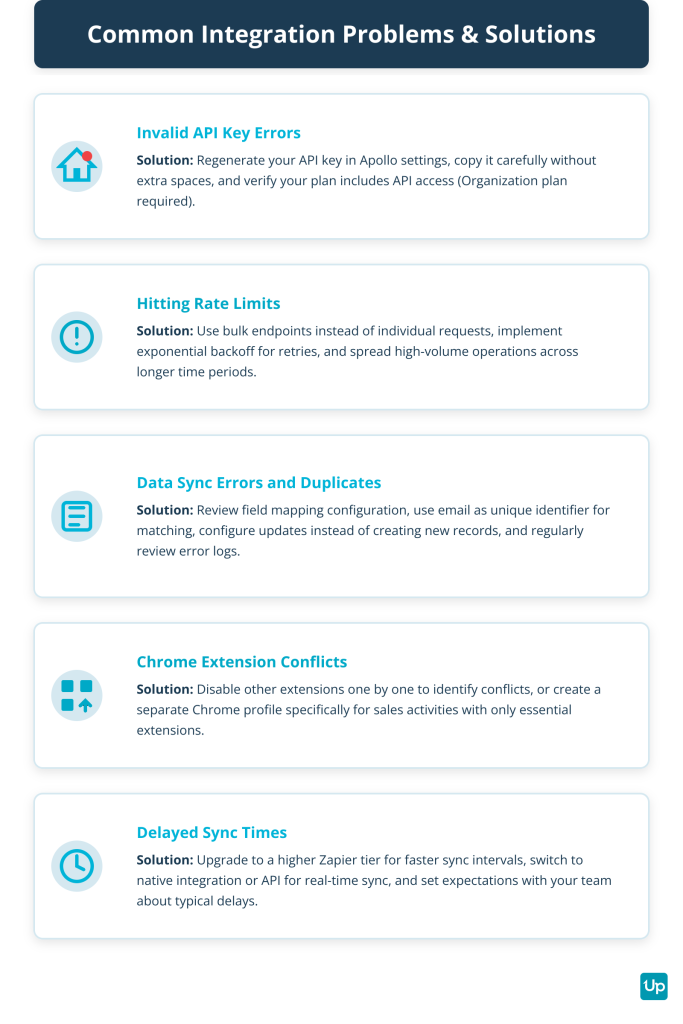
Invalid API Key Errors
This error occurs when the API key is copied incorrectly, has been revoked, or your plan does not include API access.
Solution: Navigate to Apollo’s settings and regenerate your API key. Copy it carefully, ensuring no extra spaces. Verify that your Apollo subscription plan includes API access – this feature typically requires the Organization plan. If you recently downgraded your plan, you may have lost API permissions.
Hitting Rate Limits
Apollo’s API has limits on request volume within specific time windows. Exceeding these limits causes integration failures and delayed data sync.
Solution: Optimize your integration to make fewer, more efficient API calls. Use bulk endpoints instead of individual requests when possible. Implement error handling with exponential backoff, where your integration automatically waits progressively longer between retry attempts. Review your integration’s request patterns and spread high-volume operations across longer time periods.
Data Sync Errors and Duplicates
These issues typically stem from improper field mapping, conflicting duplicate detection rules, or missing required fields in one platform.
Solution: Review your integration’s field mapping configuration carefully. Use a unique identifier like email address for matching records between platforms. Configure your integration to update existing records rather than create new ones when a match is found. Set up proper validation rules to ensure required fields are populated before syncing. Regularly review the integration’s error log in Apollo’s settings to identify patterns in sync failures.
Chrome Extension Conflicts
The Apollo.io Chrome Extension can conflict with other browser extensions, causing it to fail loading on LinkedIn or Gmail.
Solution: Disable other extensions one by one to identify the conflict. Common culprits include other sales tools, ad blockers, and privacy extensions. Once identified, either disable the conflicting extension when using Apollo or create a separate Chrome profile specifically for sales activities with only essential extensions enabled.
Delayed Sync Times
When using middleware like Zapier, data does not sync instantly. Delays can range from 1-15 minutes depending on your plan.
Solution: Upgrade to a higher Zapier tier for faster sync intervals. For truly real-time sync, switch to a native integration or API-based solution. Set expectations with your team about typical sync delays to prevent confusion.
FAQs About Apollo.io Integrations
Below are some of the most frequently asked questions and answers about Apollo.io integrations.
Some of the most popular CRM platforms natively integrating with Apollo.io include Salesforce, HubSpot, Zoho CRM, Pipedrive, and Microsoft Dynamics 365. These integrations automatically enable syncing contacts, accounts, and engagement data between the tools. Additional CRMs like Close, Attio, and Copper connect via Zapier.
Apollo.io offers a robust API providing programmatic access to over 270 million B2B contacts and 70 million companies. The API facilitates advanced integration scenarios by enabling real-time data access and updates between Apollo and external apps. Full API access requires the Organization plan.
Apollo.io pricing for integrations varies by plan. The Free plan has limited integrations, while the Basic plan ($49/user/month annually) includes native CRM connections. The Organization plan ($119/user/month annually, 3-user minimum) provides full API access. Additional costs include third-party app subscriptions and middleware fees if using Zapier (starting at $19.99/month) or Make (starting at $9/month).
The free plan includes limited integration capabilities suitable for testing. Production use requires a paid plan, with the Basic plan ($49/user/month) providing access to native CRM integrations and the Organization plan required for full API access.
Native integrations are direct connections built and maintained by Apollo, offering real-time sync, easier setup, and full support. Zapier acts as middleware connecting Apollo to 7,000+ apps without native integrations, but syncs occur every 1-15 minutes and costs scale with usage. Native integrations work best for core tools like your CRM, while Zapier suits niche apps or custom workflows.
Key Takeaways
Apollo.io integrations transform disconnected sales tools into a unified, automated system that eliminates manual work and improves data accuracy. By connecting Apollo to your CRM, email platforms, sales engagement tools, and productivity apps, you create seamless workflows that let your team focus on selling rather than data entry.
The three integration methods – native connections, middleware platforms like Zapier, and custom API development – each serve different needs. Native integrations offer the easiest setup and most reliable sync for core tools. Middleware provides flexibility for niche apps without coding. API access enables complete customization for unique business processes.
Understanding the complete cost structure, including Apollo plan fees, third-party subscriptions, and middleware costs, helps you budget effectively. Following best practices for setup and troubleshooting common issues ensures your integrations remain reliable and deliver consistent value.
Start with your most critical integration – typically your CRM – and expand from there based on your team’s workflow needs and the specific pain points you need to solve.