



Summary
- B2B list building is the process of compiling verified contact data for companies and decision-makers that match your ideal customer profile, including names, job titles, verified emails and direct dials.
- Building a list follows five steps: define your ICP, identify target companies and decision-makers, use a B2B prospecting tool, enrich your data, then verify before outreach.
- List management requires regular cleaning, segmentation by ICP criteria, GDPR/CAN-SPAM compliance and CRM integration to stay useful over time.
- The main challenges are data decay (roughly 30% per year), poor targeting and missed job changes — all addressable with verified data and regular enrichment.
Most B2B outreach fails because of the list, not the message. Sending to outdated contacts, the wrong job levels or companies outside your target market wastes budget and damages your sender reputation.
B2B contact data decays at roughly 30% per year, which means a list built six months ago may already be working against you.
This guide walks through how to build, verify, and maintain a targeted B2B contact list (sometimes called a sales lead list or B2B email list) that your B2B sales and marketing teams can rely on to generate qualified leads, run targeted outreach campaigns, and keep your CRM pipeline full.
What is B2B list building?
B2B list building is the systematic process of identifying and collecting verified contact information for businesses and decision-makers that match your ideal customer profile. A typical B2B contact list includes first and last names, job titles, company names, verified email addresses, direct dials, LinkedIn URLs and firmographic data like company size, industry and location. B2B contact data decays at roughly 30% per year, so verification is an ongoing requirement to keep the list accurate and outreach worth running.
Precision matters more than size. A focused B2B email list of 200 well-matched decision-makers will outperform a list of 2,000 unfiltered contacts. Targeted B2B lists built around a precise ICP consistently produce higher response rates, better conversion rates and less time chasing leads that were never going to buy. The terms B2B prospecting list, B2B prospect list and B2B marketing list all refer to the same thing: a curated set of target contacts ready for outreach. B2B email list-building and B2B list-building services exist to help sales and marketing teams get a targeted B2B list faster, with verified data.
Types of B2B leads
Not everyone on a B2B list is equally ready to buy. Contacts generally fall into three groups:
- Cold leads: no prior awareness of your product. They need education before they engage.
- Warm leads: aware of your product or have shown early interest, such as visiting your website or downloading content.
- Nurtured leads: have had multiple touchpoints and are closer to a purchase decision.
Most contacts on a new B2B list are cold leads. Where a contact sits in the sales funnel determines how you approach them: cold leads need education, warm leads need relevance, and nurtured leads need a clear next step. Understanding this shapes how you write your outreach and how you segment your list for different marketing campaigns.
How to build a B2B list
Building a strong B2B list follows five steps: define your ICP, identify target companies and decision-makers, use a B2B prospecting tool, enrich existing contact data, and then verify before outreach. B2B contact data decays at roughly 30% per year, which is why verification is a required final step in every list build, not optional cleanup. Whether you’re building B2B email lists for cold campaigns or a full sales lead list for your SDRs, each step filters out contacts that don’t fit.
1. Define your ideal customer profile (ICP)
Start by analyzing your existing best customers: the accounts that got the most value from your product, stayed the longest, or brought in the most revenue. Look for the traits they share:
- Industry and sub-industry
- Company size (employee count and revenue range)
- Location
- Job titles and management levels of the buyers
- Technology stack (the list building tools they already use)
- Funding stage, for teams targeting growth-stage businesses
These shared traits form your ICP. Every filter you apply when searching for new prospects should trace back to this profile. The sharper your ICP, the more focused your list and the more relevant your outreach will be to each potential customer.
2. Identify target companies and decision-makers
With your ICP defined, build a list of companies that fit. Industry directories, LinkedIn company search and Fortune rankings are common starting points for manual research. A B2B prospecting tool speeds this up significantly. You can filter a large database by company attributes in seconds rather than spending hours on individual searches. This produces a targeted B2B list of high-fit accounts before you spend any time on contact-level research.
Once you have a company list, narrow down to the contacts you actually need. For most B2B products, this means VP-level and above, or the department head in the relevant function (whoever holds budget authority or has the most influence over the purchase decision). Identifying the right decision-makers at each company is what separates a useful contact list from a collection of names.
3. Use a B2B prospecting tool
A B2B list builder replaces manual research with filtered search across a large, verified database. These automation tools let you set your ICP criteria (industry, company size, job title, location, technology stack) and instantly return a custom list of matching contacts with verified emails, direct dials and phone numbers ready for outreach.
UpLead, for example, gives access to 200 million contacts in 200+ countries, filterable by 50+ criteria including job title, industry, company size, revenue, location, technology stack and funding stage. Emails are verified in real time at the point of download, so your B2B email list arrives clean and ready to use without a separate verification pass. You get a verified sales lead list in minutes, not hours of research.
4. Enrich your contact data
Data enrichment means appending missing information to contacts you already have. If your CRM has company names but no verified emails, phone numbers or job titles, an enrichment tool fills in those fields automatically. It also catches job title changes and company moves that would otherwise cause your outreach to hit the wrong person or bounce entirely.
Enriched data adds depth beyond basic contact fields, giving you the context to prioritize better and personalize faster. Knowing a prospect’s tech stack, funding stage or recent company move lets you tailor your message to their actual situation and pain points rather than sending a generic pitch. For teams with an existing database of cold leads or older contacts, enrichment is often faster than rebuilding the list from scratch.
5. Verify contact details before you reach out
Contact data decays at roughly 30% per year. People change jobs, get promoted and leave companies continuously. A 12-month-old list may have a significant portion of outdated or invalid contacts. Sending campaigns to unverified lists results in higher bounce rates, which damages your email sender’s reputation and reduces deliverability for future sends.
Always verify emails before a major campaign to ensure deliverability and protect your sending domain. Real-time verification (where each address is checked at the moment of download) gives better accuracy than batch verification run days or weeks earlier. A verified list means you’re not paying to contact addresses that no longer exist.
Using UpLead to build your B2B contact lists
UpLead is a B2B list builder that gives access to 200 million contacts in 200+ countries, all verified with a 95% data accuracy guarantee. Emails are verified in real time before you download. The list arrives clean and ready to use, not as a starting point for further validation.

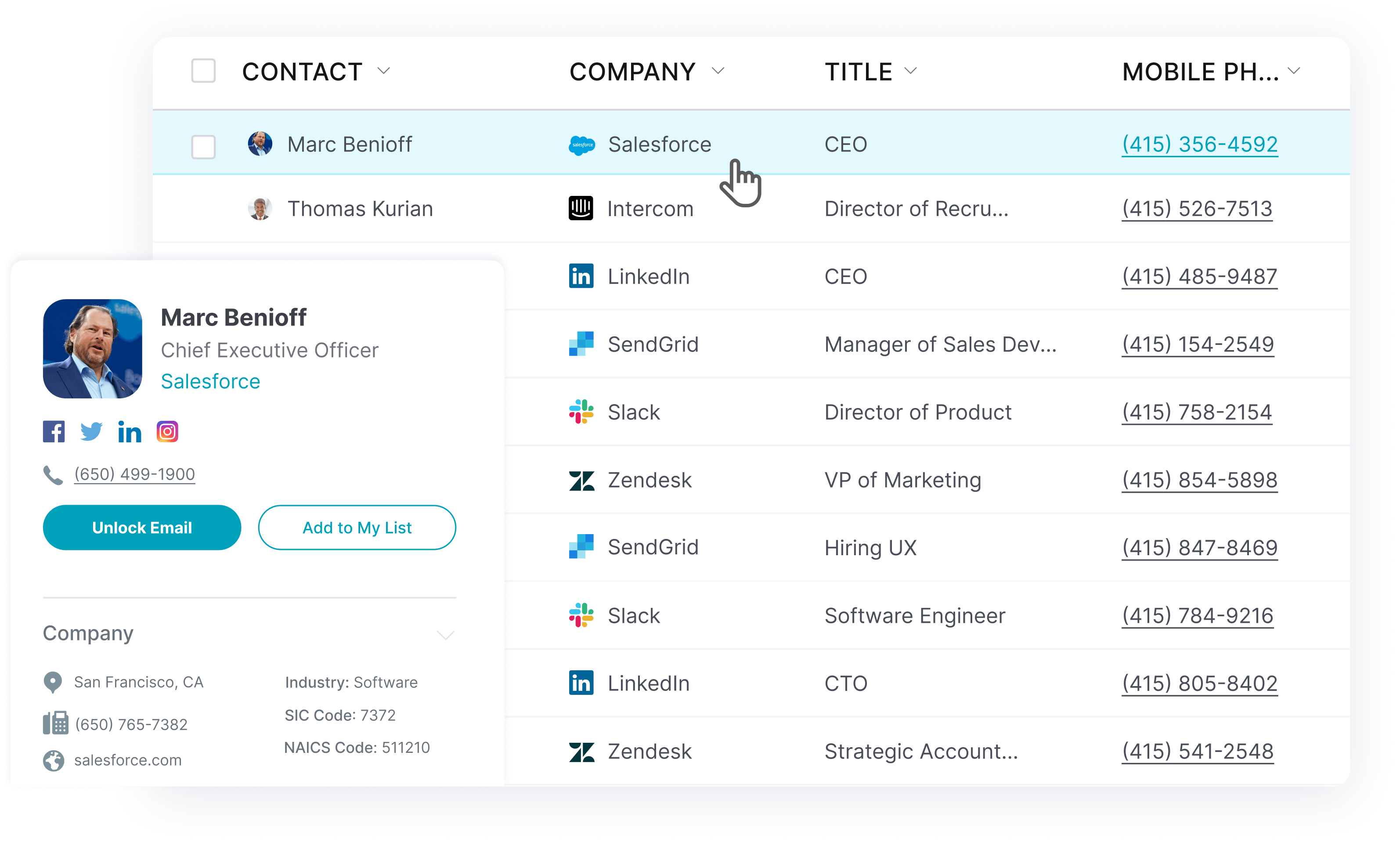
You can filter contacts by 50+ criteria: job title, industry, company size, revenue, location, management level, technology stack, funding stage and more. UpLead also supports data enrichment to fill gaps in your existing CRM data, buyer intent data to surface in-market prospects, and direct CRM sync with Salesforce, HubSpot, Zoho, Pipedrive and 1,500+ apps via Zapier. Here’s how to create lists and build a custom list for your target audience:
Step 1: Sign up and set your search criteria
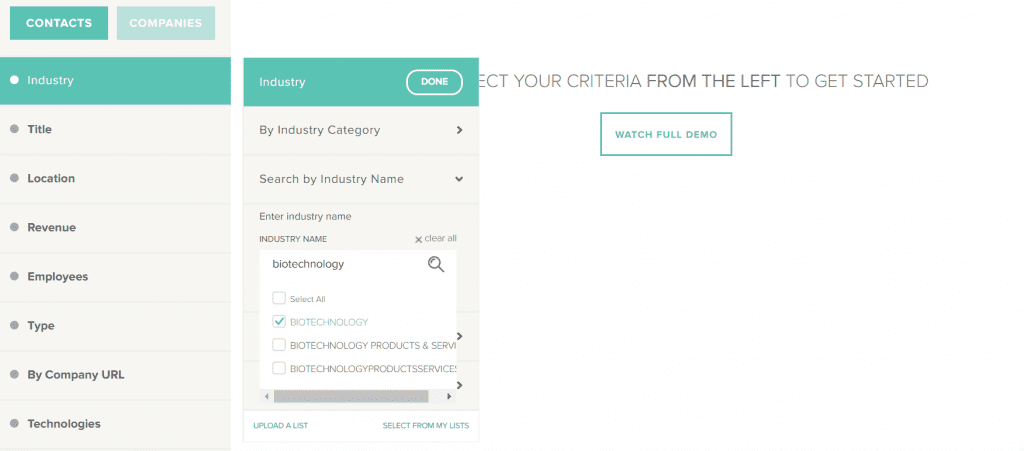
Sign up for UpLead’s free trial at uplead.com and log in to the dashboard. Use the left-hand filter panel to set your first search criteria. To start with biotech contacts, navigate to Industry, search by Industry Name, type “Biotechnology,” and select the matching option from the dropdown.
Step 2: Refine your filters to match your ICP
Add more criteria to narrow the results down to your exact target buyer. Apply filters for job title, management level, company size, location and revenue range. Use UpLead’s advanced filters to go further. Add technographics to find companies using a specific tool, or filter by funding stage to target recently funded businesses. Each filter brings the list closer to your ICP and reduces the time your team spends qualifying contacts after download.
Step 3: Unlock and export your contact list
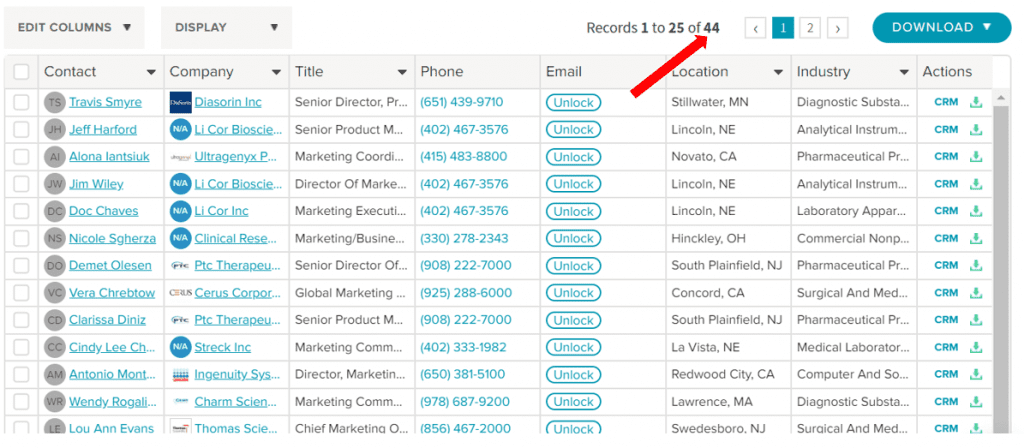
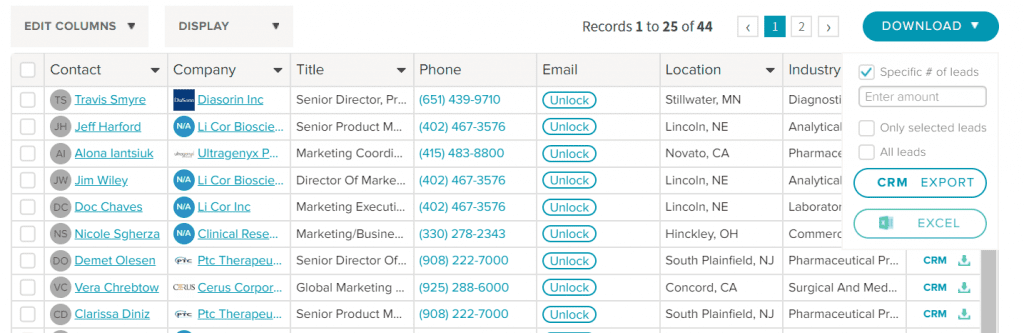
When you find contacts worth reaching, click “Unlock” to reveal each contact’s verified email address and direct phone number. One credit unlocks one contact. To download multiple contacts at once, use the “Download” button at the top right. Choose a specific number of leads, select individual contacts from the list, or download all results. Export as a CSV file or push directly to your CRM.
Use the “Exclusions” feature to exclude contacts from previous downloads, or upload a suppression list of contacts already in your CRM. This prevents re-purchasing contact data you already have and keeps your list fresh with net-new prospects.
Best practices for B2B list management
Four practices keep a B2B list useful over time: regular cleaning and deduplication, contact segmentation, data compliance and CRM integration. A B2B contact list isn’t a one-time project. Contact data decays at roughly 30% per year, so ongoing maintenance is as important as the initial build.
Clean and deduplicate your list regularly
Regularly audit your CRM to remove duplicates, invalid email addresses and contacts who bounced in previous campaigns. High bounce rates damage your email sender’s reputation, reducing deliverability on future sends and potentially getting your sending domain flagged. Schedule a verification pass before every major outreach campaign. Alternatively, use a tool that verifies contacts at the point of download so lists arrive clean and ready to use.
Segment contacts for focused campaigns
Divide your contact list into segments based on industry, company size, job function or buying stage. Segmentation lets you send relevant, targeted messages to each group rather than the same email to your entire database. Focused campaigns consistently produce higher response and conversion rates than generic blasts. They also make it easier to track performance and identify which messaging works best for each buyer type.
Stay compliant with data regulations
Data protection compliance is non-negotiable in modern B2B marketing. B2B outreach is subject to regulations, including GDPR in Europe and CAN-SPAM in the United States. Securing written authorization before adding new contacts is a key compliance practice. Confirm you have a lawful basis to contact each person, honor opt-out requests promptly and source your data from providers with clear compliance policies. Maintaining secure databases for all personal information reduces legal exposure and builds trust with the potential clients you’re approaching. Non-compliance is not just a legal risk. It damages your sender reputation and erodes response rates over time.
Integrate with your CRM and tech stack
Push contacts directly into your CRM rather than managing them in spreadsheets. The modern B2B tech stack runs on three layers: data and signals, CRM, and engagement tools. Keeping these connected means your sales team has a single view of every prospect, outreach history is tracked automatically, and duplicate contacts are avoided when multiple reps are working the same account. UpLead integrates directly with Salesforce, HubSpot, Zoho, Pipedrive, and 1,500+ additional tools via Zapier, making it straightforward to connect your list-building process to your existing sales tech stack.
Common challenges in B2B list building
The three most common challenges in B2B list building are poor data quality, low response rates from weak ICP targeting and missed opportunities caused by job changes. Data quality is the most frequent issue. Contact data decays at roughly 30% per year as people change jobs or leave companies, meaning a list that was accurate 12 months ago may have a significant portion of outdated records. High bounce rates damage your sender reputation and can get your domain flagged by email providers. Real-time email verification and regular list cleaning address most of this before it affects your campaigns.
Low response rates usually trace back to poor targeting rather than weak messaging. If your list contains contacts outside your ICP (wrong industry, wrong job level, wrong company size) even a strong email won’t generate quality leads. The fix is a tighter ICP definition before the list build and stricter filtering during it. A smaller, better-targeted contact list consistently outperforms a large, loosely filtered one on response rates, conversion rates and sales cycle length.
Job changes create missed opportunities in both directions. Contacts you’ve built a relationship with can go dark when they move to a new company. Meanwhile, people at companies you haven’t yet approached may have just moved into a decision-making role. Tools with job-change alerts and regular data enrichment help catch these shifts before they become missed opportunities, turning potential lost connections into timely outreach.
Frequently asked questions
What should a B2B contact list include?
A B2B contact list should include each contact’s first and last name, job title, company name, verified email address, direct dials, and LinkedIn URLs. Key firmographic data (industry, company size, location and revenue range) rounds out the record. Technographic data (the tools the company uses) and funding stage provide useful context for personalizing outreach, prioritizing which contacts to approach first, and identifying pain points relevant to your product.
How often should you clean a B2B list?
Clean active lists at least once per quarter. For high-volume cold email campaigns, run a verification pass before every send. Contact data decays continuously. Lists that go unchecked for six months or more are likely to have a significant portion of inaccurate or outdated records, which hurts deliverability and wastes outreach budget.
Is it better to build or buy a B2B list?
Building through a B2B database tool is generally better than buying a pre-made list. Database tools let you filter by your exact ICP, verify data in real time and exclude contacts already in your CRM. Pre-built purchased lists tend to include broad, unverified data, resulting in high bounce rates and low conversion rates relative to cost. Building your own list also gives you more control over data freshness and compliance.
What is data enrichment in B2B list building?
Data enrichment is the process of filling in missing fields on existing contact records. If your CRM has names and companies but no emails, phone numbers or job titles, an enrichment tool appends that data automatically. It also refreshes records when contacts change roles, keeping your B2B database accurate without requiring manual research on every record.





